Licensing has been a feature of software applications for a long time. Most applications use licensing to control who may run the application or which features may be used. Petrel uses several licenses to provide access to all of the Petrel features. This allows Petrel users to save money by purchasing only the features they want. To be consistent with this paradigm, Ocean provides an API for licensing plug-ins.
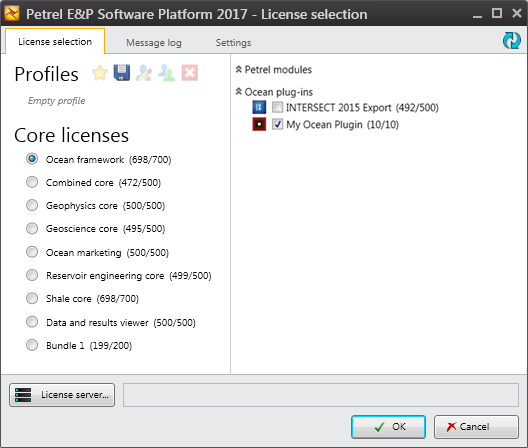
Figure 1‑1 License selection dialog box with Ocean framework license selected
Petrel uses a combination of a CodeMeter hardware key from WIBU Systems and the Ocean-supported licensing software approach, called the FlexFeature approach. Your plug-in cannot be started outside Petrel, and Petrel checks for the presence of the CodeMeter key.
Licensing is applied at either the plug-in level or the module level of an Ocean plug-in, depending on the licensing needs of your plug-in. You handle the licensing of your plug-in in one of two ways:
Bundled licensing: All of the modules in a plug-in are bundled together and licensed as a single entity.
Individual licensing: Individual modules within a plug-in are licensed separately and individually, allowing several different licenses to access all of the plug-in features.
From a deployment standpoint, neither method is preferred over the other; the deployment method is left up to you and how you want to license your plug-in functionality.
This topic is also covered in the "Implementing License for Plug-ins" white paper in the OceanForPetrel.chm file.
When designing your module, consider allowing some pieces to operate in read-only mode.
As an example, consider a scenario where only a couple of licenses for a plug-in are purchased, but these licenses are shared among members of an asset team. Some members of the team create and update custom domain objects with the module in the plug-in. Others view the custom domain object data, but because it is outside their expertise they do not create or edit it. If the plug-in operates in a read-only mode when no license is available then the second group of members of the team may also use the plug-in. The science in the plug-in module to be protected in this scenario is the creation and editing of the custom domain object. This scenario also works if the license cannot be checked out due to expiration to allow access to view data in the Petrel project.
The example code in this chapter demonstrates a module that works with read-only mode enabled.
Another way to accomplish read-only mode is to create two classes that both implement IModule:
The first module does not have any licensing requirement and is responsible for the access to the data defined by the plug-in.
The second module is licensed and provides the features of the plug-in related to creating the data.
It is possible that data could be corrupted if a scenario that followed these steps were encountered and the modules in a plug-in did not implement read-only mode.
- The user starts Petrel with the plug-in licensed, creates data with the plug-in, saves the project, and exits Petrel.
- The user restarts Petrel, but this time does not load the plug-in because the license is not available or because the check box for the module in the Petrel License selection dialog is not selected.
- The user then opens the project that contains the plug-in data and saves the project.
If read-only mode is implemented in the plug-in design, the plug-in must not damage the project data if the user opens and saves the data without a license.
You control the appearance of your plug-in in the Petrel License selection dialog box.
If your IModule implementation class is licensed, ModuleAppearanceAttribute determines the text and bitmap shown in the dialog box. This topic is discussed in the "Module appearance" section of Ocean for Petrel Developer's Guide Volume 2: Core and Services.
If your Plugin class is licensed, the text comes from the Plugin.Name property and the image comes from the Plugin. ImageResourceName property, as this example with are lease date of July 2017 shows:
[FlexFeature("OCEAN_SLB_MYSUITE", 2017.07f)]
public class MyOceanPlugin : Slb.Ocean.Core.Plugin
{ // ...
  public override string Name
  {
    get { return "My Ocean Plugin"; }
  }
  public override string ImageResourceName
  {
    get { return "MyNamespace.MyResource.logo.bmp"; }
  }
}
All other licensing examples in this volume also show a release date of July 2017.
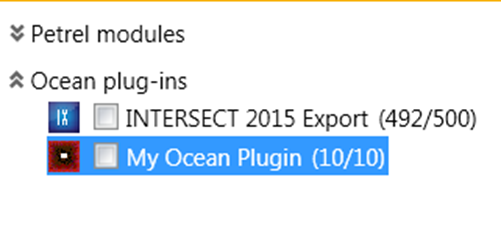
Figure 1‑2 My Ocean Plugin displayed in the License selection dialog box
The ImageResourceName property provides the full path to an embedded resource that is a bitmap to be displayed. Provide the full namespace qualified name of the resource. If the bitmap is not found, the default Ocean bitmap is used.
In the Visual Studio Properties pane for the bitmap file, follow these steps:
Set Build Action to Embedded Resource.
Set Copy to Output Directory to Do not copy.
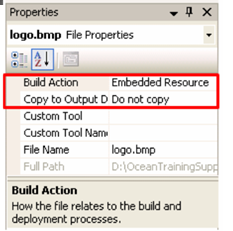
Figure 1‑3 Bitmap properties in Visual Studio
The FlexFeature licensing approach uses a FLEXlm license from Macrovision to control access to the Ocean plug-in features. Ocean plug-ins that are available through the Ocean Store must use this same licensing approach.
When this approach is used, Petrel is responsible for performing the check out and check in of licenses, and your plug-in's licensing behavior is like that of native Petrel modules.
The FlexFeature approach operates under these general rules:
- If the license is not available then the plug-in is disabled. In the Petrel License selection dialog box, the plug-in is shown as unavailable (the name is displayed in gray). This occurs when the license is already in use by another Petrel instance or when the plug-in is installed but the license is not on the license server.
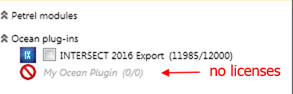
Figure 1‑4 License not available on server is grayed
If the license appears to be available and the check box is selected but for some reason the license cannot be obtained from the server, the user is informed of the issue and Petrel redisplays the License selection dialog box.
When a module has a license that is will expire within fourteen days, a pop-up message appears to notify the user of the impending expiration. Petrel uses the same notification.
If Petrel enters standby mode, Petrel is responsible for checking in the license for the Ocean plug-in. Petrel checks out the license again when Petrel comes out of standby mode. Petrel goes into standby mode when the machine hibernates or sleeps.
The module is always loaded into Petrel; it does not matter whether or not the module is selected in the Petrel License selection dialog box.
FlexFeature is the required licensing approach for plug-ins going on the Ocean Store (http://www.ocean.slb.com). When a plug-in is purchased, the Ocean Store creates and emails the license to the user for the CodeMeter dongle ID provided by the user at the time of purchase. To perform this action, the Ocean Store must have the name of the FlexFeature to generate the license.
The Ocean Store Operations Manager works with you to create the FlexFeature license for your plug-in. Contact the Operations Manager at OceanPartnerProgram@slb.com.
The license feature name uses this naming convention:
OCEAN_XXX_YYYYYYYYYYYYYYYYYYYY
where:
XXX: Is a three-character mnemonic for the company name (for example, SLB for Schlumberger).
YYYYYYYYYYYYYYYYYYYY: Is up to twenty characters and names the module to be licensed.
Both fields must be all uppercase characters.
For example, the Schlumberger PowerPoint Creator plug-in license has this FlexFeature name: OCEAN_SLB_PETREL2PPT
Whether you are using bundled licensing or individual licensing, the mechanism is the same in the code: you use the FlexFeatureAttribute in the Slb. Ocean. Petrel. Basics namespace and apply it toyour Plugin class, your Module classes, or both.
The FlexFeatureAttribute is created with:
The FlexFeature license/feature name. (This was explained previously.)
The version number. By convention, this is set to the release date expressed as a float in the format YYYY.MM.
One optional flag indicates whether the FlexFeature is shared with another module or plug-in.
public sealed class FlexFeatureAttribute : Attribute
{ ...
  FlexFeatureAttribute(string name, float versionNumber);
  FlexFeatureAttribute(string name, float versionNumber,bool isShared);
}This example shows a plug-in that uses bundled licensing with a version number/release date of 2017.07 (July 2017):
[FlexFeature("OCEAN_SLB_MYFEATURENAME", 2017.07f)]
public class MyPlugin : Slb.Ocean.Core.Plugin
{ /* implementation ... */
}
Both Petrel and Ocean plug-in license files include a maintenance date in addition to the expiration date. The licensing code now checks that the license maintenance date is later than the FlexFeature version number/release date. For example, if the license file has a maintenance date of Oct 2017 then the end user may run the plug-in above. If a later version of the plug-in has a FlexFeature release date of 2017. 12f then the end user cannot run the later version with the same license file because the maintenance date is before the release date.
If you deploy a patch release for your plug-in, the version number/release date must have the same version number/release dates as the plug-in being patched.
You are not required to set a version number/release date; if you do not wish to use this functionality, continue to set the version number/release date to 0. 0f:
[FlexFeature("OCEAN_SLB_MYFUNCNORELEASEDATE", 0.06f)]Two or more modules and/or plug-ins may share the same license feature and thus use the same single license on the license server. To share the license feature, these criteria must be met:
The value of the [FlexFeature] attribute IsShared property must be true on all Module and/or Plugin classes sharing the license feature.
The value of the [FlexFeature] attribute FeatureName property must be equal on all Module and/or Plugin classes sharing the license feature.
The value of the [FlexFeature] attribute FeatureVersion property must be equal on all Module and/or Plugin classes sharing the license feature.
When multiple modules/plug-ins that share the same license feature are selected in the Petrel License selection dialog box, the shared license feature is checked out only once.
[FlexFeature("OCEAN_SLB_SHAREDFEATURE", 2017.07f, true)]
public class MyModule : IModule
{ /* implementation ... */ }
  [FlexFeature("OCEAN_SLB_SHAREDFEATURE", 2017.07f, true)]
  public class MyModule2 : IModule
  { /* implementation ... */
  }
  [FlexFeature("OCEAN_SLB_SHAREDFEATURE", 2017.07f, true)]
  public class MyModule3 : IModule
  { /* implementation ... */
  }
If IsShared is false (the default), the license feature cannot be shared with other modules, and each additional module that uses the same license feature causes an additional license to be checked out if one is available.
In bundled licensing, all of the modules in a plug-in are bundled together and licensed as a single entity. They are licensed at the parent Plugin level. To enable bundled licensing, include the [FlexFeature] attribute on your Plugin class.
[FlexFeature("OCEAN_SLB_MYFEATURENAME", 2017.07f)]
public class MyPlugin : Slb.Ocean.Core.Plugin
{ /* implementation ... */ }
For end users, bundled licensing means that they have to buy a bundled license to gain access to all features from all the modules in the plugin. When the licensing mode is bundled licensing, any child modules cannot be checked out individually. Bundled licensing looks the same in the Petrel License selection dialog box. When bundled license mode is used, the check-out option is available for the plug-in and checking out the license provides a license for all child modules.
In individual module licensing, individual modules in a plug-in are licensed separately and individually no matter which plug-in contains the module. To enable individual module licensing, put the [FlexFeature] attribute on each Module class you want to be licensed, on Module classes only. Modules have their own license features to check out, and these license features are likely different from each other.
[FlexFeature("OCEAN_SLB_MYFEATURE1", 2017.07f)]
public class MyModuleForFeature1 : IModule
{ /* implementation ... */ }
  [FlexFeature("OCEAN_SLB_MYFEATURE2", 2017.07f)]
  public class MyModuleForFeature2 : IModule
  { /* implementation ... */
  }
For end users, individual module licensing means that users must buy an individual license for specific modules or for all the modules in the plug-in that they want to use. When the licensing mode is individual licensing, the check-out option is available on modules only. Figure 1‑5 shows individual module licensing in the Petrel License selection dialog box.
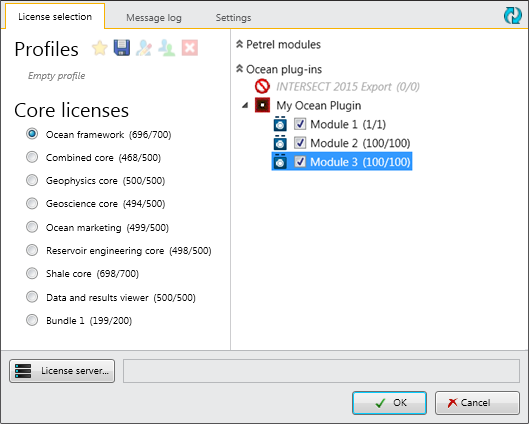
Figure 1‑5 Individual module licensing
The License selection dialog box displays the plug-in as a parent node of its modules but has no check-out option for the plug-in. When individual module license mode is used, the check-out option is available on modules only, and the license check out is completed separately for each module.
Your plug-in may support both bundled and individual module licensing. In this case, put the [FlexFeature] attribute on both your Plugin class and on at least one Module class (for each one that you want to be individually licensed).
[FlexFeature("OCEAN_SLB_PLUGINFEATURE", 2017.07f)]
public class MyPluginForFeature : Slb.Ocean.Core.Plugin
{ /* implementation ... */ }
  [FlexFeature("OCEAN_SLB_MYFEATURE1", 2017.07f)]
  public class MyModuleForFeature1 : IModule
  { /* implementation ... */ }
    [FlexFeature("OCEAN_SLB_MYFEATURE2", 2017.07f)]
    public class MyModuleForFeature2 : IModule
    { /* implementation ... */
    }
The License selection dialog shows checkboxes for both a plug-in and individual modules. If the end user selects the bundled license on a Plugin, individual licenses are not selected/checked. The bundled license is checked out which is valid for all the modules in the Plugin. If the end user selects individual modules, it unchecks the plug-in checkbox, and only individual module licenses are checked out.
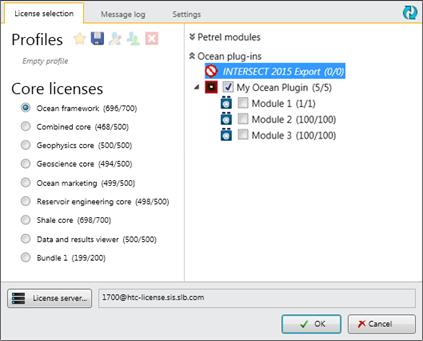
Figure 1‑6 Select bundled license
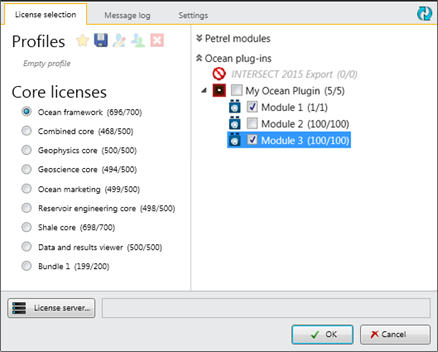
Figure 1‑7 Select individual module license
Table 1 summarizes [FlexFeature] attribute use and supported licensing modes.
Table 1 [FlexFeature] attributes
| [FlexFeature] attribute location | Licensing Mode supported |
|---|---|
| On Plugin class only | Bundled licensing only |
| On Module classes only | Individual module licensing only |
| On Plugin class and Module classes | Bundled and individual module licensing |
To check out a license, use methods in the Slb. Ocean. Petrel. Licensing. LicensingService class.Check whether Petrel has obtained a Petrel license, a module license, a plug-in license, or a particular flex feature of a module. The specific method you use for license checking depends on what licensing functionality you are supporting.
Typically this check is performed once in the IModule Initialize method, and a private variable is used to retain the license state. This example is for a plug-in that supports both bundled licensing and individual module licensing.
// using Slb.Ocean.Petrel.Basics;
// using Slb.Ocean.Petrel.Licensing;
[FlexFeature("OCEAN_SLB_INDIVIDUAL-A", 2017.07f, false)]
public class MyModuleA : IModule
{
  private bool m_hasModLicense = false;
  private bool m_hasPluginLicense = false;
  public void Initialize()
  {
    LicensingService ls = PetrelSystem.LicensingService;
    // assembly qualified type name of parent plugin
    string p ="LicensingSample.BundledPluginA, LicensingSample";
    // See if module or plugin license has been obtained.
    m_hasPluginLicense = ls.HasPluginLicense(p);
    m_hasModLicense = ls.HasModuleLicense(typeof(Module));
  }
  public void Integrate()
  {
    if (m_hasModLicense || m_hasPluginLicense)
    {
      // Add services provided by this module
    }
    else
    {
      // Do read only work or nothing... please consider that
      // existing projects may be around with serialized data
      // produced by this plugin. Even if license has expired,
      // deserialization of those data is usually necessary.
    }
  }
  // Do same for other Module methods...
  public void Dispose()
  {
    // No license to dispose
  }
}
And the containing Plugin class:
[FlexFeature("OCEAN_SLB_BUNDLED-A", 2017.07f)]
public class BundledPluginA : Slb.Ocean.Core.Plugin
{ /* implementation ... */ }
See additional examples in the "Implementing License for Plug-ins" white paper in the OceanForPetrel.chm file.
The Ocean API exposes well-known Petrel licenses with the WellKnownPetrelLicenses class. You access the Petrel license from the static properties on the class, and you access the corresponding string identifiers for each license through the nested Identifiers class.
public static class WellKnownPetrelLicenses
{ ...
  public static PetrelLicense CombinedCore { get; }
  public static PetrelLicense DataAnalysis { get; }
  public static PetrelLicense GeoscienceCore { get; }
  public static PetrelLicense FaultAnalysis { get; }
  public static class Identifiers
  { ...
    public const string CombinedCore;
    public const string DataAnalysis;
    public const string GeoscienceCore;
    public const string FaultAnalysis;
  }
}
The identifier is the display name, which is typically displayed in the Petrel License selection dialog box. For all available licenses and identifiers, see the OceanForPetrel.chm file.
These identifiers are also used as PetrelLicense attributes (as Module Names) to license Ocean plug-ins that are allowed to be licensed both from the Ocean store and/or as part of a Petrel package/SOS license. This example demonstrates use of WellKnownPetrelLicenses. Identifiers as a code attribute to markan Ocean plug-in as dependent on the Petrel FaciesModeling modulelicense.
public class MyPluginUsesPetrelLicense : Slb.Ocean.Core.Plugin
{ /* implementation ... */
If the plug-in depends on the availability of a Petrel license, use these identifier values when setting the Licensing attribute for a command or resource in the Configuration Designer.
Before 2012, an additional licensing software approach called LicenseProvider was supported; however, Petrel support for this approach has been dropped.
Plug-ins that use this licensing approach are not placed on the Ocean Store. You may use this approach if your plug-in will not be available on the Ocean store.
The LicenseProvider approach to licensing your module requires much more code on your part to manage the license; no support from Ocean is provided at all. You are required to handle all aspects of the licensing feature, including license verification and license check-out and check-in mechanisms. In this case, the license check out is performed in the constructor of your module. You must dispose of the license to check it back in during your Dispose method.
Implementing the LicenseProvider style of licensing requires you to handle all of the licensing code yourself. You must implement a LicenseProvider class. In your code that implements IModule you must follow these tasks:
Add a LicenseProvider attribute to your module to indicate it implements its own LicenseProvider.
Declare a private member variable of type System.ComponentModel.License; this is used to allow read-only operation of your module, if desired.
Initialize your license variable and checkout the license in the constructor of your class.
Release the license in the Dispose method to ensure the license is correctly checked in.
[LicenseProvider(typeof(MyOwnLicenseProvider)]
public class MyModuleWithOwnLicenseProvider : IModule
{
  private System.ComponentModel.License m_License = null;
  public MyModuleWithOwnLicenseProvider()
  {
    // Try to obtain license ...
    {
      CoreLogger.Info("Module is licensed with key: " +
      m_License.LicenseKey);
      // Add services provided by this module ...
    }
    // if could not get license ...
    {
      CoreLogger.Info("License is not valid.");
      // Possibly work with no license required ...
    }
  }
  public void Initialize()
  {
    if (m_License != null)
    {
      // Do something adding feature to Petrel ...
    }
    else
    {
      // Possibly work with no license required ...
    }
  }
  // Do same for other Module methods...
  public void Dispose()
  {
    // Must dispose of license if it exists.
    if (m_License != null)
    {
      m_License.Dispose();
      m_License = null;
    }
    // Perform any other cleanup for module
  }
}
Note: In this example, the license validation is performed in the constructor for the module. If the IsValid method fails to get a license and returns false, the module continues to load and run in a read-only mode.
See additional examples and information in the "Implementing License for Plug-ins" white paper in the OceanForPetrel.chm file.
Warm license checkout allows users to start Petrel with a minimal set of licenses and later check out additional licenses during runtime to enable features when needed. This introduces a behavioral change when licenses are checked out. To support warm checkout Ocean developers have to enable all components of their plug-ins unconditionally and then protect each one by license checks. It is optional for plug-ins to support warm license checkout.
A new LicenseAttribute has been introduced to indicate that an Ocean plug-in supports warm checkout. Current Ocean plug-ins only need to replace the FlexFeatureAttribute with the LicenseAttribute.
[License("OCEAN_SLB_MYSUITE", 2017.07f)]
public class MyOceanPlugin : Slb.Ocean.Core.Plugin
{
  /* implementation */
}
[License("OCEAN_SLB_MYSUITE", 2017.07f)]
public class MyOceanPlugin : Slb.Ocean.Core.Plugin
{
  /* implementation */
Note: Ensure consistent usage of LicenseAttribute. When a plug-in has been updated to support warm checkout, all occurrences of the FlexFeatureAttribute in the Plugin class and module classes must be replaced with LicenseAttribute. A plug-in that has been partially updated is not supported. The behavior might have unexpected side effects.
For more information on how to add license checks in commands, worksteps, custom windows and more, see the "Warm License Checkout for Plug-ins" white paper in the OceanForPetrel.chm.
Use the LicensingUpdaterService to request a callback when a warm checkout of a license happens. This allows a module to piggy back on a Petrel license and only function if a particular Petrel license is available. To request a callback, you need to register a LicenseUpdaterManifest.
On Petrel startup Ocean plug-ins that do not support warm checkout are displayed with an info icon and a tooltip. The tooltip explains that the plug-in needs to be checked out at startup and cannot be checked out later. Ocean plug-ins supporting warm checkout are displayed without any info.
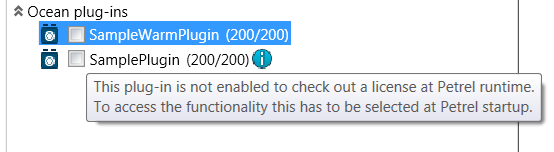
Figure 1‑8 Plug-in that supports warm checkout and one that does not
The Petrel end user may check out a license after Petrel is up and running, by launching the License dialog from File > License modules. Ocean plug-ins using the LicenseAttribute are displayed as selectable and FlexFeatureAttribute plug-ins selected at startup are displayed without a check box. Ocean plug-ins using FlexFeatureAttribute that were not checked out during startup are not displayed.
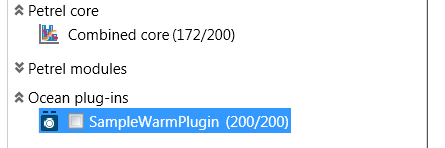
Figure 1‑9 SampleWarmPlugin available for warm checkout
It is important to note that once a license has been checked out it cannot be checked back in. Petrel needs to be restarted to free-up the license(s).