- GeoX and Opportunity Assessor database deployed in a cloud environment
- Delfi contract including one of the following subscriptions:
- Exploration Portfolio
- Geologist Plus
- Geophysicist Plus
- Reservoir Engineer Plus
- Project Data Manager
Follow the SLB Developer Portal Overview documentation pages (and links therein) to create a Developer Portal Team, App and Client.
If created client is of service account type, a valid subscription needs to be assigned to it by a Delfi admin. Please, contact your Delfi admin and refer to this page on how this can be achieved.
To authorize data access, the user on whose behalf the request is made must be registered in the GeoX and Opportunity Assessor database.
For user authentication clients, see this page on how to add users.
For service account clients, the process is the same. Real name and Database username fields don't matter and can hold any values. Cloud ID field should contain the Client ID value of the corresponding service account client.
Please find available Opportunity Assessor APIs in one of the following groups:
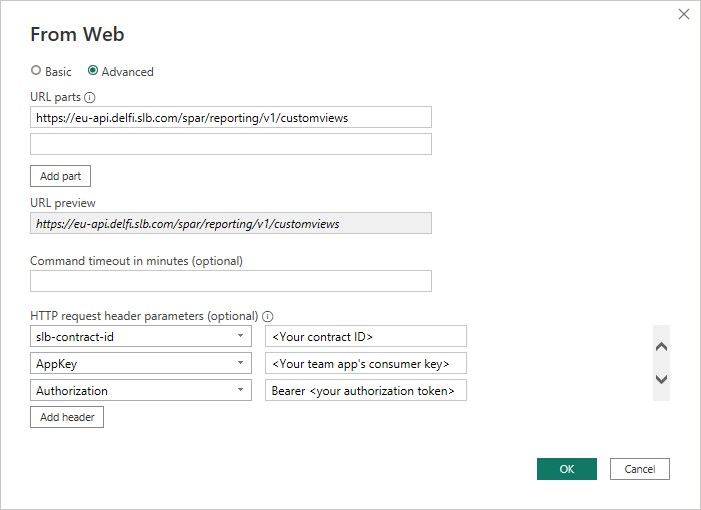
When making requests, include required HTTP request headers:
- slb-contract-id: <Your Delfi contract ID>
- AppKey: <The app key of your Dev Portal team application, as described in the SLB Developer Team and App Management documentation>
- Authorization: Bearer <your authorization token>
Instructions on how to obtain authorization token can be found here. Authorization token can be obtained either:
- Programmatically using programming language of choice. This page contains an example in python.
- Manually using oauth playground.
It is possible to create custom applications for both obtaining a token and for calling the web APIs. Also it is possible to use various existing applications that support getting data via http.
PowerBI Example