SLB Authenticator v2.0 uses the OpenID Connect (OIDC) standard protocol. OIDC is an authentication protocol built on the OAuth 2.0 authorization framework. OIDC is about user authentication. Conceptually, the following steps are performed:
- The user signs on to the application.
- The Delfi Application (Client Application) sends an authentication request to SLB Authenticator.
- SLB Authenticator will forward the request to the users corporate Identity Provider (IdP).
- The user's IdP will prompt the user to enter their credentials.
- Upon successful Authentication, SLB Authenticator will return a response to the Delfi application. The response will contain one or more tokens in the form of a JSON Web Token (JWT).
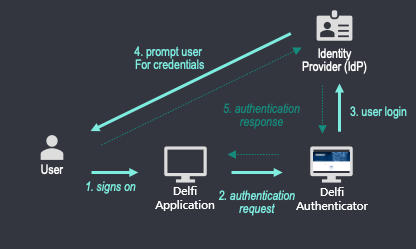
SLB Authenticator v2.0 Client registration can be done through the My Apps area of the developer portal.
Token expiration: Both ID and access tokens expire in 1 hour. This is not configurable.
GET /v2/.well-known/openid-configuration
Host: https://csi.slb.com| Endpoint | Use |
|---|---|
| /auth | Authenticate the user |
| /token | Used to request tokens |
| /certs | Obtain JSON Web Key Set (JWKS) containing public keys to validate JWT issued by Delfi |
| /userinfo | Return claims about authenticated user |
| /.well-known/openid-configuration | OIDC metadata document |
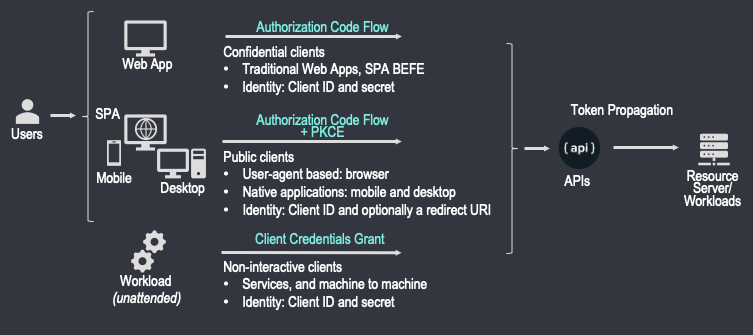
Different Authentication Flows exist. Choosing which one depends on your application type.
| Application Type | Authentication Flow |
|---|---|
| Server-side (Web) | Authorization Code Flow |
| Single-Page Application (SPA) | Authorization Code Flow with PKCE |
| Native (mobile, desktop) | Authorization Code Flow with PKCE |
| Service (unattended workload) | Client Credentials Grant |
Authorization Code Validity: The authorization code is a one time use code. In addition to this, it becomes invalid after 10 minutes of its issuance.
Authorization Code Flow with PKCE builds upon the base Authorization Code Flow and should be used for public clients (single-page apps (SPA), mobile and desktop applications). This is because these applications cannot securely keep the client secret. For SPAs, the entire source is available to the browser. For native applications, code can be decompiled and custom URL schemes are intercept-able. Proof Key for Code Exchange (PKCE) extension introduces the element of a dynamic secret to keep the code-for-token exchange secure.
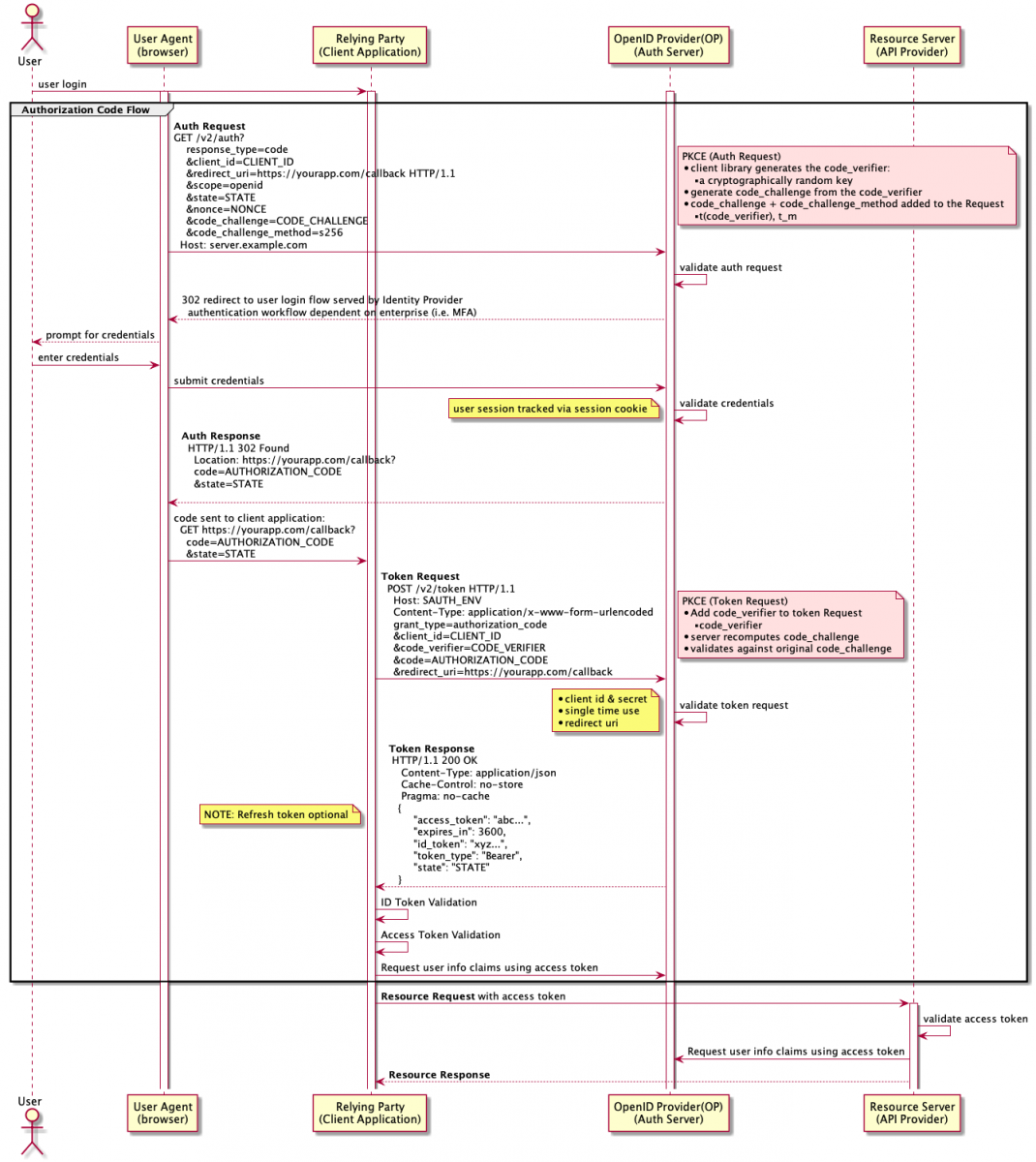
Example Authentication Request:
GET /v2/auth?
    response_type=code
    &client_id=YOUR_CLIENT_ID_HERE
    &redirect_uri=YOUR_CALLBACK_URL_HERE
    &scope=openid
    &state=YOUR_OPAQUE_STRING_FOR_STATE
    &nonce=YOUR_NONCE
    &code_challenge=YOUR_CODE_CHALLENGE_FROM_CODE_VERIFIER
    &code_challenge_method=S256
&response_mode=form_post| Request Parameter | Presence | Description |
|---|---|---|
| response_type | REQUIRED | For Authorization Code Flow, this value must be code |
| client_id | REQUIRED | The application Client ID when created on the Delfi Developer Portal |
| redirect_uri | REQUIRED | The URL encoded version of the URL specified during application creation. SLB Authenticator will validate this URL against the Redirect URIs associated to the Client ID. SLB Authenticator will redirect the browser after authentication has been granted. The Authorization Code will be in the code URL parameter. Example: https://yourapp.com/callback HTTP/1.1 |
| scope | REQUIRED | Specify the scopes for the authorization request. scope=openid is a mandatory parameter Note: for using token exchange, PKCE clients may want to pass their backend confidential client's client_id in this parameter. scope values are space-delimited. See the Note for clients using PKCE in the front end section for more details. |
| state | RECOMMENDED | An opaque arbitrary string. Used to prevent cross-site request forgery (CSRF). SLB Authenticator will include it in the redirect response. |
| nonce | RECOMMENDED | Nonce binds the token to the authorization request to prevent replay attacks. Token validation must ensure the nonce claim is the exact same value as sent during the request. |
| code_challenge | REQUIRED | Code challenge is created from a code verifier using the code challenge method. The code verifier is a cryptographic random string. |
| code_challenge_method | REQUIRED | S256 : code_challenge = base64 (URL-ENCODE(SHA256(ASCII(code_verifier))) |
| response_mode | OPTIONAL | If present, must be one of query or form_post, otherwise default response mode is query. |
Example Successful Response
HTTP/1.1 302 Found
    Location: https://yourapp.com/callback?
    code=AUTHORIZATION_CODE
    &state=STATE
Example Token Request
POST /v2/token HTTP/1.1
    Host: https://csi.slb.com
    Content-Type: application/x-www-form-urlencoded
    grant_type=authorization_code
    &client_id=YOUR_CLIENT_ID
    &code_verifier=YOUR_CODE_VERIFIER
    &code=YOUR_AUTHORIZATION_CODE_OBTAINED_FROM_PREVIOUS_REQUEST
    &redirect_uri= YOUR_CALLBACK_URL_HERE
Example Token Response
HTTP/1.1 200 OK
    Content-Type: application/json
    Cache-Control: no-store
    Pragma: no-cache
   {
        "access_token": "abc...",
        "expires_in": 3600,
        "id_token": "xyz...",
        "token_type": "Bearer",
        "state": "STATE"
    }
Example SLB Authenticator ID Token
Header:...
Payload:
{
    "sub": "jdoe@slb.com",
    "iss": "https://csi.slb.com/v2",
    "aud": "CLIENT_ID",
    "iat": 1598590453,
    "exp": 1598594053,
    "client": "CLIENT_ID",
    "email": "jdoe@slb.com",
    "provider": "slb.com",
    "userid": "jdoe@slb.com",
    "nonce": "NONCE",
    "lastname": "Doe",
    "firstname": "J",
    "subid": "OIDC_SUBID",
    "idp": "o365",
    "hd": "slb.com",
    "desid": "jdoe@slb.desid.delfi.slb.com",
    "contact_email": "jdoe@slb.com"
}
Signature:..In SLB Authenticator v1.0, desktop applications registered their clients with non-standard redirect_uri of "noredirect." Instead, SLB Authenticator v2.0 adheres closely to the OAuth 2.0 for Native Apps and supports the loopback interface redirection. Therefore, desktop applications using SLB Authenticator v2.0 should register one or more of the following as their redirect_uri: "http://127.0.0.0.1/{path}" for IPv4, "http://[::1]/{path}" for IPv6 or "http://localhost/{path}" including the full path but without any port number.
Then at the time of request, SLB Authenticator v2.0 will accept any port to be specified to accommodate clients that obtain an available ephemeral port from the operating system.
Example Authentication Request for Native App using loopback interface redirection
GET /v2/auth?
    response_type=code
    &client_id=YOUR_CLIENT_ID_HERE
    &redirect_uri=YOUR_CALLBACK_URL_HERE
    &scope=openid
    &state=YOUR_OPAQUE_STRING_FOR_STATE
    &nonce=YOUR_NONCE
    &code_challenge=YOUR_CODE_CHALLENGE_FROM_CODE_VERIFIER
    &code_challenge_method=S256
&response_mode=form_postUse Authorization Code Flow when your server-side app's source code is not publicly exposed. Your App will need to securely store a client secret that was obtained during app registration. The authorization request ultimately requires your app to exchange an authorization code (with its client secret) for an Id token and access token.
Authorization request is the same as described above section Authorization Code Flow with PKCE without the need for code_challenge and code_verifier parameters. Additionally, the Token request requires the use of Basic Authentication header as shown below.
Example Authentication Request
GET /v2/auth?
    response_type=code
    &client_id=CLIENT_ID
    &redirect_uri=https://yourapp.com/callback HTTP/1.1
    &scope=openid
    &state=STATE
    &nonce=NONCE
    &response_mode=query
Example Successful Response
HTTP/1.1 302 Found
    Location: https://yourapp.com/callback?
    code=AUTHORIZATION_CODE
    &state=STATE
Example Token Request
POST /v2/token HTTP/1.1
    Host: https://csi.slb.com
    Content-Type: application/x-www-form-urlencoded
    Authorization: Basic <base64 encoded CLIENT_ID:CLIENT_SECRET>
    grant_type=authorization_code
    &code=AUTHORIZATION_CODE
    &redirect_uri=https://yourapp.com/callback
Example Token Response
HTTP/1.1 200 OK
    Content-Type: application/json
    Cache-Control: no-store
    Pragma: no-cache
   {
        "access_token": "abc...",
        "expires_in": 3600,
        "id_token": "xyz...",
        "token_type": "Bearer",
        "refresh_token": "tGzv3JOkF0XG5Qx2TlKWIA",
        "state": "STATE",
        "scope":{
            "valid":["valid clients list"],
            "invalid":["invalid clients list"]
        }

    }
The scope field in the response is only returned when the requested scopes contain some non existent or unauthorized client_ids. The scope.valid field contains the authorized and valid scopes that were presented in the request. The valid scopes are also added to the aud claim of the access_token. The scope.invalid field contains the unauthorized or non existent scopes that were presented in the request.
As per OIDC specification, upon successful response from Authorization code flow, the token end point will issue an id_token, an access token and an optional refresh_token. The access token can be used as a bearer token to provide access to the protected resources. Access tokens can also be propagated to other applications as explained in the token exchange section. All receiving applications must check that their client_id is listed in the audience claim of the access_token.
On the other hand, id_tokens can only provide identity information of the authenticated users. id_tokens should not be propagated outside of the application to which they were issued. As a result, they cannot be used with token exchange to request for a change in audience.
Confidential clients authenticate themselves using the Client Credentials Flow. It is the app that is being authenticated, no end-user is involved. These apps, running server-side, must be trusted with the client secret. The client credentials grant is intended to replace the service identity feature of SLB Authenticator v1.
Example Request
POST /v2/token HTTP/1.1
 Host: https://csi.slb.com
 Content-Type: application/x-www-form-urlencoded
 Authorization: Basic <base64 encoded CLIENT_ID:CLIENT_SECRET>
 grant_type=client_credentials
 &scope=<CLIENT_IDs>


curl --location --request POST 'https://csi.slb.com/v2/token' \\
--header 'Content-Type: application/x-www-form-urlencoded' \\
--header 'Authorization: Basic <base64 encoded CLIENT_ID:CLIENT_SECRET>' \\
--data-urlencode 'grant_type=client_credentials' \\
--data-urlencode 'scope=<CLIENT_IDs>'| Request Parameter | Presence | Description |
|---|---|---|
| grant_type | REQUIRED | For Client Credentials Grant, this value must be client_credentials |
| scope | OPTIONAL | If provided, must be a space-delimited list of client_ids of other clients this client wishes to access with the access_token received from this grant. The "aud" claim in the access_token will contain these client_ids for validation. |
Example Response
HTTP/1.1 200 OK
Content-Type: application/json;charset=UTF-8
Cache-Control: no-store
Pragma: no-cache
{
    "access_token":"ACCESS_TOKEN",
    "token_type":"Bearer",
    "expires_in":3600,
    "scope":{
            "valid":["valid clients list"],
            "invalid":["invalid clients list"]
        }
}
The scope field in the response is only returned when the requested scopes contain some non existent or unauthorized client_ids. The scope.valid field contains the authorized and valid scopes that were presented in the request. The valid scopes are also added to the aud claim of the access_token. The scope.invalid field contains the unauthorized or non existent scopes that were presented in the request.
Using the Refresh Token Grant, confidential clients may refresh an access_token issued to a user when user was initially authenticated to the application. The Refresh Token Grant will issue a new access_token with the same validity period as original access_token as well as a new refresh_token to be used for subsequent Refresh Token Grant requests.
Notes:
- The Refresh Token Grant does not issue a new user id_token in its response, only an access_token. Using this access_token, user details may be requested from the userinfo endpoint (/userinfo).
- Only the original confidential client which authenticated the user may request a new access_token using the Refresh Token Grant.
- Refresh tokens are valid for 7 days but once used, they become invalid.
Example Request
POST /v2/token HTTP/1.1
 Host: https://csi.slb.com
 Content-Type: application/x-www-form-urlencoded
 Authorization: Basic <base64 encoded CLIENT_ID:CLIENT_SECRET>
 grant_type=refresh_token
&refresh_token=tGzv3JOkF0XG5Qx2TlKWIA| Request Parameter | Presence | Description |
|---|---|---|
| grant_type | REQUIRED | For Refresh Token Grant, this value must be refresh_token |
| refresh_token | REQUIRED | The refresh_token issued when user first authenticated to the application or refresh_token issued on subsequent refresh requests. |
Example Response
HTTP/1.1 200 OK
Content-Type: application/json;charset=UTF-8
Cache-Control: no-store
Pragma: no-cache
{
    "access_token":"ACCESS_TOKEN",
    "token_type":"Bearer",
 "refresh_token": "tGzv3JOkF0XG5Qx2TlKWIA",
    "expires_in":3600
}In the past, only confidential clients in SLB Authenticator v2.0 were issued a refresh_token when user is authenticated. A recent feature added to SLB Authenticator v2.0 allows public clients (Single-page and native applications) to enable the issuance of refresh tokens on initial user authentication. In addition, public clients can then use the Refresh Token Grant to request a new access_token when original one expires.
To enable this feature, public clients may choose to issue a refresh_token when users are authenticated to their applications. This can be accomplished from the Client settings in the My Apps area of the developer portal:
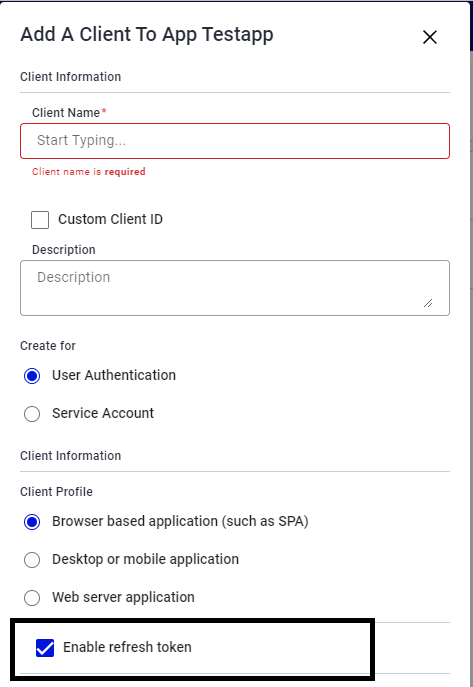
Once enabled, public clients will receive a refresh_token as part of the response to authentication just as a confidential client would and without any modification to existing authentication code.
Notes on refresh tokens issued to public clients:
- Public clients may use the Refresh Token Grant without providing a client_secret (only the client_id must be present in the Authorization header).
- As with confidential clients, using the Refresh Token grant with a public client only issues an access_token, not an id_token.
- Refresh tokens issued to public clients are valid for a maximum of 12 hours and once used, they become invalid.
Once a user is authenticated and access token is issued, the Delfi applications may want to exchange this access token for a different one, such as the one with a different audience, to be able to present it to the next application downstream in their workflow. The OAuth 2.0 protocol that allows this is called Token Exchange and is defined in RFC 8693.
When running user workflows, Delfi applications may want to call other APIs/applications downstream by passing the user's access token in the authorization header of their downstream call. The target API which receives the access token should validate it to ensure that the token was signed by SLB Authenticator and the access token claims are valid. One such claim is "aud" (aka audience) which must be set and the audience value should be the client_id of the target application. If the audience is not set or is set incorrectly, then the target APIs must reject the token.
In order to facilitate the source applications to call the target API downstream, the source application should exchange this access token for a newly minted token with the audience of the target application. This newly minted access token can then be passed in the authorization header to the downstream APIs and the target APIs should then be able accept it because it contains the correct audience. Additionally, since this is still the user’s access token, the APIs can use this access token for user authorization scenarios.
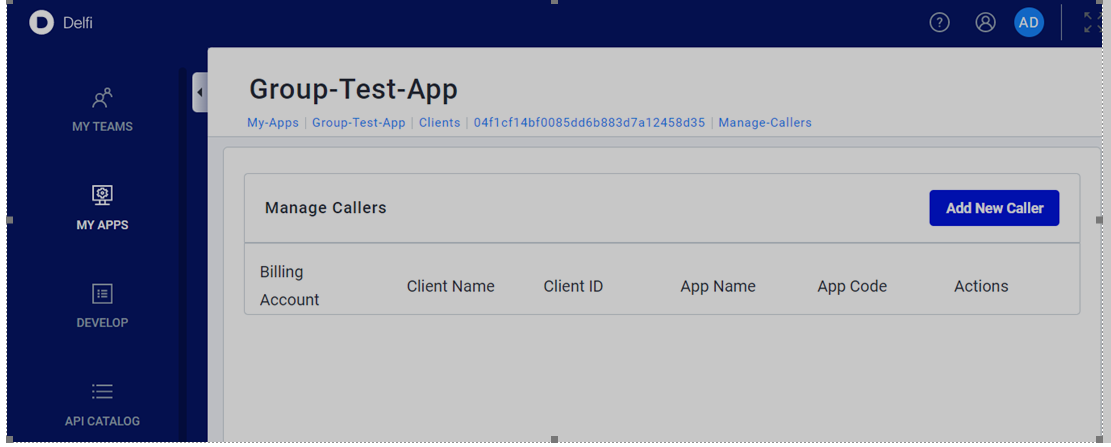
The token exchange can only be performed by confidential OAuth 2.0 clients (i.e. the ones created as web application in developer portal). Additionally, the downstream application must also authorize the ‘calling’ application in the developer portal to allow it to exchange the access token with their audience. To do this, the downstream application should add the client id of the ‘calling’ application in the ‘Approved callers’ list as shown in the screen shot below.
Example Token Exchange Request
POST /v2/token HTTP/1.1
    Host: https://csi.slb.com
    Content-Type: application/x-www-form-urlencoded
    Authorization: Basic <base64 encoded CLIENT_ID:CLIENT_SECRET>
    grant_type=token-exchange
    &subject_token=<Original User’s access token>
    &subject_token_type=urn:ietf:params:oauth:token-type:access_token
    &requested_token_type=<access_token or urn:ietf:params:oauth:token-type:access_token>
&audience=<Client id of the called application>| Request Parameter | Presence | Description |
|---|---|---|
| grant_type | REQUIRED | For Token Exchange, this value must be token-exchange |
| subject_token | REQUIRED | This is the original user's access token that the calling Delfi application possesses |
| subject_token_type | REQUIRED | This is the original user's token type and must be "urn:ietf:params:oauth:token-type:access_token" |
| requested_token_type | OPTIONAL | For Audience Propagation use case of token exchange, defaults to urn:ietf:params:oauth:token-type:access_token |
| audience | OPTIONAL | Client id of the downstream application/APIs. Multiple audiences can be requested by providing a space-delimited list of client_ids. If not specified, will default to requesting client_id |
Example Successful Response
HTTP/1.1 200 OK
Content-Type: application/json;charset=UTF-8
Cache-Control: no-store
Pragma: no-cache
{
    "access_token":"ACCESS_TOKEN",
    "issued_token_type":"urn:ietf:params:oauth:token-type:access_token",
    "token_type":"Bearer",
    "expires_in":3600
}Some typical uses of token exchange for audience change in Delfi are:
- One Delfi application calling APIs of another Delfi application as explained above
- Scenarios where SLB Authenticator v1 OBO token was used for dual purposes of (a) whitelisting & authenticating services and (b) propagating user’s authorization claims signed within the OBO token.
- Scenarios where custom HTTP headers such as x-Slb-on-behalf-of (and similar) were used to pass on user’s access token and in addition a client credentials grant was used in the authorization header for authentication and whitelisting of calling applications.
SPAs / frontends may use PKCE flow to authenticate their users. PKCE clients are public clients and hence not issued a client secret. As a consequence, these clients cannot use token exchange directly. In order to use token exchange, PKCE clients can rely on their backends confidential clients to perform the token exchange. PKCE clients can:
- Use the scope parameter of the /auth endpoint to specify client_id of their backend confidential client.
- The access token thus issued, will have the audience of the backend client_id
- PKCE clients can then use this token, with correct audience of their backend, to call their backend confidential client.
- The confidential client can then propagate the access token to other components of Delfi as desired by the workflow.
Delfi applications would often want to offload long running jobs to a backend service or to another Delfi component. Common examples are front end Delfi applications launching simulations in EESy or running a data science workload in AI workspace/Dataiku. These workloads are also passed a user access token for user authorization concerns.
Often these workloads would run beyond the lifespan of the access token. The calling applications cannot pass their refresh tokens to these backend components nor is the user signed into these applications which means re-login and extension of the session is not possible. These backend components can however use the token exchange to request a refresh token from SLB Authenticator by presenting the user’s access token provided to them by the calling application. For establishing trust for this exchange, the audience in the user’s access token must be set to the component requesting the refresh token and the client credentials of the backend component must also be provided.
The refresh tokens issued by token exchange behave the same as the refresh tokens issued otherwise using Authorization Code Flow. Their lifespan is same and they are used with refresh_token grant to renew the user’s access token.
Example Token Exchange Request
POST /v2/token HTTP/1.1
    Host: https://csi.slb.com
    Content-Type: application/x-www-form-urlencoded
    Authorization: Basic <base64 encoded CLIENT_ID:CLIENT_SECRET>
    grant_type=token-exchange
    &subject_token=<Original User’s access token>
    &subject_token_type=urn:ietf:params:oauth:token-type:access_token
&requested_token_type=<refresh_token or urn:ietf:params:oauth:token-type:refresh_token>| Request Parameter | Presence | Description |
|---|---|---|
| grant_type | REQUIRED | For Token Exchange, this value must be token-exchange |
| subject_token | REQUIRED | This is the original user's access token that the calling Delfi application possesses |
| subject_token_type | REQUIRED | This is the original user's token type and must be "urn:ietf:params:oauth:token-type:access_token" |
| requested_token_type | OPTIONAL | To include a refresh token in audience propagation use case, this must be set to urn:ietf:params:oauth:token-type:refresh_token |
| audience | OPTIONAL | Client id of the downstream application/APIs. Multiple audiences can be requested by providing a space-delimited list of client_ids. If not specified, will default to requesting client_id. |
Example Successful Response
HTTP/1.1 200 OK
Content-Type: application/json;charset=UTF-8
Cache-Control: no-store
Pragma: no-cache
{
    "access_token":"ACCESS_TOKEN",
    "issued_token_type":"urn:ietf:params:oauth:token-type:access_token",
    "refresh_token":"REFRESH_TOKEN",
    "token_type":"Bearer",
    "expires_in":3600
}This endpoint allows confidential clients to query the authorization server to determine the validity for a given token. It may also provide some metadata about the token. For more details please refer to OAuth 2.0 Token Introspection.
Example Token Introspection with basic auth
     POST /v2/introspect HTTP/1.1
     Host: server.example.com
     Accept: application/json
     Content-Type: application/x-www-form-urlencoded
     Authorization: Basic czZCaGRSa3F0MzpnWDFmQmF0M2JW

     token=2YotnFZFEjr1zCsicMWpAA
Example Token Introspection with bearer token
     POST /v2/introspect HTTP/1.1
     Host: server.example.com
     Accept: application/json
     Content-Type: application/x-www-form-urlencoded
     Authorization: Bearer 23410913-abewfq.123483

     token=2YotnFZFEjr1zCsicMWpAA
The Bearer token should have audience of "auth-token-introspect.slbclient.com"
Example Successful Token Introspection Response
HTTP/1.1 200 OK
     {
      "active": true,
      "azp": "l238j323ds-23ij4",
      "sub": "Z5O3upPC88QrAjx00dis",
      "aud": "l238j3432ds-2sfgaj4",
      "iss": "https://csi.slb.com/v2",
      "exp": 1419356238,
      "iat": 1419350238
}As in SLB Authenticator v1.0, SLB Authenticator v2.0 supports SLO (single logout) which means within the same browser session, logging out of one application triggers a logout of all other Delfi applications that have implemented SLO (using the client-side check-session Javascript). This is the default behavior for Delfi applications within the same browser session. However, there is a need for some applications to track user activity and after a period of idleness, choose to log the user out without triggering SLO of all other applications in the same browser session. To achieve this, a new request parameter must be sent with the logout request.
Example Logout Request
GET '/v2/slo?
        post_logout_redirect_uri=https://yourapp.com/post-logout-page
        &lgt_rqst_err_redirect_uri=https://yourapp.com/post-logout-error-page
        &ssid=UNIQUE-SESSION-IDENTIFIER-RECEIVED-ON-LOGIN
        &idle_timeout=true
        &state=some_random_string' \
--header 'Referer: https://yourapp.com'| Request Parameter | Presence | Description |
|---|---|---|
| post_logout_redirect_uri | REQUIRED | A valid URL to redirect user-agent (browser) after successful logout |
| ssid | REQUIRED | A unique identifier of the current user session. This identifier is part of the response to the initial user login to application |
| Referer | REQUIRED | The origin of the application requesting logout (typically sent by browser automatically as part of the header) |
| idle_timeout | OPTIONAL | A flag indicating the application wishes to log the user out without triggering SLO for all other Delfi applications within the browser session |
| lgt_rqst_err_redirect_uri | OPTIONAL | A valid URL to redirect user-agent (browser) after failed logout |
| state | OPTIONAL | Opaque value used by the application to maintain state between the logout request and the callback to the endpoint specified by the post_logout_redirect_uri parameter. |
| id_token_hint | NOT SUPPORTED | This is not currently supported in SLB Authenticator v2.0 but may be in the future |
Example Successful Response
HTTP/1.1 302 Found
Location: https://yourapp.com/post-logout-page?state=some_random_string- OIDC Certified Relying Party Libraries
- Angular: angular-auth-oidc-client 1.0.2
- Python: Authlib
- Python: pyoidc 0.9.4