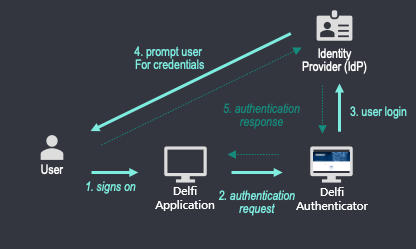
SLB Authenticator uses the OpenID Connect (OIDC) standard protocol. OIDC is an authentication protocol built on the OAuth 2.0 authorization framework. OIDC is about user authentication. Conceptually, the following steps are performed:
- The user initiates a login on the Delfi application.
- The Delfi Application (Client Application) sends an authentication request to SLB Authenticator.
- SLB Authenticator will forward the request to the users corporate Identity Provider (IdP).
- The user's IdP will prompt the user to enter their credentials.
- Upon successful Authentication, SLB Authenticator will return a response to the Delfi application. The response will contain one or more tokens in the form of a JSON Web Token (JWT).
Authorization Code Flow with PKCE builds upon the base Authorization Code Flow and should be used for public clients (single-page apps (SPA), mobile and desktop applications). This is because these applications cannot securely keep the client secret. For SPAs, the entire source is available to the browser. For native applications, code can be decompiled and custom URL schemes are intercept-able. Proof Key for Code Exchange (PKCE) extension introduces the element of a dynamic secret to keep the code-for-token exchange secure.
Use Authorization Code Flow when your server-side app's source code is not publicly exposed. Your app will need to securely store a client secret that was obtained during app registration. The authorization request ultimately requires your app to exchange an authorization code (with its client secret) for an Id token and access token.
Authorization request is the same as described above section Authorization Code Flow with PKCE without the need for code_challenge and code_verifier parameters. Additionally, the Token request requires the use of Basic Authentication header as shown below.
Confidential clients authenticate themselves using the Client Credentials Flow. It is the app that is being authenticated, no end-user is involved. These apps, running server-side, must be trusted with the client secret. The client credentials grant is intended to replace the service identity feature of SLB Authenticator v1.
Once a user is authenticated and access token is issued, the Delfi applications may want to exchange this access token for a different one, such as the one with a different audience, to be able to present it to the next application downstream in their workflow. The OAuth 2.0 protocol that allows this is called Token Exchange and is defined in RFC 8693.
When running user workflows, Delfi applications may want to call other APIs/applications downstream by passing the user's access token in the authorization header of their downstream call. The target API which recevies the access token should validate it to ensure that the token was signed by SLB Authenticator and the access token claims are valid. One such claim is "aud" (aka audience) which must be set and the audience value should be the client_id of the target application. If the audience is not set or is set incorrectly, then the target APIs must reject the token.
In order to facilitate the source applications to call the target API downstream, the source application should exchange this access token for a newly minted token with the audience of the target application. This newly minted access token can then be passed in the authorization header to the downstream APIs and the target APIs should then be able accept it because it contains the correct audience. Additionally, since this is still the user’s access token, the APIs can use this access token for user authorization scenarios.
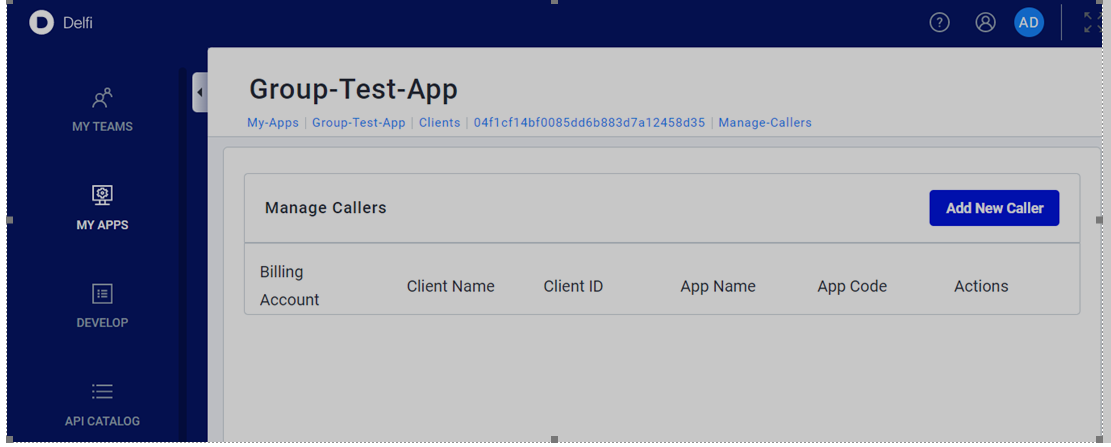
The token exchange can only be performed by confidential OAuth 2.0 clients (i.e. the ones created as web application in developer portal). Additionally, the downstream application must also authorize the ‘calling’ application in the developer portal to allow it to exchange the access token with their audience. To do this, the downstream application should add the client id of the ‘calling’ application in the ‘Approved callers’ list as shown in the screen shot below.
Rate limiting is the standard industry practice to manage load on the key resources. It controls the rate at which users or services can access a resource. When the rate exceeds the set quota (threshold), the requests are throttled or blocked. This prevents Denial of Service (DoS) attacks and abuse of the server but ensures fair usage.
SLB Authenticator is introducing rate limiting on the token endpoint (/token) to ensure fair distribution of compute capacity and to avoid accidental Distributed Denial of Service (DDoS) from internal and 3rd party applications. Any application using SLB Authenticator should review the quota and rate limit details on the token endpoint-
- Rate Limiting quota will be based on “number of calls per grant_type per client_id”. Default quota is set to 100 requests per minute per grant_type per client id. Each of the grant_types (authorization_code, client_credentials, refresh_token and token-exchange) get their own separate quota.
- When your application goes above the rate limits, token endpoint will give 429 status code (too many requests) to the traffic that breaches the set quota.
- When your application gets one-off 429 status code due to a sudden burst in traffic/user activity, you should handle this in code and react accordingly. Quota gets replenished frequently (in seconds), so a retry with a delay will succeed here. It is recommended to implement exponential backoff (or exponential backoff with jitter) to handle throttling gracefully.
- When your application gets more persistent 429 status code due to calling SLB Authenticator at a high rate, you should review the usage of token endpoint and introduce caching of tokens to eliminate repeated calls for the same token.
You may submit a support ticket using Delfi help options
- To review the usage pattern of token endpoint from your application/client id
- To request for additional quota as per the business needs of your application/ client id