# Introduction
Out of the box SchematicsJS package offers user set of predefined schematic elements to use. See Elements Catalog example for the elements appearances grouped by their categories. All the elements graphics are stored in ComponentNodeFactoryRegistry object. Any component in the registry can be replaced with a custom implementation; or a new component can be added (see Custom Nodes tutorial for more details).
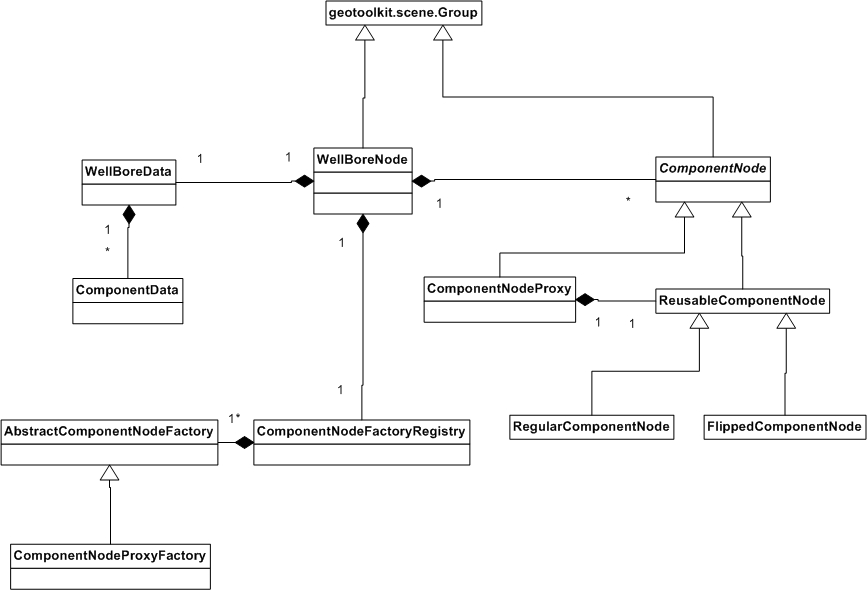
To display wellbore data all elements data are collected in WellBoreData that in its turn is passed to WellBoreNode object for visualization purposes. If labeling is needed WellBoreWithLabels wrapper is utilized (see Labeling Strategy tutorial for more details).
# Class diagram (simplified)
# Wellbore data
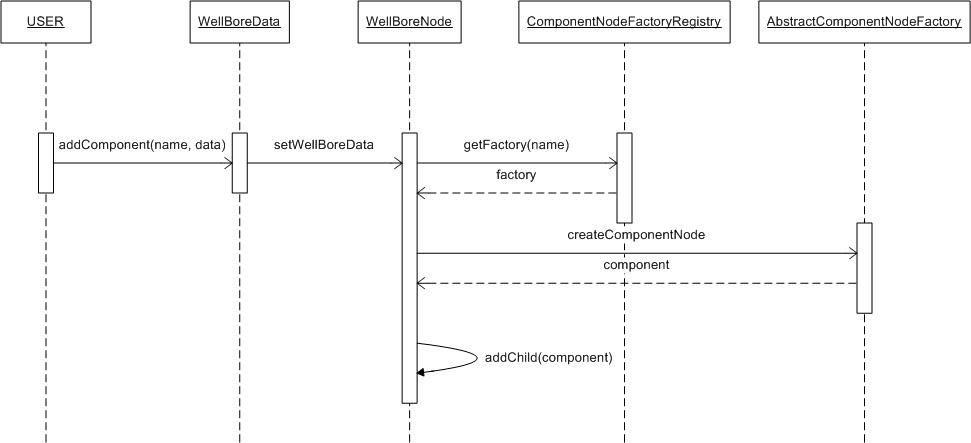
WellBoreData is essentially schematics component data container class (see its addComponent(componentName, componentData) method API). The class is used by WellBoreNode shape to visualize data. If this is the way user chosen, the elements’ data are translated into shapes internally by means of a factory registry associated with the WellBoreNode object (see "User data input to component node" sequence diagram at the bottom of the document).
# Component node factories and factory registry
All schematics element type classes (more specifically, their AbstractComponentNodeFactory implementations) are stored in ComponentNodeFactoryRegistry object. Note that list of registered component names is returned by the registry's getRegisteredComponents method. By default every WellBoreNode contains an instance of the registry; in opposite case the registry can be created explicitly).
# Component nodes
ComponentNode is the most common abstraction representing schematics element visualization to be handled by WellBoreNode. However all of predefined elements in SchematicsJS are implemented as reusable ones (i.e. inherited from ReusableComponentNode class) for performance/memory consumption reasons. More specifically most of the elements are derived from RegularComponentNode class while the rest is derived from FlippedComponentNode class. See Custom Nodes tutorial for more details.
# Wellbore node
The class accepts WellBoreData and translates the data into visualization shapes. Currently it supports Regular and Compressed View Modes. Besides that the class provides filtering capabilities via its setVisible and setComponentsVisibility methods.
# Labeling strategies
The class WellBoreWithLabels incapsulates WellBoreNode shape object. It provides labeling capability via applied LabelingStrategy. There are two labeling strategies implemented in the toolkit at the moment. See Labeling Strategy tutorial for more info.
# 'User data input to component node' sequence diagram