This tutorial outlines the basic prerequisites that you need to have in order to use the DrillPlan APIs, found in the DrillPlan API Catalog.
In order to use any DELFI APIs, an AppKey is required. An App and corresponding AppKey can be generated from the My Apps tab in the Developer Portal.
Refer how to create a Team, how to add members to a Team, how to create an App and how to get the AppKey.
When creating your app it is important to specify all the Services that you'd like to use. To use the DrillPlan Public APIs you should ensure that both
- ✅ DrillPlan
- ✅ SLB Authenticator
are selected.
Once you have created an App and enabled the necessary services, you need to create a Client. When creating a new client you will be prompted for
- Name
- Permitted Grant Types (ACF, ACF with PKCE, CCG etc)
- Redirect URIs (if using ACF or ACF with PKCE)
This will generate a
Client_IdSecret
Please note that the secret will only be displayed once when initially created. It can be reset any time from the Actions menu.
An access_token can be generated by following one of the authentication flows described here.
While there are several possible authentication flows, the common approaches are
- Authorization Code Flow (ACF)
- User based authentication
- Preferred approach
- Data entitlement is governed by the user issuing the request
- Client Credentials Flow (CCG)
- Also known as a
service account - Service accounts have full access to all DrillPlan data within the data partition
- Requires some additional configuration in DELFI, see step X below
- Also known as a
All JWT (JSON Web Tokens) require the following audience claim to be added to access DrillPlan data
fwk-drillplan.slbservice.com
This can be done in the initial token request by providing as a scope or it can later be added by doing a secondary token exchange.
Authorization code flow (or ACF with PKCE) is the preferred approach for authentication since it will honour the data entitlements of the user issuing the API call. However it does require the browser to perform some redirects to the provided URI in the client setup above.
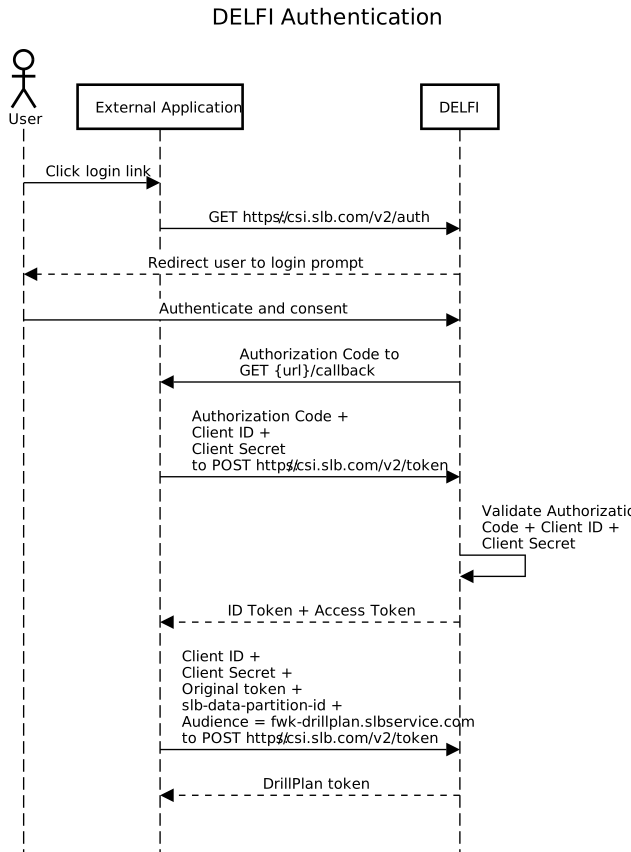
Fig 1: Sequence diagram illustrating 'Authorization Code Flow'
Assuming you have provided the following redirect URI in the client setup:
http://localhost:3000/callback
the following .js code can be used to retrieve a token in the browser:
Example node.js app code
const express = require('express');
const axios = require('axios');
const querystring = require('querystring');

const app = express();

const CLIENT_ID = 'XXXXX'; // Replace with your Client ID
const CLIENT_SECRET = 'XXXXX'; // Replace with your Client Secret
const REDIRECT_URI = 'http://localhost:3000/callback'; // Redirect URI
const AUTHORIZATION_URL = 'https://csi.slb.com/v2/auth'; // Replace with the provider's authorization URL
const TOKEN_URL = 'https://csi.slb.com/v2/token'; // Replace with the provider's token URL
const AUDIENCE = 'fwk-drillplan.slbservice.com'; // Specific for calls to DrillPlan

// Step 1: Redirect to the SAuth authorization page
app.get('/', (req, res) => {
    const authQueryParams = querystring.stringify({
        response_type: 'code',
        client_id: CLIENT_ID,
        redirect_uri: REDIRECT_URI,
        scope: AUDIENCE, // Add the specific DrillPlan audience
        state: 'random_string_to_prevent_csrf', // Optional
    });

    res.redirect(`${AUTHORIZATION_URL}?${authQueryParams}`);
});

// Step 2: Handle the redirect with the authorization code
app.get('/callback', async (req, res) => {
    const { code, state } = req.query;

    if (!code) {
        return res.status(400).send('Authorization code not found');
    }

    try {
        const basicAuth = Buffer.from(`${CLIENT_ID}:${CLIENT_SECRET}`).toString('base64');
        // Exchange the authorization code for an access token
        const tokenResponse = await axios.post(
            TOKEN_URL,
            querystring.stringify({
                grant_type: 'authorization_code',
                code,
                redirect_uri: REDIRECT_URI,
            }),
            {
                headers: {
                    'Content-Type': 'application/x-www-form-urlencoded',
                    'Authorization': `Basic ${basicAuth}`,
                },
            }
        );

        const { access_token } = tokenResponse.data;

        res.send(`DrillPlan Public API Token: ${access_token}`);
    } catch (error) {
        console.error(error.response?.data || error.message);
        res.status(500).send('Error during token generation');
    }
});

// Start the server
app.listen(3000, () => {
    console.log('Server running on http://localhost:3000');
});
Please note in order to run the above code you need to have node.js installed and should install the
expressandaxiosdependencies e.g.npm install express axios
Client Credential Flow (CCF) (a.k.a. a service acccount) can also be used with DrillPlan, but requires some additional configuration.
In order for the generated access_token to work, some additional steps in DELFI need to be taken.
The
{client_id}@delfiserviceaccount.comneeds to be added as a user to a department and issued with aDrillPlan - Plussubscription (part numberDRPL-PB-SUBU). This can be done by a Department or Account Manager in DELFI under theManage→Users→Bulk Import Usersaction.Example CSV Table format to Add DrillPlan - Plus Subscription to a clientId
Email Address Last Name First Name Department crmContractId Part Number Region {client_id}*@delfiserviceaccount.com ServiceAccount* AppName1* MyDepartmentName* MyContractID* DRPL-PB-SUBU EUR* Please note that all the * values are examples and should be replaced
The App needs to be added to the
Associated Applicationslist for the respective data partition. This can be done by the DELFI Account Manager in DELFI underManage→Data Source Registry→Data Source→Data Partition→Allowed Applications→Add New
Once the additiona configuration has been completed, a token can be retrieved from the https://csi.slb.com/v2/token end point.
Example CURL request to retrieve a token
curl -X POST https://csi.slb.com/v2/token \
  --header 'Content-Type: application/x-www-form-urlencoded' \
  --header 'Authorization: Basic <base64 encoded CLIENT_ID:CLIENT_SECRET>' \
  --data grant_type=client_credentials \
  --data 'scope={client_id} fwk-drillplan.slbservice.com' \
  --data client_id={client_id} \
  --data client_secret={client_secret}
If successful, a response containing the final access_token will be generated:
{
  "access_token": "{access_token}",
  "token_type": "Bearer",
  "expires_in": 3600
}The SLB data partition ID is auto-generated for each data partition within the DELFI Account. It is needed in the header of each API call to DrillPlan. This can be obtained either programmatically using the the CCM API user-context-service or manually from the Copy Context button on the DELFI homepage. This is found by first selecting your initials in the upper right of the screen, then selecting the clipboard icon found on the right of the heading Selected User Context.
Note: you may need to add the service
- ✅ CCM
to your APP to use the CCM endpoint.
Once you have the following:
- AppKey
- A valid
access_token - And identified the
slb-data-partition-id
You can begin to make queries to DrillPlan's public API catalog. For example:
curl -X GET 'https://eu-api.delfi.slb.com/drillplan/plan/v1/projects/joined' \
--header 'accept: text/plain' \
--header 'slb-data-partition-id: <slb-data-partition-id>' \
--header 'Authorization: Bearer <access_token>' \
--header 'AppKey: <AppKey>'