- Introduction
- Concepts
- How to use this service?
- Shared schemas
- Things to keep in mind for indexing the schema
- Schema notifications
- Schema validation
- Schema decorations/code
The Schema service enables centralized governance and management of schemas in the Managed Planning Data Foundation. It offers an implementation of the schema standard. The Schema service provides all necessary APIs to fetch, create, update, and mark a schema obsolete.
- Schema - A data model definition. The Schema service allows data models to be defined in rich JSON objects (as per JSON Schema draft #07).
- Schema resolution - Schema definitions can include references to other schema definitions or fragments. During schema creation, the Schema service resolves all the referred schema fragments and creates a completely resolved schema. The sample entity-relationship diagram below demonstrates the associations between various domain entities and how schema fragment references can be helpful when defining models for these entities.
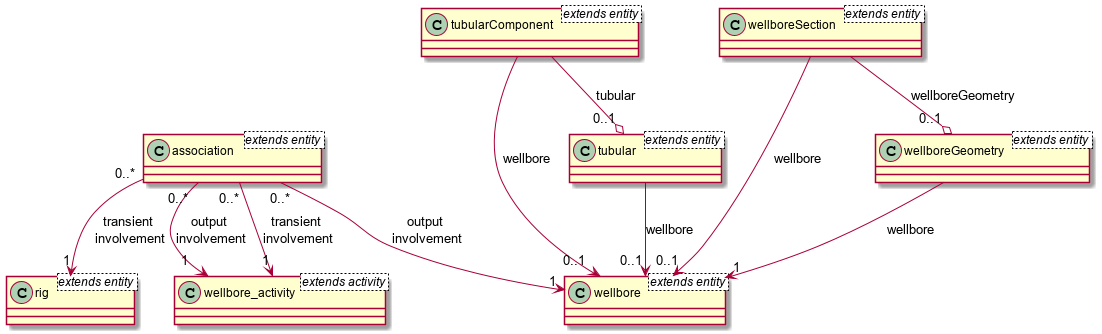
Schema uniqueness - A schema is uniquely identified by the schema identity information. The identity information includes authority, source, entity type, major version, minor version, and patch version. These attributes are used to generate the kind and ID of the schema.
Schema scope - A schema defined with the Schema service has a defined scope. Scope values can be SHARED or INTERNAL.
- INTERNAL - Schemas with an INTERNAL scope are defined in a specific data partition and are available only to the users of that data partition.
- SHARED - The concept of sharing of a schema is intended to allow the creator of a schema to share it with another data partitions. To create or update a schema in SHARED scope, one has to use the dedicated endpoint i.e
schemas/system. In the current version, a user of the Schema service cannot explicitly share an INTERNAL schema. Certain standard schemas are available out of box with all the data partitions in the Managed Planning Data Foundation. So these are the schemas that are shared by default.
Schema state - A schema defined with the Schema service could be in one of the following states:
- PUBLISHED - When a schema is created, it could be set to the PUBLISHED state. Or a schema in the DEVELOPMENT state can be changed to the PUBLISHED state. A schema that is in the PUBLISHED state is immutable.
- DEVELOPMENT - A schema in a draft or evolutionary state. This state is usually set when the schema definition is a work in progress. A schema in the DEVELOPMENT state is mutable.
- OBSOLETE - When a schema is no longer in use or is not needed, it can be marked as OBSOLETE. Only a schema in the DEVELOPMENT state can be moved to the OBSOLETE state.
Semantic schema versioning - Schema definitions are expected to be semantically versioned. Major, Minor, and Patch versions are part of the schema identity information. The Schema service checks for breaking changes in the schemas being created. And if a breaking change is found, it prompts the user to change the major version of the schema.
Schema vs Storage Schema
| Schema defined with Schema service | Schema defined with Storage Schema service |
|---|---|
| Rich JSON Objects as per JSON Schema draft#07 | Flattened JSON having an array of attributes |
| Being JSON object allows defining real entity model | Schema definition does not support this |
| Schema fragments can be referred within the definition | Schema definition does not support this |
| Intended for central governance for all schema defined in the system | Intended primarily for discovery and searching of data |
The Schema service promotes reuse and composition using JSON schema draft 07 features. Typically you start with the registration of reusable schema fragments or schema elements, which are used, for example, by API specifications or other schemas.
Then these schema fragments can be referenced and included in more complex constructs up to actual record schemas for Storage.
The example below defines a schema fragment that defines a map position that has a latitude and a longitude.
Schema fragment example, 2D map position
{
  "schemaInfo": {
    "schemaIdentity": {
      "authority": "osdu",
      "source": "wks",
      "entityType": "mapPosition",
      "schemaVersionMajor": 1,
      "schemaVersionMinor": 0,
      "schemaVersionPatch": 0,
      "id": "osdu:wks:mapPosition:1.0.0"
    },
    "createdBy": "OSDU",
    "scope": "SHARED",
    "status": "DEVELOPMENT"
  },
  "schema": {
    "description": "A 2D point location in latitude and longitude referenced to WGS 84 if not specified otherwise.",
    "properties": {
      "latitude": {
        "description": "The latitude value in degrees of arc (dega). Value range [-90, 90].",
        "title": "Latitude",
        "type": "number",
        "minimum": -90,
        "maximum": 90
      },
      "longitude": {
        "description": "The longitude value in degrees of arc (dega). Value range [-180, 180]",
        "title": "Longitude",
        "type": "number",
        "minimum": -180,
        "maximum": 180
      }
    },
    "required": [
      "latitude",
      "longitude"
    ],
    "title": "2D Map Location",
    "type": "object"
  }
}
Eventually a storage record schema is created. It will use a variety of other standard schema fragments, which are boilerplate record properties. An example record schema is given in the following example:
Storage record schema example for a PointOfInterest record
{
  "schemaInfo": {
    "schemaIdentity": {
      "authority": "osdu",
      "source": "wks",
      "entityType": "pointOfInterest",
      "schemaVersionMajor": 1,
      "schemaVersionMinor": 0,
      "schemaVersionPatch": 0,
      "id": "osdu:wks:pointOfInterest:1.0.0"
    },
    "createdBy": "OSDU",
    "scope": "SHARED",
    "status": "DEVELOPMENT"
  },
  "schema": {
    "$schema": "http://json-schema.org/draft-07/schema#",
    "title": "Point Of Interest",
    "description": "A Point of Interest data association a textual label with a description to a 2D map position.",
    "type": "object",
    "properties": {
      "id": {
        "description": "The entity ID which identifies this Managed Planning Data Foundation resource object without version.",
        "title": "Entity ID",
        "type": "string",
        "example": "someDataPartitionId:dataSourceNamespace:pointOfInterest:unique-id-3680fceb-bfef-4027-abba-6e580f6d212e"
      },
      "kind": {
        "description": "The schema identification for the Managed Planning Data Foundation resource object following the pattern <Namespace>:<Source>:<Type>:<VersionMajor>.<VersionMiddle>.<VersionMinor>",
        "title": "Kind",
        "default": "osdu:wks:pointOfInterest:1.0.0",
        "type": "string",
        "pattern": "[A-Za-z0-9-_]+:[A-Za-z0-9-_]+:[A-Za-z0-9-_]+:[0-9]+.[0-9]+.[0-9]+"
      },
      "version": {
        "description": "The version number of this Managed Planning Data Foundation resource; set by the framework.",
        "title": "Version Number",
        "type": "integer",
        "format": "int64",
        "example": "1831253916104085"
      },
      "acl": {
        "description": "The access control tags associated with this entity.",
        "title": "Access Control List",
        "$ref": "osdu:wks:accessControlList:1.0.0"
      },
      "legal": {
        "description": "The entity's legal tags and compliance status.",
        "title": "Legal Tags",
        "$ref": "osdu:wks:AbstractLegalTags:1.0.0"
      },
      "ancestry": {
        "description": "The links to data, which constitute the inputs.",
        "title": "Ancestry",
        "$ref": "osdu:wks:AbstractLegalParentList:1.0.0"
      },
      "meta": {
        "description": "The metadata section linking the 'unitKey', 'crsKey' to self-contained definitions.",
        "title": "Frame of Reference Meta Data",
        "type": "array",
        "items": {
          "$ref": "osdu:wks:metaItem:1.0.0"
        }
      },
      "data": {
        "$ref": "#/definitions/data"
      }
    },
    "required": [
      "kind",
      "acl",
      "legal"
    ],
    "definitions": {
      "relationships": {
        "description": "All relationships from this Point of Interest.",
        "properties": {
          "relatedItems": {
            "description": "Any entities related to this entity.",
            "$ref": "osdu:wks:toManyRelationship:1.0.0",
            "title": "Related Entities"
          }
        },
        "title": "Relationships",
        "type": "object"
      },
      "data": {
        "type": "object",
        "title": "Point of Interest",
        "description": "",
        "properties": {
          "description": {
            "description": "The textual description for this point of Interest.",
            "example": "Proposed Drilling Location",
            "title": "Description",
            "type": "string"
          },
          "additionalURL": {
            "description": "An optional URL leading to more contextual information.",
            "example": "https://www.bigoil.com/internal/campaigns/area/Drilling2021/plannedLocation.html",
            "title": "Additional URL",
            "type": "string"
          },
          "location": {
            "description": "The 2D map location of the Point of Interest.",
            "title": "Location",
            "$ref": "osdu:wks:mapPosition:1.0.0"
          },
          "relationships": {
            "description": "The related entities.",
            "$ref": "#/definitions/relationships",
            "title": "Relationships"
          }
        }
      }
    }
  }
}
As the example demonstrates, the record schema is composed of a number of schema fragments, which are included by $ref and the schema identity, such as osdu:wks:mapPosition:1.0.0 for the location property. All of the referenced schema fragments must have been registered prior to the new schema osdu:wks:pointOfInterest:1.0.0.
The following parameters are required to create a schema:
| Attribute | Use | Example | Datatype | Required (Yes/No) |
|---|---|---|---|---|
| authority | Authority defining the schema | authority: "osdu" | String | Yes |
| source | Source from data of the given schema is expected | source: "prosource" | String | Yes |
| entityType | Entity type for which the schema is being defined | entityType: "wellbore" | String | Yes |
| schemaVersionMajor | Major version of the schema | schemaVersionMajor: 1 | String | Yes |
| schemaVersionMinor | Minor version of the schema | schemaVersionMinor : 0 | String | Yes |
| schemaVersionPatch | Patch version of the schema | schemaVersionPatch : 0 | String | Yes |
| schema | Schema definition | JSON object, refer to the example above | Object | No |
There is a shared partition configured into the system where schemas are created so that the schemas can be shared across all partitions. The shared schemas are bootstrapped into the system at the time of deployment of the schema-service app by listing the schemas at the following location:
/deployments/shared-schemas/<folder-name>
Each folder must contain the load_sequence.1.0.0.json file with entries of the schema kind to be bootstrapped. The following lists the properties of shared schemas:
- Schemas created in a shared partition are by default
SHAREDsuch as"scope": "SHARED". - Shared schemas are public which means anyone can access them using the GET endpoint.
- A shared schema's kind must be unique. In other words, no private partition can have the same schema kind.
- Anyone can create a schema into shared partition, but it must have a unique kind.
Note: Two private partitions can have the same schema kind if that schema kind is not already present in a shared partition.
Warning: It is recommended that the shared schemas (which are stored in the folder /deployments/shared-schemas/folder-name> ) should never be created in any private partitions that use the same schema-kind (authority: source: entityType: major-version. minor-version. patch-version).This would result in schema bootstrap failure due to duplicate schema kinds. To avoid this conflict, it is advised to at least modify the schema kind by altering its authority. At present, since there is no direct mechanism to delete schemas from any data-partitions, it is advised to follow the above mentioned guideline strictly.
The Indexer service performs validations on the schemas when they are created. The update of a schema does not lead to automatic re-indexing. If users make changes to a schema, then they must manually trigger the re-indexing for the kind. For schemas to be indexed correctly, a set of rules must be followed:
- The "type" attribute is mandatory for all the properties.
- Internal references are resolvable.
- Valid references:
- "$ref": "#/definitions/relationships"
- "$ref": "opendes:wks:toManyRelationship:1.0.0"
- Invalid references in which the indexer schema processing will fail:
- "$ref": "#/definitions/relationships" – where ‘relationships’ does not exist on ‘definitions’.
- "$ref": "#/definitions/Relationships" – ‘definition’ section has ‘relationship’ (all lower case).
- "$ref": "#/definitions/relationsh" -- definition’ section has ‘relationship’ (spelling mistakes).
- Valid references:
Example with valid properties and references
{
	"schemaInfo": {
		"schemaIdentity": {
			"authority": "osdu",
			"source": "wks",
			"entityType": "mapPosition",
			"schemaVersionMajor": 1,
			"schemaVersionMinor": 0,
			"schemaVersionPatch": 0,
			"id": "opendes:wks:mapPosition:1.0.0"
		},
		"createdBy": "OSDU",
		"scope": "SHARED",
		"status": "DEVELOPMENT"
	},
	"schema": {
		"description": "A 2D point location in latitude and longitude referenced to WGS 84 if not specified otherwise.",
		"properties": {
			"name": {
				"description": "Name of person.",
				"type": "object",
				"$ref": "#/definitions/name"
			},
			"latitude": {
				"description": "The latitude value in degrees of arc (dega). Value range [-90, 90].",
				"title": "Latitude",
				"type": "number",
				"minimum": -90,
				"maximum": 90
			},
			"longitude": {
				"description": "The longitude value in degrees of arc (dega). Value range [-180, 180]",
				"title": "Longitude",
				"type": "number",
				"minimum": -180,
				"maximum": 180
			}
		},
		"required": [
			"latitude",
			"longitude"
		],
		"title": "2D Map Location",
		"type": "object",
		"definitions": {
			"name": {
				"type": "object",
				"required": [
					"firstName",
					"lastName"
				],
				"properties": {
					"firstName": {
						"description": "First name of person.",
						"type": "string"
					},
					"lastName": {
						"description": "Last name of person.",
						"type": "string"
					}
				}
			}
		}
	}
}
Example with invalid properties that have a missing "type" attribute and invalid references, without an actual reference in the definitions block.
{
	"schemaInfo": {
		"schemaIdentity": {
			"authority": "osdu",
			"source": "wks",
			"entityType": "mapPosition",
			"schemaVersionMajor": 1,
			"schemaVersionMinor": 0,
			"schemaVersionPatch": 0,
			"id": "opendes:wks:mapPosition:1.0.0"
		},
		"createdBy": "OSDU",
		"scope": "SHARED",
		"status": "DEVELOPMENT"
	},
	"schema": {
		"description": "A 2D point location in latitude and longitude referenced to WGS 84 if not specified otherwise.",
		"properties": {
			"name": {
				"description": "Name of person.",
				"type": "object",
				"$ref": "#/definitions/name"
			},
			"latitude": {
				"description": "The latitude value in degrees of arc (dega). Value range [-90, 90].",
				"title": "Latitude",
				"type": "number",
				"minimum": -90,
				"maximum": 90
			},
			"longitude": {
				"description": "The longitude value in degrees of arc (dega). Value range [-180, 180]",
				"title": "Longitude",
				"type": "number",
				"minimum": -180,
				"maximum": 180
			}
		},
		"required": [
			"latitude",
			"longitude"
		],
		"title": "2D Map Location",
		"type": "object",
        "definitions": {}
	}
}
Example with a valid schema ID reference that will be resolved by the Schema service.
{
	"schemaInfo": {
		"schemaIdentity": {
			"authority": "osdu",
			"source": "wks",
			"entityType": "mapPosition",
			"schemaVersionMajor": 1,
			"schemaVersionMinor": 0,
			"schemaVersionPatch": 0,
			"id": "opendes:wks:mapPosition:1.0.0"
		},
		"createdBy": "OSDU",
		"scope": "SHARED",
		"status": "DEVELOPMENT"
	},
	"schema": {
		"description": "A 2D point location in latitude and longitude referenced to WGS 84 if not specified otherwise.",
		"properties": {
			"name": {
				"description": "Name of person.",
				"type": "object",
				"$ref": "opendes:wks:toManyRelationship:1.0.0"
			},
			"latitude": {
				"description": "The latitude value in degrees of arc (dega). Value range [-90, 90].",
				"title": "Latitude",
				"type": "number",
				"minimum": -90,
				"maximum": 90
			},
			"longitude": {
				"description": "The longitude value in degrees of arc (dega). Value range [-180, 180]",
				"title": "Longitude",
				"type": "number",
				"minimum": -180,
				"maximum": 180
			}
		},
		"required": [
			"latitude",
			"longitude"
		],
		"title": "2D Map Location",
		"type": "object",
        "definitions": {}
	}
}The Schema service triggers a notification event whenever there is a create or update operation performed. In other words, these notifications are triggered whenever POST or PUT end-points are called. The subscribers outside of the Managed Planning Data Foundation boundaries who want to subscribe to the schemachangedtopic through push subscriptions must register to the topic using register services.
The event message body has the following sctructure:
- Create event
[
	{
        "kind": "osdu:wks:wellbore:2.0.0",
        "op": "create"
      }
]- Update event
[
	{
        "kind": "osdu:wks:wellbore:1.0.0",
        "op": "update"
      }
]
How to subscribe to the schemachangedtopic?
Refer to ['Subscribing to a topic'](. ./Data-Notification.md) in the register service tutorial.
The Schema service does multiple checks on different levels to make sure the inserted schema fits into validations on major, minor, and patch version levels. Following is the list of all validations that are performed while creating or updating any schema into the system.
A schema version constitutes three parts, MAJOR, MINOR, and PATCH. Depending upon the nature of changes made to the structure of schema, the application may force the user to update the version number. This list describes, at a high level, when a version update is required for each level:
- Update the PATCH version when you make backwards compatible bug fixes or documentation/decoration changes.
- Update the MINOR version when you add functionality or contents in a backwards compatible manner.
- Update the MAJOR version when you make incompatible schema changes, such as when an attribute is removed or the
typeof an attribute is updated.
Changes in the values of the following attributes are permitted at the patch version increment. They are non-mandatory attributes, so addition or removal of any of these attributes is permitted.
- title
- description
- example/examples
- pattern
- $id
- $comment
- any JSON extension tag starting with x-osdu
In addition to all permitted changes in PATCH versions, the following actions are permitted:
Adding properties to existing data and nested structures
Adding object structures to the following arrays:
allOf : To validate against allOf, the given data must be valid against all of the given subschemas.
oneOf : To validate against oneOf, the given data must be valid against exactly one of the given subschemas.
anyOf : To validate against anyOf, the given data must be valid against any (one or more) of the given subschemas.
Changing the indices of objects containing title inside oneOf or allOf arrays
Changing indices of ref attributes while keeping same text values
Changing the order of a required attribute
Changes that are explicitly not permitted:
The list of required properties
The state of additionalProperties
If
additionalPropertiesis not present in the original schema, then it cannot be added with a value of false.If
additionalPropertiesis present with a value equal to false, then it cannot be removed or altered.The value of
additionalPropertiescannot be changed from true to false.
Changing the type of any attribute
You can declare existing properties as deprecated, preferably with instructions about how to migrate from the previous to the next version. The documentation automatically marks properties with a strike-through if the description starts with "DEPRECATED: " .
Any changes are permitted, specifically:
- Removal of properties
- Removal of structures in allOf, oneOf, anyOf
- Changing the list of required properties
- Changing the state of additionalProperties
- Changing the indices of attributes without a title in oneOf and allOf arrays
- Changing the type of any attribute
- Breaking change introduced in the external schema of the
refattribute
There is intensive use of $ref to schema fragments, which are incoming as schema IDs such as "$ref": "osdu:wks:AbstractSpatialLocation:1.0.0". These fragments use semantic versioning as well. As a consequence, these IDs are also validated during schema create or update.
- If base schemas only differ at the patch version, then
$refcan only differ at the patch version. If they refer to a higher minor (or even major version), validation must fail.
Example: Consider this base schema with versionosdu:wks:AbstractSpatialLocation:1.0.0toosdu:wks:AbstractSpatialLocation:1.0.1below; validation rules will be applied to the$reftag.
| Sl No | Type | Initial version | New version | Status |
|---|---|---|---|---|
| 1 | $ref | osdu:wks:AbstractCommonResources:2.1.1 | osdu:wks:AbstractCommonResources:2.1.2 | valid |
| 2 | $ref | osdu:wks:AbstractCommonResources:2.1.1 | osdu:wks:AbstractCommonResources:2.2.1 | invalid |
| 3 | $ref | osdu:wks:AbstractCommonResources:2.1.1 | osdu:wks:AbstractCommonResources:2.0.1 | invalid |
| 4 | $ref | osdu:wks:AbstractCommonResources:2.1.1 | osdu:wks:AbstractCommonResources:2.1.0 | invalid |
| 5 | $ref | osdu:wks:AbstractCommonResources:2.1.1 | osdu:wks:AbstractCommonResources:3.1.1 | invalid |
| 6 | $ref | osdu:wks:AbstractCommonResources:2.1.1 | osdu:wks:AbstractCommonResources-Changed:2.1.1 | invalid |
- Similarly, if base schemas only differ at minor versions, then
$refcan only differ at minor versions. If there is a change in a major version to$ref, then it must be rejected during validation.
Example: Consider this base schema with versionosdu:wks:AbstractSpatialLocation:1.0.0toosdu:wks:AbstractSpatialLocation:1.1.0below; validation rules will be applied to the$reftag.
| Sl No | Type | Initial version | New version | Status |
|---|---|---|---|---|
| 1 | $ref | osdu:wks:AbstractCommonResources:2.1.1 | osdu:wks:AbstractCommonResources:2.1.2 | valid |
| 2 | $ref | osdu:wks:AbstractCommonResources:2.1.1 | osdu:wks:AbstractCommonResources:2.2.1 | valid |
| 3 | $ref | osdu:wks:AbstractCommonResources:2.1.1 | osdu:wks:AbstractCommonResources:2.0.1 | invalid |
| 4 | $ref | osdu:wks:AbstractCommonResources:2.1.1 | osdu:wks:AbstractCommonResources:2.1.0 | invalid |
| 5 | $ref | osdu:wks:AbstractCommonResources:2.1.1 | osdu:wks:AbstractCommonResources:3.1.1 | invalid |
| 6 | $ref | osdu:wks:AbstractCommonResources:2.1.1 | osdu:wks:AbstractCommonResources-Changed:2.1.1 | invalid |
The following table lists the error messages you get when a breaking change is introduced at any level:
| Error code | Condition | Error message |
|---|---|---|
| 400 | Occurs when a breaking change not allowed at patch version level is found. | Patch version validation failed. Changes requiring a minor or major version increment were found; analyzed version: 2.2.15 and 2.2.14. Updating the schema version to a higher minor or major version is required. |
| 400 | Occurs when a breaking change not allowed at minor version level is found. | Minor version validation failed. Breaking changes were found; analyzed versions 1013.2.0 and 1013.1.0. Updating the schema version to a higher major version is required. |
Note: The above array message would contain the given schema version and the existing schema in the system.
Use the below link to get all possible decorations and properties that you can use in a schema: