- Introduction
- Upload a File using File Service vs Dataset Service
- System interactions
- API Specs
- References
The Dataset service provides API endpoints to allow an application or user to register datasets in Data Platform.
This service was created by the OSDU community to register instructions to enable dataset upload. A dataset could be a single file, a collection of files, seismic datasets, etc.
The Dataset Service is similar to the File Service in the context of data flow services; it supports creating file metadata records to upload a file.
But the File Service does not support metadata creation for file collections. So, if a client wants to register a file collection, they can use the Dataset service to register a single file or a collection of files.
Note that the existing metadata, upload and download endpoints of the File service will be deprecated. The scope of the File service is limited to the storage of files without the association of any metadata, upload or download.
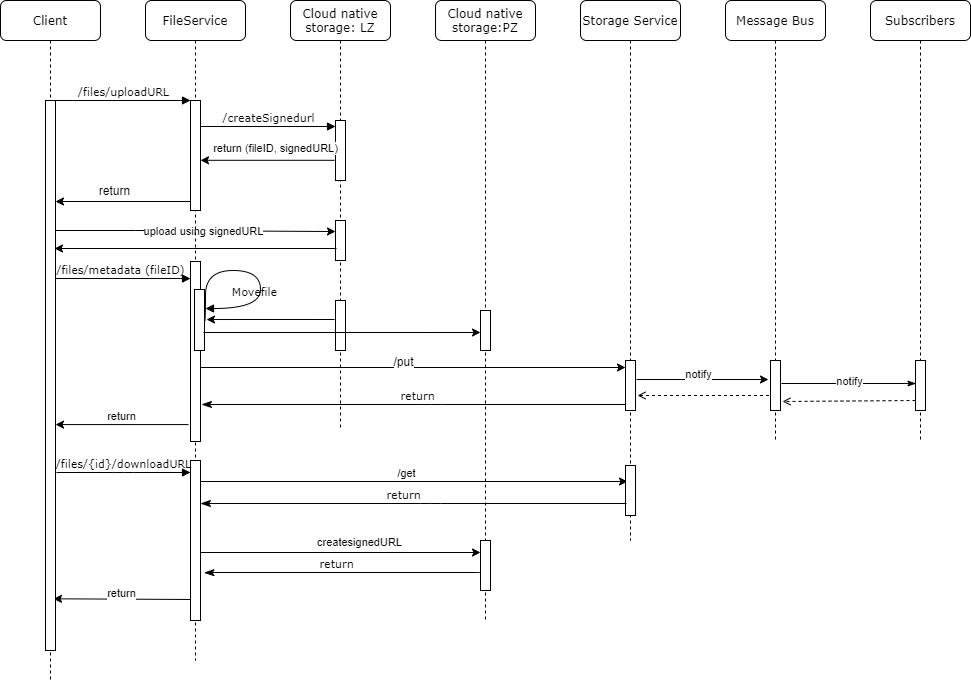
DMS Service → The file service used for Azure implementations. (Currently AWS is using another service called File DMS (not approved in OSDU), ultimately all CSPs should start using the File service as the File DMS.)
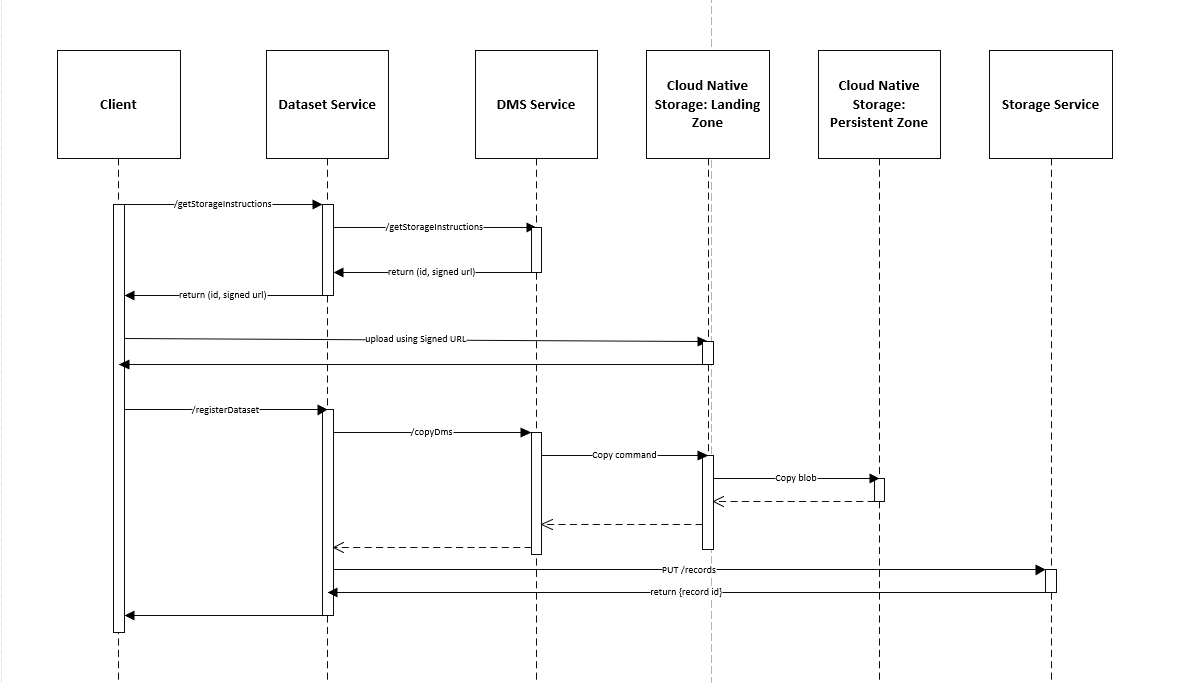
The Dataset service defines the following workflows:
- Storage instructions
- Register dataset
- Retrieval instructions
Required roles: service.delivery.viewer.
These endpoints are used to generate signed URLs, and they are used by users or applications to upload a file for ingestion:
/v1/storageInstructionsIt is a POST endpoint to get instructions to upload a file. This generates a temporary signed URL to upload a file or collection of files.kindSubTypeis a required query parameter used to specify the dataset that will be uploaded:- dataset--File - signed URL to upload a single file
- dataset--FileCollection - signed URL to upload a collection of files
Note:
- The Dataset Service only provides the URL, which signifies the location where the file can be uploaded. It is your responsibility to upload the file using this URL.
- While using the generated URL to upload the file, there might be limitations from the cloud provider on the maximum file size that can be uploaded. You must check the allowed limit defined by the cloud provider to which you are trying to upload the file.
- The signed URL expires after a set time that varies as per the environment. For example, on Azure implementations, the expiration limit is set to 7 days.
- When a generated URL expires, it cannot be used anymore to upload a file. You should request a new signed URL.
- If the generated URL expires in the middle of a file upload, the upload continues and the file is uploaded.
The response lists the
fileSource. This is the relative path where the uploaded file will persist. After the file is uploaded successfully, you can use thefileSourceto register the dataset. If the dataset is not registered within 24 hours of uploading, the uploaded file is deleted.Note: This behavior is similar to
/uploadURLin the File service.
The register dataset schema allows you to define the attributes and properties of the files, such as name, size, etc., but it also allows you to define and describe the content of the file. You can do this using the ExtensionProperties. FileContentDetails part of the ExtensionProperties.
The Dataset service includes the content details in the file metadata records. The main consumers of this information are workflows that are triggered after a file is uploaded and discoverable.
The schema for providing the metadata information for a file to register a single dataset can be found here: Generic File Metadata Schema
This is the sample metadata needed to register a single dataset for a CSV file: Sample Generic File Metadata
The schema for providing the metadata information for a file to register a collection dataset can be found here: Generic File Collection Metadata Schema
This is the sample metadata to register a collection dataset for CSV file: Sample Generic File Collection Metadata
These endpoints are used to register and read a dataset:
/v1/registerDatasetThis is a PUT endpoint to register a dataset (create metadata) for a single file or collection of files that are already uploaded.
It expects a list of dataset registries to create metadata for each uploaded file. The metadata is linked to the file via the FileSource provided in the request body.
If the FileSource attribute is missing in the request body, the "No valid File Path found for File dataset" error is returned. If there is no file present, then the request fails with the "Invalid dataset metadata" error.
Success responses return a list of dataset registries with the ID and information of all registered file records.
Note: This behavior is similar to POST
/metadatain the File service.
/v1/getDatasetRegistryThis is a GET endpoint which returns the latest version of the dataset registry metadata record identified by the given
ID.Note: This behavior is similar to GET
{Id}/metadatain the File service./v1/getDatasetRegistryThis is a POST endpoint which returns the latest versions of a list of dataset registry metadata records that are identified by the given
datasetRegistryIdslist.Example:
  {
    "datasetRegistryIds": [
      "opendes:dataset--File.Generic:64090fbfbd974cfdb9d329f22315071e",
      "opendes:dataset--File.Generic:feb56674cb674a459ce7d778df0aab3c"
    ]
  }
The endpoints shown before are used to generate the signed URL that is used to download and access the uploaded file content.
/v1/retrievalInstructionsThis is a GET endpoint used to generate a download signed URL for the previously uploaded files and whose metadata was also created. For all such files, you should provide a unique fileId. This download signed URL allows you to download and access the content of the file.Note:
- When the generated URL expires, you can no longer use it to download the file. You must request a new signed URL.
- If the generated URL expires in the middle of file download, the download continues, and the file is downloaded successfully.
- This behavior is similar to GET
/downloadURLin the File service.
/v1/retrievalInstructionsThis is a POST endpoint, which returns list of datasets with a
signedUrlthat allows you to download and access the content of multiple files for a given list ofdatasetRegistryIds(file IDs) shared within request body.Example:
  {
    "datasetRegistryIds": [
      "opendes:dataset--File.Generic:64090fbfbd974cfdb9d329f22315071e",
      "opendes:dataset--File.Generic:feb56674cb674a459ce7d778df0aab3c"
    ]
  }
All available Dataset service APIs are listed in the following: Open API Specification