The Pipesim Python Toolkit is a collection of SLB proprietary and publicly available Python modules. It is deployed through a Python distribution from Anaconda, a third-party distributor, which includes data and scientific Python modules, such as Numpy, SciPy and pandas.
This User Guide documents the usage of the Pipesim Python Toolkit. It includes reference documentation for the SLB proprietary modules with introductions to the publicly available modules. The publicly available Python modules are well documented both online and in literature. Links to existing Python documentation are included where applicable.
The key Python modules included in the Pipesim Python Toolkit are:
Sixgill (Proprietary): The primary Python programming classes and functions provided by the Pipesim Python Toolkit.
Manta (Proprietary): A low level Python interface with Pipesim. Reference documentation is included but you are not expected to typically use this module.
pandas: (Public): A Python module for working with data sets and arrays.
You can use any Python editor to develop scripts. For example, you may choose to edit scripts using Atom, Visual Studio, Visual Studio Code, PyCharm, NotePad or NotePad++.
You can run the Pipesim Python Toolkit scripts from the desktop or you can call them from Excel workbooks.
The Pipesim Python Toolkit runs independent of the Pipesim user interface (UI). It opens a Pipesim model, referred to as a session, and starts interacting with the model. It is not possible to edit a model through both the Pipesim UI and Pipesim Python Toolkit simultaneously. The Pipesim Python Toolkit can, however, open any number of sessions and work on many models at the same time.
The underlying technology for interacting with the Pipesim model is the web API. This is a RESTful interface that allows third party vendors to integrate with Pipesim. The Pipesim Python Toolkit is a software development kit (SDK) and you use it to interact with the Pipesim web API. The web API implementation is proprietary to SLB and is documented separately.
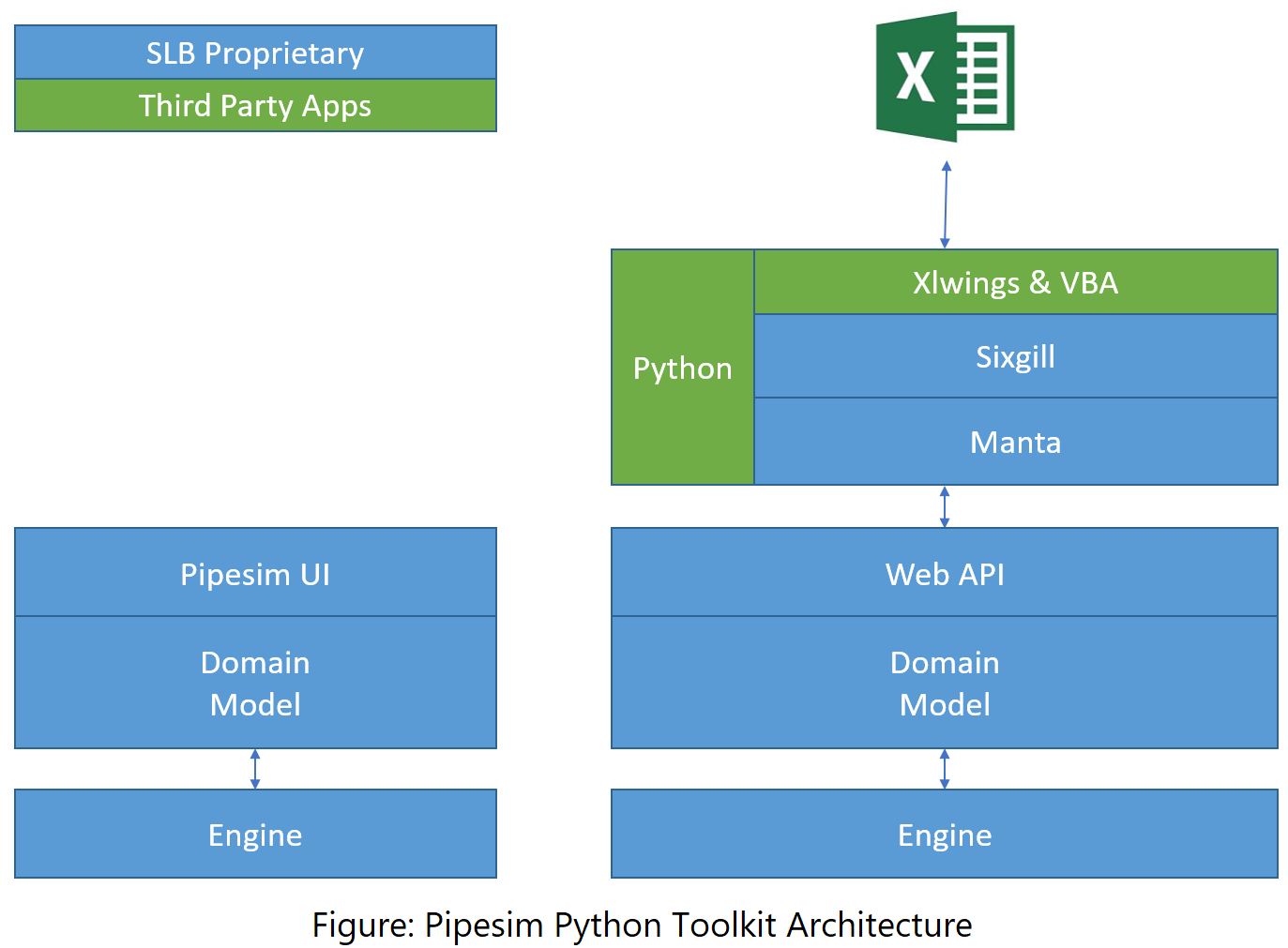
A Pipesim Python Toolkit session can be considered an input/output (I/O) communications channel with a Pipesim model. You can query the model for its contents and parameters; add, delete, and modify the model components; and perform tasks on the model. The Sixgill module of the Pipesim Python Toolkit is designed to easily perform these actions with a similar user perspective to the Pipesim UI. The Manta module is a direct reflection of the underlying Pipesim domain model and is more complex but provides more control.
The Sixgill module is implemented as a stable interface for working with Pipesim. As Pipesim evolves with new features and architecture improvements, the Sixgill module adapts and maintains a constant programming interface. This ensures that scripts are compatible across Pipesim releases.
The Pipesim Python Toolkit has been developed around the concept of querying the model and performing actions on the data. The key points to this are:
Context: This can be considered the area of interest when performing the query. It could be an area of the model (for example, Well-01), a set of similar components (for example, choke valves), or variations thereof (for example, all the choke valves on wells).
Parameter: This is a property of a model component within the context. You do not need to consider which Pipesim object the property belongs to, just that it is presented as part of the context. For example, you can search for bean sizes on wells, and the toolkit will query for chokes on wells, knowing that bean size is a choke valve property.
Value: This is the value of the parameter. It could be a single value (for example float), or a table (for example, array).
The context method was designed to present the complex Pipesim domain model in a simplified method similar to the user interface. In particular, there are domain aspects that exist in the data model but not in the UI which can be both confusing and add complexity. Through the context method, you do not need to consider on what object a parameter resides. You only need to present a query that identifies the parameter.
Context queries are built up using the model components. For example:
    #Find all the wells
    Well=ALL

    #Find the well named Well01
    Well='Well01'

    #Find the item named CK1
    Name='CK1'

    #Find the flowline named FL-03
    Flowline='FL-03'

    #Find all the tubing in Well01
    Well='Well01', Tubing=ALL
There are several ways that you can enter contexts.
Keyword Argument is the typical entry method where you enter the component type along with the search value (for example, Well=’Well01’). You can chain keyword arguments together and enter several at once (for example, Well=’Well01’, Completion=ALL).
find(Well='Well01', Tubing=ALL)Dictionary is the Python dictionary equivalent to the keyword argument, for example, {‘Well’:’Well01’, ‘Completion’:ALL}. You can pass a dictionary in through the Python expansion, and a few methods can take dictionary directly:
find(**{'Well':'Well01', 'Completion':ALL})You can uniquely identify individual components by a context string with a path style representation. This uses the colon delimiter to indicate the hierarchy in the model. For example, “Well01:VertComp” identifies the completion VertComp on Well01.
find(context="Well01:VertComp")The context is a powerful method for filtering and finding components through its different search methods.
The string context identifies one unique component in the model. Methods that use it will only manipulate that one component. It is therefore useful for specific updates to specific components, or for providing the specific context as a parameter. Examples are setting the fluid on a source, or making connections between components.
The keyword argument is the most versatile with identifying anything from the full model through to individual components. Each component in the model is tagged with keywords and the looking up the context returns all the components that are tagged with the keywords.
To find a specific named component, pass in the name:
>>> model.find(Name='Well')It is recommended to use unique names for all top level items in the Pipesim model. If there are several items named ‘Well’, it will list them all.
    >>> model.find(Name='TopsyTurvy')
    ['TopsyTurvy', 'TopsyTurvy', 'TopsyTurvy']
To find the unique item, the component is specified:
    >>> model.find(Name='TopsyTurvy', component=ModelComponents.PUMP)
    ['TopsyTurvy']
The difference between passing the ‘Name’ and component is also present for subsurface equipment. Any component in a well is considered part of the well context and is therefore returned:
    >>> model.find(Well="ESP_Well")
    [
        'ESP_Well',
        'ESP_Well:Casing',
        'ESP_Well:ESP_7',
        'ESP_Well:Packer',
        'ESP_Well:Source 1',
        'ESP_Well:Tubing',
        'ESP_Well:VW_7',
        'ESP_Well:VW_7:IPRBACKPRESSURE',
        'ESP_Well:VW_7:IPRDARCY',
        'ESP_Well:VW_7:IPRFETKOVITCH',
        'ESP_Well:VW_7:IPRFORCHHEIMER',
        'ESP_Well:VW_7:IPRHYDRAULICFRACTURE',
        'ESP_Well:VW_7:IPRJONES',
        'ESP_Well:VW_7:IPRPIModel',
        'ESP_Well:VW_7:IPRVERTICALPI',
        'ESP_Well:VW_7:VW_7:IPRVERTICALPI'
    ]
Whereas passing in the name just returns the well:
    >>> model.find(Name="ESP_Well")
    ['ESP_Well']
This is useful for querying and manipulating parameters on a high level, without needing to specify the exact component:
    >>> model.get_value(Well='ESP_Well', parameter='IPRModel')
    'IPRHydraulicFracture'
Which could also be done through other more detailed contexts:
    >>> model.get_value(Well='ESP_Well', Completion='VW_7', parameter='IPRModel')
    >>> model.get_value(**{'Well':'ESP_Well', 'Completion':'VW_7'}, parameter='IPRModel')
>>> model.get_value('ESP_Well:VW_7', parameter='IPRModel')All the available model components can be found through the context. The find(Name=ALL) method provides a list of all of the components. The list includes the context for everything that is considered an object in Pipesim, such as:
Surface equipment such as pumps, separators, heat exchangers and flowlines.
Subsurface items such as casings, completions and ESPs.
Compositional fluid components, both predefined and psuedocomponents.
Sources, sinks and junctions.