This tutorial provides information on how to use the TwinProperty module of SDK to subscribe to changes in Desired properties and write the Reported properties. It uses Redis as the data store. The properties must be associated to a Group Name.
This module allows more than 1 Edge application to access the same Group Name and Desired property with Redis acting as the shared repository for information.
Namespace: Agora.Edge
A singleton member of Agora.SDK called Twin is used by applications to interact with twin properties.
Configuration
The module uses Redis as the data store, hence, has dependency on the SDK's Redis module. The Edge application must have the following configuration in its primary configuration file
{
    "AEA2":{
        "RedisClient": {
            "Server": "localhost",
            "Port": 6379,
        }
    }
}
Additionally, the application should connect to Redis using Redis.Connect() method.
Properties:
Instance: TwinProperty- Used to access the singleton instance and is the same as using the Agora.SDK.TwinProperty.
Event
ChangeEvent- Used to subscribe/unsubscribe to a Desired property or a Group Name
Methods:
public bool SetReportedProperty(string propName, string propValue, string tpId)- Method to set reported property of namepropNameassociated to group nametpIdwith valuepropValue. The method uses redis key pattern as mentioned below. :-
twin_properties/{tpId}/reported/{propName}
twin_properties/{tpId}/reported/__appname
public string GetDesiredProperty(string propName, string tpId)- Method to read the value of a desired property i.e.propNameassociated to a GroupNametpId. The method uses the key pattern as mentioned below.:-
twin_properties/{tpId}/desired/{propName}public string GetReportedProperty(string propName, string tpId)- Method to read the value of a reported propertypropNameassoicated to group nametpId. The method uses key pattern as mentioned below:-
twin_properties/{tpId}/reported/{propName}def observe(app_callback:Any, tp_group_id:str, property_name:str=None)- Method to add observable fortp_group_idandproperty_name. Ifproperty_nameset to None, observable is set for Redis Key pattern:
twin_properties/{tp_group_id}/desired/*def stop_observe(tp_group_id:str,property_name:str=None)- Method to remove observable fortp_group_idandproperty_nameif it exists. Ifproperty_nameset to None, observable is removed for the pattern:
twin_properties/{tp_group_id}/desired/*def set_reported_property(prop_name:str, prop_value:any, tp_group_id:str):- Method to set reported property. The method uses redis key as mentioned below. :-
twin_properties/{tp_group_id}/reported/
twin_properties/{tp_group_id}/reported/__appname
def get_desired_property(prop_name:str, tp_group_id:str):- Method to read the value of a desired property i.e. prop_name. The method uses the key pattern as mentioned below. :-
twin_properties/{tp_group_id}/desired/def get_reported_property(prop_name:str, tp_group_id):- Method to read the value of a reported property prop_name. The method uses key pattern as mentioned below:-
twin_properties/{tp_group_id}/reported/using System.Text.Json;
using static Agora.SDK;
namespace redis_sdk_project
{
public class Program
{
public static void appCallback(string groupId, Dictionary<string, string> data)
{
foreach (var kvp in data)
{
$"AppCallback called for group {groupId} and the Key: {kvp.Key}, and Value: {kvp.Value}\n".LogInfo();
}
}
public static void Main(string[] args)
{
Redis.Connect(30);
var propName = "TwinPropName";
var tpGroupId = "Group2";
//Add subscription to all desired properties associated to a GroupName
Twin["Group1"].ChangeEvent += appCallback;
//Add subscription to a particular desired property associated to a GroupName
Twin["Group2"][propName].ChangeEvent += appCallback2;
//Set reported Property
Twin.SetReportedProperty(propName, "30", tpGroupId);
//Get desired property value
$"Desired Property:{propName}- {Twin.GetDesiredProperty(propName, tpGroupId)}".LogInfo();
//Get reported property
$"Reported Property:{propName}- {Twin.GetReportedProperty(propName, tpGroupId)}".LogInfo();
//Remove subscription
Twin["Group2"][propName].ChangeEvent -= appCallback2;
Console.ReadLine();
}
}
}
from agora_twin_property import Twin
from agora_logging import *


def callback(twin:any):
    logger.info(f"callback {twin.tp_id}: {twin.key}: {twin.value}")

def callback1(twin:any):
    logger.info(f"callback 1 {twin.tp_id}: {twin.key} :{twin.value}")

#Subscribe to all desired properties under a GroupName
Twin.observe(callback, "Group1")
#Subscribe to a desired property under a GroupName
Twin.observe(callback1,"Group2","TwinPropName")

# Set reported property
logger.info(f"Set property {Twin.set_reported_property("TwinPropName",30,"Group1")}")
# Get reported property
logger.info(f"Reported property: TwinPropName- {Twin.get_reported_property("TwinPropName","Group1")}")
# Get desired property
logger.info(f"Desired Property: TwinPropName- {Twin.get_desired_property("TwinPropName","Group1")}")
#Stop Observable
Twin.stop_observe("Group1")
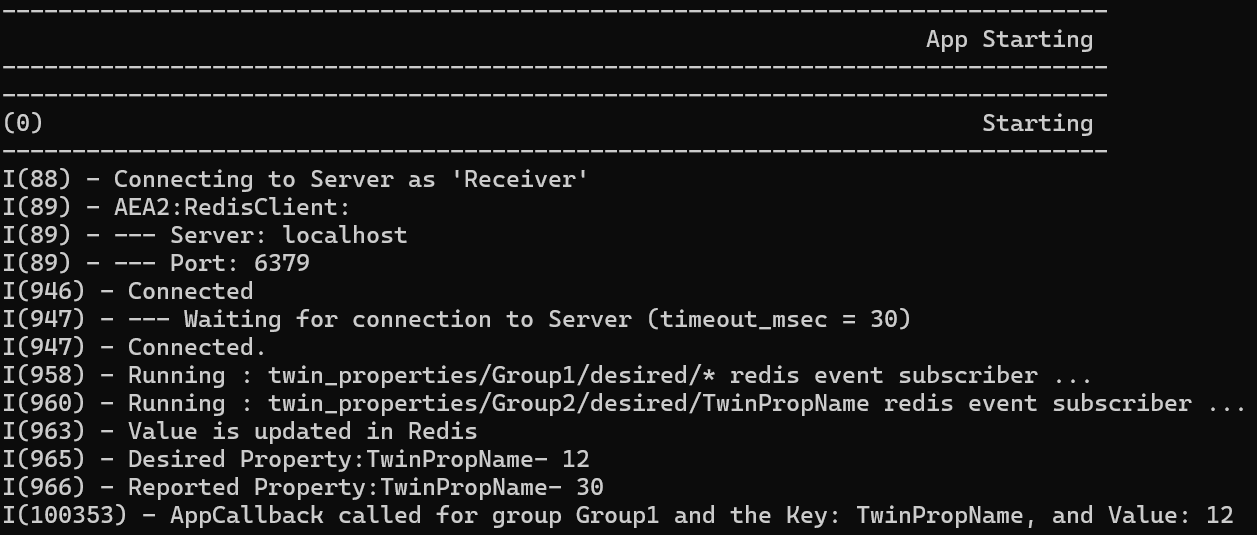
On running the application locally, application should connect and print the below output.