This tutorial provides information about key-value NoSQL type technology.
Redis is a NoSQL key-value cache that stores information in a hash table format. It provides the possibilities to store different type of structured data like strings, hashes, lists, sets, sorted sets, bitmaps and hyperloglogs.
With IIoT Edge SDK 3.0 RedisClient functionality, developers can easily use Redis Server deployed on the gateway as a part of the IRIS Platform Release.
Namespace: Agora.Edge
The RedisClient is implemented as a singleton and it is a required component of the SDK. This singleton exposes a full-fledged RedisClient to interact with the server to store, retrieve values from Radis Server etc.
RedisClient can be configured from within the AEA.json as shown below.
Configuration Parameters:
Name (string)- Used to set the RedisClient Name that identifies the client to the server. Default:Entry Assembly Name. Although "optional", it is recommended to specify the "Name" setting in theAEA.jsonconfiguration file.AEA2:RedisClient:Server (string): Server name hosting the Redis Server. Default:localhost. Commonly, this is set to the name of the container running Redis Server when deployed in a container.AEA2:RedisClient:Port (uint): Server Port hosting the Redis Server. Default:6379. Commonly, this is set as a container create option with the port exposing Redis Server when deployed as a container.
{
    "Name": "Sender",
    "AEA2": {
       "LogLevel": "Trace",
        "RedisClient": {
            "Server": "localhost",
            "Port": 6379,
        }
    }
}
If the Redis server is temporarily unreachable at startup or an existing connection is lost during runtime, the SDK will attempt to reconnect to the redis server using an exponential backoff retry mechanism. Among the Redis errors that will trigger a retry are ConnectionError, TimeoutError, ConnectionResetError and ConnectionAbortedError
Properties:
Instance: Redis- Used to access the singleton instance and is the same as using the Agora.SDK.RedisClient.Client- Used to access the Redis Server.IsConnected: bool-Trueif connected to Redis Server.
Methods:
void Connect(int timeout_msec)- Connects to the Redis Server using configuration settings. If the server is not available, it will wait for timeout_msec and then it will try to connect in background. This is possible due to underneath Nuget Package StackExchange.Redis.public void Dispose()- Cleans up resources required to keep the connection live to the Redis Server. Dispose makes underneath connection closed.
def connect(self, sec: float):- Connects to the Redis Server using configuration settings. If the server is not available, it will wait for timeout_msec and then it will try to connect in background. This is possible due to underneath Py Package Redis-Server.def dispose(self):- Cleans up resources required to keep the connection live to the Redis Server. Dispose makes underneath connection closed.
To get started with Redis Stack using docker, first you need to select a docker image:
redis/redis-stack- contains both Redis Stack server and RedisInsight. This container is best for local development because yu can use the embedded RedisInsight to visualize your data.
To start a Redis Stack container using the Redis Stack image, run the following command in your terminal:
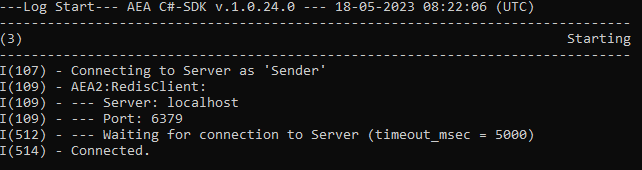
docker run -d --name redis-stack -p 6379:6379 -p 8001:8001 redis/redis-stack:latestAdd an AEA.jsonfile to project with below setting:
{
    "Name": "Sender",
    "AEA2": {
       "LogLevel": "Trace",
        "RedisClient": {
            "Server": "localhost",
            "Port": 6379,
        }
    }
}using System.Text.Json;
using static Agora.SDK;
internal class Program
{
private static void Main(string[] args)
{
"Starting".LogHeading();
Redis.Connect(2000);
if (Redis.IsConnected)
{
var redisValues = Redis.Client?.ListRange("Key");
}
}
}from agoraiot import *
redisclient = redisClientSingleton.connect(2)On running the app locally, Application should connect and print the below output.