The IIoT edge apps SDK is engineered to serve as the foundational layer for the development and deployment of edge applications. With a focus on facilitating key functionalities, the SDK accommodates:
Edge data processing - Optimized for low-latency computations, the SDK allows for data manipulation at the edge, minimizing the exigencies of data transport and enabling real-time operational decision-making.
Device communication - Configured to permit bi-directional data flow between a multitude of devices and the edge platform, the SDK supports various hardware communication interfaces, including but not limited to Ethernet and Serial ports.
Broker-driven interoperability - Incorporating a standardized message broker architecture at the edge, the SDK fosters a unified environment that significantly eases the integration challenges posed by heterogeneous edge applications.
By providing a robust and standardized framework, the IIoT edge apps SDK aims to accelerate the development cycle, while ensuring system integrity and scalability. It serves as a pivotal element for developers tasked with the assembly of reliable and cohesive edge computing solutions.
The SDK provides the minimal set of features that allows an application to be developed in either .NET or Python while providing a consistent, documented set of features for developers to use.
The IIoT edge apps SDK encompasses a suite of core functionalities essential for the development and management of applications on edge devices. These functionalities are engineered to support complex operational requirements and facilitate seamless inter-application and cloud communication:
Application configuration: This module provides a robust configuration management system that enables dynamic application settings at runtime. It leverages a hierarchy of configuration sources, including defaults, environmental variables, command-line arguments, and external configuration files. This system supports operational agility by allowing runtime adjustments and prioritized configuration overlays.
Messaging framework: Central to the SDK is an advanced messaging infrastructure designed to enable efficient and reliable communication between edge applications and between edge and cloud systems. This framework utilizes NATS —an open-source messaging system— for message brokering, supporting both data and command propagation across distributed components with high reliability and low latency.
File transfer management: This functionality integrates comprehensive file handling capabilities to manage data transfers between the cloud and edge devices. It includes mechanisms for both inbound and outbound data flows, ensuring data consistency and security during file transfer operations. The system supports scheduled and triggered transfers, accommodating a variety of operational scenarios.
Digital twins: The SDK supports the concept of Digital twins by synchronizing properties representing them between the cloud and the edge. This ensures that the digital representation of physical devices remains accurate and up-to-date, reflecting the current state of edge devices in real-time.
For a guided introduction to use the SDK, refer to the Tutorials.
Extra components for working with the IIoT and the SDK are also included or available during app development or when the app is deployed on a gateway:
- Core components
- FileManager - File Manager handles file transfer for SLB applications to/from the cloud as well hosts files for sharing at the edge.
- Redis Server - A continuous backend data store for Edge API Gateway Module which is a webapp hosted on gateway.
To ensure consistency and ease of communication between apps, all timestamps in the IRIS ecosystem should be expressed as the number of milliseconds since January 1, 1970 (UTC), represented as a double. Developers can utilize the AgoraTimeStamp function within the SDKs to obtain this value. Unless otherwise specified in the variable name, this should be the default format for timestamps in IIoT edge apps.
For Python, it is discouraged to try to use the default Python libraries to get unix epoch because it will return the shifted number of seconds relative to the local time zone. The AgoraTimeStamp within the SDK always returns the number of milliseconds relative to an exact point in time, which is not subject to a local timezone.
When deployed, IIoT edge apps are executed to protect both the application and the rest of the edge system from damage. As part of a deployment, each application is provided with several shared volumes that allow it to be configured remotely and to exchange files with the cloud and local users.
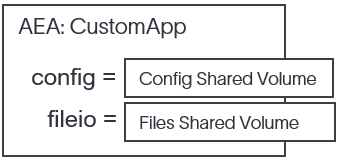
To distribute containers to the edge, container registries are utilized. For commercial deployments, containers are placed in private container registry. Each container in this registry undergoes security scanning by AgoraOps personnel to make sure that any security or quality issues are resolved before inclusion. Additionally, all IIoT edge application containers must be well-documented and comply with the configuration and file input/output methodology.
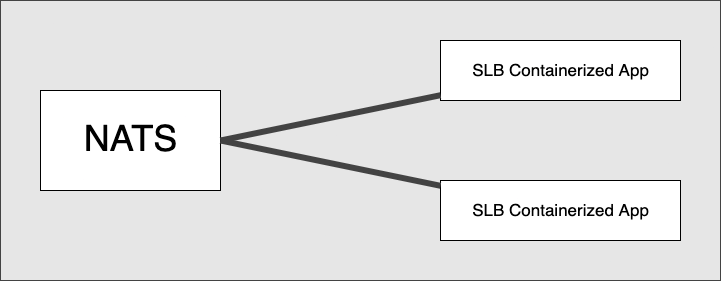
On the gateway, IIoT edge applications are deployed as a group and communicate through the use of messages via NATS
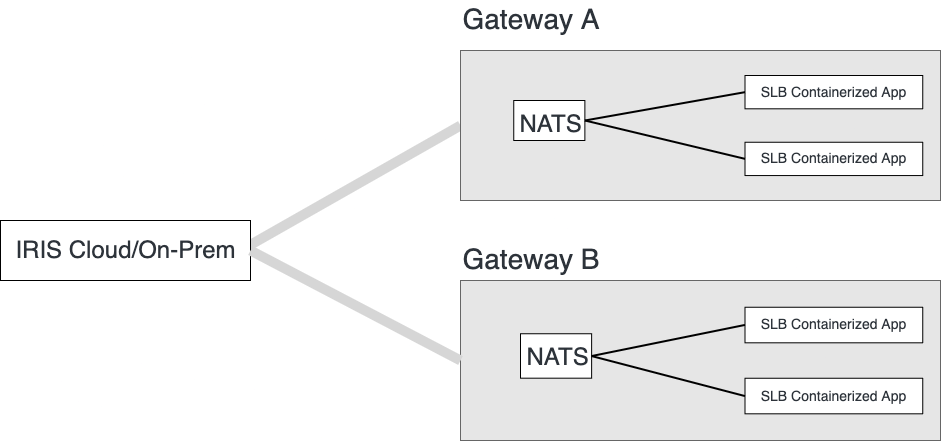
Similarly, gateways are deployed across the world and communicate with IRIS cloud or IRIS on-premise using messaging. Gateways do not communicate with one-another via the MQTT IoT hub.
Gateways communicate to other systems at the edge using physical connections, which are allocated to specific containers.
For example, a container may be provided access to a serial port to communicate with a WITS server or allocated a TCP port to provide a Modbus Slave endpoint. This allows clear and secure communication between the gateway and other systems at the edge, and ensures that each container is only able to access the resources it needs to function.
The IIoT edge apps SDKs provide a common method of sharing configuration across an application and with AgoraOps. Configurations are built at runtime using several sources, in the following order:
- Defaults - In memory configuration provided by app and SDK defaults.
AEA.json- Internal configuration file, a.k.a. primary configuration.- Runtime configuration (optional) - Allows remote configuration at runtime via twins after an application is deployed. During development, one typically does not use this.
The purpose of the runtime configuration is to allow a module to be configured while running as a container using the twin properties for each app.
Below are the set of well known Configuration settings provided by default:
- Name - The Name of the App. This setting is used to set the NATS Client Name for identifying the client to NATS. Default: Entry Assembly Name. It is recommended to specify the "Name" setting in the
AEA.jsonconfiguration file and the same name used as part of subject (topic) names. - DEVICE_ID - Device/Machine Id
- GROUP_ID - Group Id of the Gateway
- GATEWAY_ID - Gateway Id
- AEA2:LogLevel (string) - [optional] One of ("Trace", "Debug", "Info" (default), "Off"). This setting is not case sensitive and provides the capability to specify the minimum level of log statements included in the log. This setting affects all Logging Targets contained by the Logger.
- AEA2:BusClient:Server (string): Server name hosting the NATS server. Default:
localhost. - AEA2:BusClient:Port (uint): Server port for NATS server. Default:
4222. - AEA2:BusClient:DeviceId (int): [optional] Default device ID to use when publishing messages. Use this instead of setting device ID programmatically to make application more configurable.
- AEA2:BusClient:Subscriptions (string array): [optional] Array of string topics to subscribe. Common topic groups include:
- Topics containing
DataInare Io Data Reports. - Topics containing
RequestInare Request Messages.
- Topics containing
- AEA2:FileManager:SharedVolumeFolder (string): The folder used to interact with the FileManager.
The IIoT edge apps SDKs include BusClients which are utilized to interact with a NATS messaging server. A BusClient is responsible for sending and receiving messages through the NATS server.
Within the SDKs, the below topics are used by the BusClients:
- DataOut/In - Used for passing data messages (
IoDataReportMsg). - RequestOut/In - Used for requesting other application services (
RequestMsg). - EventOut/In - Used for publishing events/alerts (
EventMsg).
The BusClient sends Data Messages contained within IoDataReportMsg, Request Messages contained within RequestMsg, and custom messages (byte[]). Additionally, when data is received, the BusClient stores the messages in the BusClient Message Queues. Applications are expected to check and dequeue messages periodically. Currently, there is no mechanism provided that signals to the app that a message has arrived.
Within Data and Request messages, there is a 'header' element which contains information that allows the receiver to determine:
- SrcModule (string) - The Name of the originating sender module as specified in the configuration setting "Name".
- MessageID (Int32) - An integer used to uniquely identify the message.
- MessageType (string) - The type of message
- ConfigVersion (Int32) - The subtype of message (used for versioning the message schema)
- Timestamp (Int64) - Milliseconds since JanJanuary 1, 1970 (UTC) - AgoraTimeStamp
The IoDataReportMsg is used for accessing DataIn and creating DataOut messages.
The following is an example of a JSON data message that is generated by serializing an IoDataReportMsg:
Note: It is not required for the developer to serialize or deserialize the data and request messages. The SDK does this for you.
{
  "header": {
    "SrcModule": "Sender",
    "MessageType": "IODataReport",
    "ConfigVersion": 1,
    "MessageID": 21556310,
    "TimeStamp": 1674686831036
  },
  "device": [
    {
      "id": "18",
      "tags": {
        "HKLD_m": {
          "value": 10,
          "quality_code": 0,
          "timestamp": 1674686831036
        }
      }
    }
  ]
}Request messages allow applications to pass requests to other applications and to provide responses (as needed). A request message allows a string command to be sent, as well as a set of parameters as string key/value pairs. A correlation id header.MessageID is provided on both messages to allow the request sender to correlate a request with a possible response (also sent as a request message), as required.
To use request messages, subscribe to RequestIn. When requests arrive, they are placed into the BusClient message queue as RequestMsg.
The following are example JSON request and response messages:
Example of request Message
{
  "header": {
    "SrcModule": "Sender",
    "MessageType": "RequestName",
    "ConfigVersion": 1,
    "MessageID": 21556311,
    "TimeStamp": 1674686832593,
  },
  "payload": {
    "Arg1": "Value1",
    "Arg2": "Value2"
  }
}
Example of response messages for above request
Note: MessageID is the same so that the request/response can be correlated.
{
  "header": {
    "SrcModule": "Receiver",
    "MessageType": "RequestName_RSP",
    "ConfigVersion": 1,
    "MessageID": 21556311,
    "TimeStamp": 1674686832649,
  },
  "payload": {
    "RetVal1": "Value1",
    "RetVal2": "Value2"
  },
  "response": {
    "status": "SUCCESS"
  }
}In addition to data and request messages, the BusClient provides event messages that allow applications to send and receive alerts/events.
To listen to event messages, subscribe to EventIn topic. When event arrive, they are placed into the BusClient's event message Queue as EventMsg.
The following is an example JSON event message that is generated by serializing an EventMsg:
Example of an event message
{
    "EventId": 164544168,
    "GroupId": "safoco",
    "GatewayId": "b3s",
    "SlaveId": 963,
    "ControllerId": "714db0ee-a549-48e9-acda-a4c5b05787a7",
    "Start_tm": 343434234.0,
    "End_tm": 565654645.0,
    "DetectedStart_tm": 10101010.0,
    "DetectedEnd_tm": 20202020.0,
    "Sent_tm": 34343456656.0,
    "Created_tm": 979797979.0,
    "Detected_tm": 868686868.0,
    "mediaDataRef": [
        {
            "Type": "Image",
            "Id": 164544168,
            "ZoneId": "4",
            "CameraId": "5",
            "MotTrackerId": null,
            "EdgeFilename": "arq-4-5-31192-1-Rigzone2_0.mpeg",
            "MotEdgeFilename": "",
            "MIMEType": "mpeg",
            "AltText": "Entry Detection - Zone 4 - Camera 5 @ 1688985616525.5986",
            "RawData": "",
            "DetectedStart_tm": 0.0,
            "DetectedEnd_tm": 0.0
        }
    ],
    "workFlow": {
        "Type": "Rigzone2.0",
        "Properties": {
            "area1": "1",
            "area2": "0"
        }
    },
    "Version": "1.0.27"
}A deployment of IIoT edge apps provides the AEA_FileManager Application by default. This application is used to transfer files between the cloud and the applications on the gateway.
To transfer files from your application to the cloud, write files to the {fileManagerSharedVolume}/fileOut folder.
Files beginning with '~' are ignored to allow writing files in place before sending.
Files received from the cloud will appear in the {fileManagerSharedVolume}/fileIn folder.
For consistency, use the following configuration setting to set the shared volume folder.
- AEA2:FileManager:SharedVolumeFolder (string): The folder used to interact with the FileManager.
On the cloud, files can be transferred using the Nimbus File Manager Service API described at https://swagger.p4d.nimbus.slb-ds.com/swagger. An approved account is required to access the cloud API documentation.
The IIoT edge apps SDK integrates the concept of digital twins, facilitating dynamic and continuous synchronization of properties representing digital twins between the cloud and edge environments. This synchronization ensures that the digital representation of physical devices remains accurate and up-to-date, reflecting the current state of edge devices in real-time.
Domain-specific workflows: twin properties are specifically designed to support domain-specific workflows rather than operational workflows such as application configuration. This focus ensures that the properties are used to enhance the core functionalities of the digital twin within its specific operational context.
Exclusion from telemetry: twin properties are not intended for use in telemetry data handling. Their use is reserved for managing state information between the cloud and edge components, not for transmitting continuous or medium to high volume data streams.
Definition and association: Twin property groups are named collections of properties defined in the cloud and associated with specific gateways within the IRIS Ecosystem. These groups organize properties that collectively represent a digital twin.
Accessibility: All applications operating on a given gateway have access to the twin property groups. This accessibility ensures that multiple applications can collaborate on maintaining and utilizing the digital twin, enhancing the robustness and functionality of both edge and cloud components.
Twin properties within these groups are categorized into two types to facilitate effective synchronization and management:
Desired twin properties: These properties represent the values that the cloud component of a digital twin desires to set on the edge device. Desired properties dictate the intended state or configuration as determined by cloud-based analytics and management systems.
Reported twin properties: These are the actual values as reported by the edge device. They reflect the current state or outcomes from the edge, providing feedback to the cloud about the device’s operational status and any deviations from the desired configurations.
Process integration: Synchronization between the desired and reported properties is managed by processes operating both at the edge and in the cloud. This dual-process integration ensures that any changes in the cloud's desired state are promptly reflected on the edge, and any state changes at the edge are accurately reported back to the cloud.
Consistency and reliability: By maintaining a consistent and reliable flow of property values in both directions, the IIoT edge apps SDK ensures that the digital twins accurately mirror their physical counterparts, facilitating improved monitoring, management, and operational efficiency.