Messaging enables applications to communicate with each other and exchange data. The SDKs provide messaging capabilities that enable developers to send and receive predefined and custom moessages.
The BusClient is used for sending and receiving NATS messages.
Properties:
IsConnected: bool-Trueif connected.Messages: BusMessageQueues- Provides access to the queues used to store incoming messages. See BusMessageQueues for more information.
Methods:
public void Connect()public void Disconnect()public void SendMessage(string topic, string payload)
Properties:
is_connected: bool-Trueif connected.messages: BusMessageQueues- Provides access to the queues used to store incoming messages. See MessageQueues for more information.
Methods:
configure()- Reads settings from AEA configuration.connect(sec)- Connects... waiting up tosecseconds. If not connected, connection will continue to try asynchronously.disconnect()- Disconnects.send_data(msg: IoDataReportMsg, topic = "DataOut")- Sends IoDataReportMsg (msg) to topic (default is "DataOut").send_message(topic, header, payload)- Combines header and payload into json msg and sends message to topic.send_raw_message(topic, payload)- Sends message payload to topic.send_request(msg: RequestMsg, topic = "RequestOut")- Sends RequestMsg (msg) to topic (default is "RequestOut").
Name: Used to identify the client.AEA2:BusClient:Mock(default =false): Used for testing by looping back sent messages to the incoming message queues. Messages are not sent to NATS server.Server(default = 'localhost'): Server or container name where NATS Server is running.Port(default = '4222'): Port number of NATS Server.DeviceId(default = '999'): The default Device Id to use when sending data.Subscriptions: The array of incoming topics to subscribe to. "DataIn" and "RequestIn" are required to receiveIoDataReportMsgandRequestMsg, respectively.
Example
{
    "Name": "MyApp",
    "AEA2": {
        "RedisClient": {
            "Server": "localhost",
            "Port": "6379"
        },
        "BusClient": {
            "Server": "nats://localhost:4222",
            "Subscriptions": [
                {
                    "DataIn": [
                        "slbapps.MyApp.DataIn",
                        "slbapps.events.DataIn"
                    ]
                },
                {
                    "RequestIn": [
                        "slbapps.MyApp.RequestIn"
                    ]
                },
                {
                    "EventIn": [
                        "slbapps.MyApp.EventIn"
                    ]
                }
            ],
            "Targets": [
                {
                    "DataOut": [
                        "slbapps.app1.DataIn",
                        "slbapps.app2.DataIn",
                    ]
                },
                {
                    "RequestOut": [
                        "slbapps.app1.RequestIn",
                        "slbapps.app2.RequestIn",
                    ]
                },
                {
                    "EventOut": [
                        "slbapps.app1.EventIn",
                        "slbapps.app2.EventIn",
                    ]
                }
            ]
        }
    }
}
### BusClient and the IIoT Edge Apps Message Broker
The **BusClient** is used for interacting with the NATS server.
##### IoDataReportMsg - DataIn/DataOut
The `IoDataReportMsg` is used to create data Data messages. The class diagram for an `IoDataReportMsg` is shown below.

The class diagram is complex as it takes advantage of many generic classes, however it ultimately represents
the JSON messages shown below, encapsulating data from potentially multiple device and multiple tags single values per tag.
##### Example IoDataReport JSON Message
```json
{
"header": {
"MessageID": 123,
"MessageType": "IODataReport",
"ConfigVersion": 1,
"SrcModule": "test-module",
"TimeStamp": 1709069281899
},
"device": [
{
"id": "1000",
"tags": {
"Pressure_psi": {
"quality_code": 0,
"timestamp": 1709069251699,
"value": 1002.2
},
"Temperature_degC": {
"quality_code": 0,
"timestamp": 1709069251699,
"value": 30.1
}
}
},
{
"id": "2",
"tags": {
"Pressure_psi": {
"quality_code": 0,
"timestamp": 1709069251699,
"value": 983.2,
},
"Temperature_degC": {
"quality_code": 1,
"timestamp": 1709069251699,
"value": 29.2
}
}
}
]
}While running unit tests, it is usually necessary to generate test data for an app or to check that the application produced appropriate messages while running.
The following example shows how to mock the connect, send data, and parse the incoming data messages:
AEA.json:
{
    "AEA2": {
        "BusClient": {
        "Mock": true,
        "DeviceId": 300,
        }
    }
}double [] temperatures = {71.0, 72.0, 73.0, 72.5, 53.8, 68.3, 79.3, 85.4};
IoDataReportMsg msg = new();
int i = 0;
foreach(var t in temperatures)
{
msg.Add($"TEMP{i}", new IoPoint() {value = t, quality_code = 0 };
i++;
}
Bus.SendData(msg);
foreach(var m in Bus.Message.GetDataMessages())
foreach(var d in m.device)
{
$"DeviceId = {d.Id}".Cout();
"Tags:".Cout();
foreach(var t in d.Tags)
$"--- {t.Key} - {t.Value.value}".Cout();
}from agoraiot import *
temperatures = [71.0, 72.0, 73.0, 72.5, 53.8, 68.3, 79.3, 85.4]
msg = IoDataReportMsg()
i = 0
for t in temperatures:
msg.add_data(f"TEMP{i}", IoPoint(value = t, quality_code=0))
i = i + 1
bus_client.send_data(msg)
for m in bus_client.messages.get_data_messages():
for d in m.device:
print(f"DeviceId = {d.id}")
print("Tags:")
for key,value in d.tags.items():
print(f"--- {key} - {value.value}");The SDK provides the ability to construct and receive Requests. A request is a simple message, which allows a Command name and a set of named Arguments or Device data to be encapsulated within. The following is an example of creating a request:
var req = new RequestMsg();
req.Command = "RequestName";
req.Payload.Add( "Parameter1", "Value1" );
req.Payload.Add( "Parameter2", "Value2" );

int correlationId = Bus.SendRequest(req);req = RequestMsg(requestName = "RequestName")
req.payload["Parameter1"] = "Value1"
req.payload["Parameter2"] = "Value2"
correlation_id = bus_client.send_request(req)Receiving requests is also simple and is shown below with the creation of a response message that uses the requests correlation id (RequestMsg.Id):
if (Bus.Messages.HasRequestMessages)
{
    var requests = Bus.Messages.GetRequestMessages();

    foreach (var request in requests)
    {
        if (request.Command == "RequestName")
        {
            // ... do something interesting ...
        }
    }
}if bus_client.messages.has_request_messages:
msgs = bus_client.messages.get_request_messages()
for msg in msgs:
if msg.header.MessageType == "RequestName":
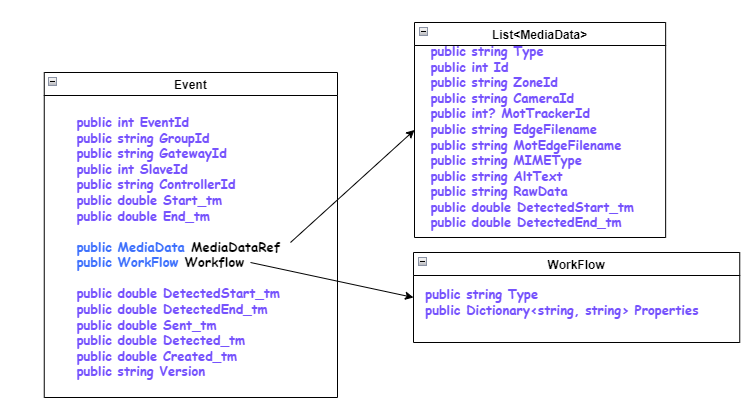
# do something interestingThe Events Schema describes Alert / Events to Agora Cloud via Passthrough handler.
The class diagram for an EventMsg Schema is shown below.
The BusMessageQueues is used for accessing the messages arriving via the BusClient. To communicate through the NATS Server, you should use BusClient as it provides methods that enable the core messages used by IIoT Edge Apps.
Properties:
HasApplicationMessage: bool-Trueif Application Messages are available.HasDataInMessages: bool-Trueif DataIn Messages are available. RequiresAEA2:BusClient:UseDataIn = Truein the application configuration.HasRequestInMessages: bool-Trueif RequestIn Messages are available. RequiresAEA2:BusClient:UseRequestIn = Truein the application configuration.HasEventMessages: bool-Trueif Event Messages are available.
Methods:
GetApplicationInMessages(): IList<byte[]>- Returns a list of raw Application Messages.GetDataInMessages(): IList<IoDataReportMsg>- Returns a list of DataIn Messages waiting in the queue converted toIoDataReportMsg.GetRequestInMessages(): IList<RequestMsg>- Returns a list of Request Messages waiting in the queue converted toRequestMsg.GetEventMessages(): IList<EventMsg>- Returns a list of Event Messages waiting in the queue converted toEventMsg.
Properties:
has_application_messages: bool-Trueif Application Messages are available.has_data_messages: bool-Trueif DataIn Messages are available.has_request_messages: bool-Trueif RequestIn Messages are available.has_event_messages: bool-Trueif event Messages are available.
Methods:
get_application_messages():- Returns a list of raw Application Messages.get_data_messages():- Returns a list of DataIn Messages waiting in the queue converted to IoDataReportMsg.get_request_messages():- Returns a list of raw StateRequest Messages.get_event_messages():- Returns a list of raw event Messages.