Log Recognition API specification
Wellbore logs are acquired by different logging company with their convention of defining the log name. This leads to a log called by different mnemonics for the same measurement. Also, different logging tools of the same measurement can have different description and units. If, all this data is stored together without any classification it could lead to a lot of confusion and waste of time. Hence, logs need to be classified in groups / Families based on the measurement. This would help in identifying the logs easily and optimize the time spent looking for the logs.
Example: The following curves coming from the field are all gamma ray, but they have different names.
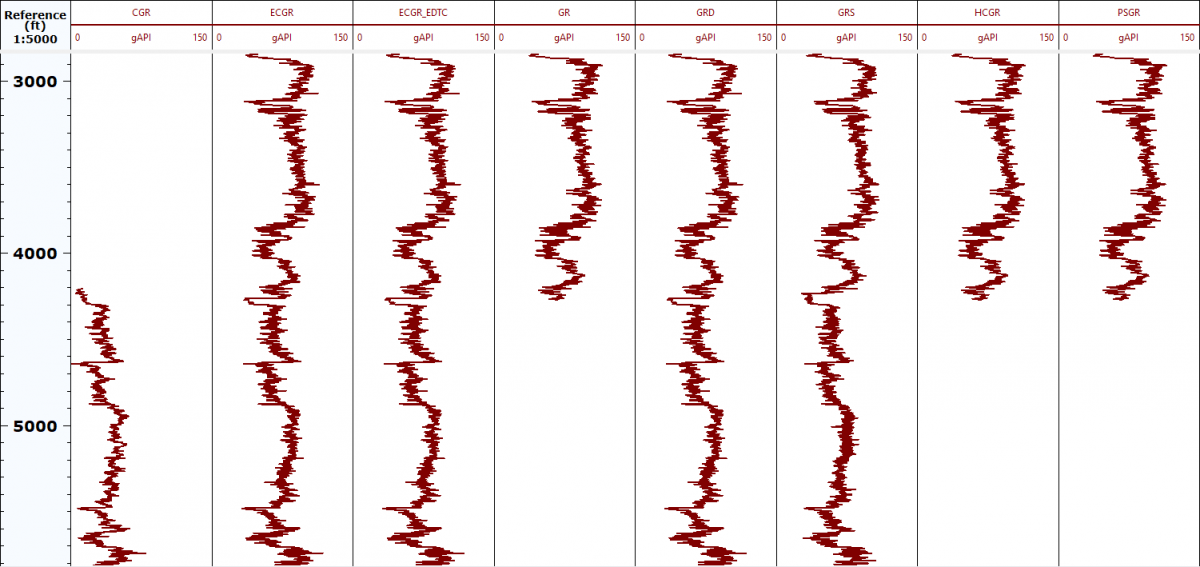
The processing workflows only need Gamma ray. You need to know all of them are Gamma ray. Hence the classification of these curves to Families is important.
In cloud environment, we are looking for automatic solutions. To have automatic workflows, it becomes important that the logs mnemonics are identified accurately. But, identifying the logs manually is a very tedious work. As there could be thousands of logs in a well, and many such wells in a field. Log recognition is a service that is assigning the Family attribute to the all the logs automatically using family assignment rules. This will ensure that the correct logs are picked up by the workflows for automatic processing.
Log Recognition service has a huge default catalog of assignment rules, which helps in the identification of log family using the Log name / Mnemonics, Log unit and description. This catalog cannot be modified by user. But the users can create their own custom catalog with different set of assignment rules specific to their data partition. The custom catalog will always have priority over the default catalog. Hence, if a company wants to have their own set of rules which are not present in the default catalog or override some rules defined in the default catalog that are different for their company. Then, they could create their own customized catalog.
Log Recognition service provides API's to assign Family attribute to logs using the Log name / Mnemonics, Description of the Log and log unit. If the curve name is GRD and unit GAPI, then the family will be identified as Gamma Ray**.** The table below illustrates more such examples. There are examples of how to use the API below the table.
| Curve Name | Unit | Description | Family |
|---|---|---|---|
| GRD | GAPI | LDTD Gamma Ray | Gamma Ray |
| HD01 | g/cc | SMOOTHED AZIMUTHAL DENSITY - BIN 01 | Bulk Density |
| DFHF0_FSI | Filtered Water Holdup Electrical Probe 0 | Water Holdup |
Here is an example of an API
/recognize API
POST  /api/log-recognition/recognize
{
"label": "GRD",
"log_unit": "gApi",
"description": ""
}Curl
curl -X POST "/api/log-recognition/recognize" -H "accept: application/json" -H "Authorization: BearerToken" -H "appkey: appKey" -H "Content-Type: application/json" -d "{ \"label\": \"GRD\", \"log_unit\": \"gApi\", \"description\": \"\"}"Parameters
| Parameter | Description |
|---|---|
| label | Curve name (mandatory) |
| log_unit | Curve unit (optional) |
| description | Curve description (optional) |
Response:
| Key | Description |
|---|---|
| family | Recognized family |
| family_type | Recognized main family |
| log_unit | Curve unit (same as input) |
| base_unit | Default unit defined by main family |
Example:
Recognize the family for a curve named "GRD" and unit is "gapi"
{
 "label": "GRD",
 "log_unit": "gapi",
 "description": ""
}
The result will be
{
  "family": "Gamma Ray",
  "family_type": [ "Gamma Ray"],
  "log_unit": "gapi",
  "base_unit": "gAPI"
}The custom catalog consists of the following attributes.
Unit of log
Family of log
Rule or Mnemonic
Main Family
Unit of the Family
Examples:
Adding a new rule or overriding an existing Family assignment rule. The catalog needs to be in the following (json) format.
{
  "data": {
    "family_catalog": [
      {
        "unit": "ohm.m",
        "family": "Medium Resistivity",
        "rule": "MEDR"
      }
    ],
    "main_family_catalog": [
      {
        "MainFamily": "Resistivity",
        "Family": "Medium Resistivity",
        "Unit": "OHMM"
      }
    ]
  }
}
For adding multiple family assignment, you can also create rules in a csv file that can be used for creating the custom catalog.
| Log | Unit | Family | Main Family | Family unit |
|---|---|---|---|---|
| BL1M | Kg/m3 | Bulk Density | Density | g/cm3 |
| RDPL | OHMM | Deep Resistivity | Resistivity | ohm.m |
| PFC2 | mm | Caliper | Borehole Properties | in |
| MICR | OHMM | Micro Spherically Focused Resistivity | Resistivity | ohm.m |
| ALCD1 | mS/ft | Conductivity - Deep Induction | Conductivity | mS/m |
| CNCQH | PU | Thermal Neutron Porosity | Porosity | v/v |
| CNCQH2 | PU | Thermal Neutron Porosity | Porosity | v/v |
Use the following Python script to convert the csv file to Json format as required by the service.
import csv
import json
import sys

if len(sys.argv) is not 2:
    print("usage: python converter.py filetoconvert.json")
    exit(-1)
res = {"data": {"family_catalog": [], "main_family_catalog": []}}

filetoopen = sys.argv[1]
with open(filetoopen, newline="") as csvfile:
    catalog_reader = csv.DictReader(csvfile, delimiter=",", quotechar="|")
    for row in catalog_reader:
        rule = {
            "unit": row["Unit"],
            "family": row["Family"],
            "rule": row["Log"],
        }
        main_fam = {
            "MainFamily": row["Main Family"],
            "Family": row["Family"],
            "Unit": row["Family unit"],
        }
        if rule not in res["data"]["family_catalog"]:
            res["data"]["family_catalog"].append(rule)
        if main_fam not in res["data"]["main_family_catalog"]:
            res["data"]["main_family_catalog"].append(main_fam)

# res["data"]["main_family_catalog"] = list(dict.fromkeys(res["data"]["main_family_catalog"]))
with open("out.json", mode="w") as json_file:
    json.dump(res, json_file, indent=4)
print("out.json generated")
The python will generate the input for the service as below.
{
  "data": {
    "family_catalog": [
      {
        "unit": "Kg/m3",
        "family": "Bulk Density",
        "rule": "BL1M"
      },
      {
        "unit": "OHMM",
        "family": "Deep Resistivity",
        "rule": "RDPL"
      },
      {
        "unit": "mm",
        "family": "Caliper",
        "rule": "PFC2"
      },
      {
        "unit": "OHMM",
        "family": "Micro Spherically Focused Resistivity",
        "rule": "MICR"
      },
      {
        "unit": "mS/ft",
        "family": "Conductivity - Deep Induction",
        "rule": "ALCD1"
      },
      {
        "unit": "PU",
        "family": "Thermal Neutron Porosity",
        "rule": "CNCQH"
      },
      {
        "unit": "PU",
        "family": "Thermal Neutron Porosity",
        "rule": "CNCQH2"
      }
    ],
    "main_family_catalog": [
      {
        "MainFamily": "Density",
        "Family": "Bulk Density",
        "Unit": "g/cm3"
      },
      {
        "MainFamily": "Resistivity",
        "Family": "Deep Resistivity",
        "Unit": "ohm.m"
      },
      {
        "MainFamily": "Borehole Properties",
        "Family": "Caliper",
        "Unit": "in"
      },
      {
        "MainFamily": "Resistivity",
        "Family": "Micro Spherically Focused Resistivity",
        "Unit": "ohm.m"
      },
      {
        "MainFamily": "Conductivity",
        "Family": "Conductivity - Deep Induction",
        "Unit": "mS/m"
      },
      {
        "MainFamily": "Porosity",
        "Family": "Thermal Neutron Porosity",
        "Unit": "v/v"
      }
    ]
  }
}
Note: If there is an existing catalog, it will be replaced. It takes maximum of 5 mins to replace the existing catalog. Hence, any call to retrieve the family should be made after 5 mins of uploading the catalog