- Subscription requirements for running engines using EESy
- Engine Ecosystem API
- Examples using EESy APIs
To use an engine through the Engine Ecosystem, user needs a subscription to a Delfi product that allows the user to run the engine. For example, the "On Demand Reservoir Simulation" subscription enables a user to run the IX engine, the "Geoscience Engine Access" subscription enables a user to run PetroMod, etc. User can request subscriptions on the Delfi portal.
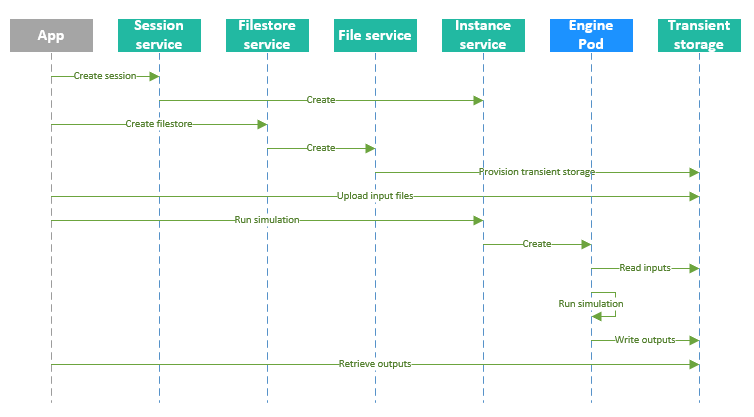
The complete reference of the REST API is available in the API reference. Following is a sequence diagram of running an engine that takes input from files, and output to file. Each service defines a resource, e.g., the session service defines the session resource. App sends a POST request to the session service to create a new session, a POST request to the filestore service to create a new filestore, a GET request to the instance service to list all instances or the specifics of a single instance. Behind the scenes when a new session is created, the session service creates a Kubernetes namespace to secure the resources within the same session, and start an instance service within the namespace.
As an alternative to using files to interact with an engine, EESy also supports message channels that an app can use to communicate with an engine. The message channel is exposed to the engine as a pipe. Following is a sequence diagram of an app interacting with an engine that takes input from a "RequestResponse" channel, and write outputs to the channel.
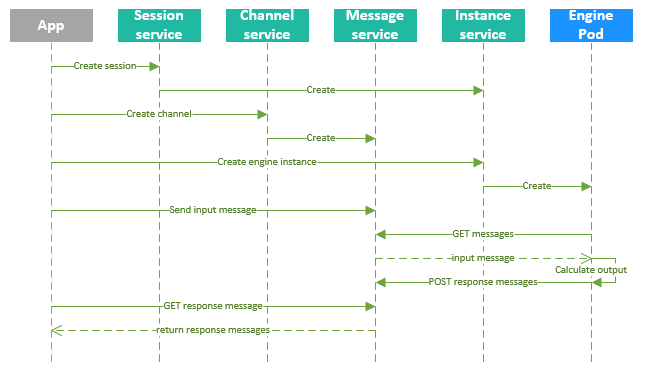
Following are two examples illustrating how to use the EESy API. The first example runs the channel smoke test using curl, and follows the sequence diagram of an engine that uses message channels.The second example runs the IX engine using "eesy" cli, and follows the sequence diagram of an engine that uses filestores for IO.
In both examples, it is assumed that EESY_TOKEN environment variable is set to a authorization token that authorizes the client, EESY_BASEURL is set to the server url, and EESY_APPKEY is set to the appkey for a Team app using EESy.
Sessions are global entities. To avoid name clashes, the session name should be generated from a prefix using the 'generateName' field. Labels are recommended for calling applications to identify their sessions across user sessions.
session_request=$(cat <<JSON
{
    "apiVersion": "v1",
    "kind": "Session",
    "metadata": {
       "generateName": "channel-smoketest-"
    },
    "spec": {
      "workflowName": "channel-smoketest",
      "maxIdleTime": 20
    }
}
JSON
)
session=$(curl -sS -X POST -H "Authorization: Bearer ${EESY_TOKEN}" -H "appkey: ${EESY_APPKEY}" -H "accept: application/json" -H "Content-Type: application/json" -d "${session_request}" ${EESY_BASEURL}/v1/sessions)
session_name=$(echo ${session} | jq -r .metadata.name)
The response is a JSON object and looks like the following, where "..." represents values that are omitted, and the actual session name is replaced with "session_name".
{
  "spec": {
    "correlationId": "...",
    "maxLifetime": 20,
    "workflowName": "channel-smoketest"
  },
  "status": {
    "phase": "Initializing"
  },
  "apiVersion": "v1",
  "kind": "Session",
  "metadata": {
    "name": "session_name",
    "namespace": "eesy-session_name",
    "labels": {...},
    "annotations": {...},
    "creationTimestamp": "...",
    "selfLink": "v1/sessions/session_name",
    "uid": "..."
  }
}
As shown in the example output, actual session name is returned in the ".metadata.name" property of the response. In the example, the "jq" utility is used to extract the session name from response and assigned to the "session_name" variable. Session creation is an asynchronous process, client can call the GET method on the session, which returns the same session object as above but with an updated status. Check the status and proceed to the steps below after the phase in status becomes "Active".
curl -X GET -H "Authorization: Bearer ${EESY_TOKEN}" -H "appkey: ${EESY_APPKEY}" -H "accept: application/json" -H "Content-Type: application/json" ${EESY_BASEURL}/v1/sessions/${session_name} The 'eesy-channel-smoketest' smoketest engine communicates through messages. This requires to establish a message channel. The channel operates in two directions: Requests are sent to the engine, and results are returned to the calling application. The type of the channel thus is "RequestResponse". Sizes allow to provision storage. The capacity is the desired number of messages that can be buffered on the channel. The channel indicates a full queue with a 507 status. In this case, the application is expected to back off and retrieve results before posting more requests.
channel_request=$(cat <<JSON
{
    "kind": "Channel",
    "apiVersion": "v1",
    "metadata": {"name":"eesy-channel-smoketest-requests"},
    "spec": {
      "type": "RequestResponse",
      "capacity": 100,
      "maxMessageSize": 1024,
      "maxResponseMessageSize": 1024,
      "deleteOnOverflow": false
    }
}
JSON
)
curl -X POST -H "Authorization: Bearer ${EESY_TOKEN}" -H "appkey: ${EESY_APPKEY}" -H "accept: application/json" -H "Content-Type: application/json" -d "${channel_request}" ${EESY_BASEURL}/v1/sessions/${session_name}/channels
The response channel object looks like the following, where the session name is replaced with "session_name".
{
  "metadata": {
    "session": "session_name",
    "namespace": "eesy-session_name",
    "name": "eesy-channel-smoketest-requests",
    "labels": {...},
    "creationTimestamp": "...",
    "selfLink": "v1/sessions/session_name/channels/eesy-channel-smoketest-requests",
    "uid": "..."
  },
  "spec": {
    "callbackURL": "",
    "capacity": 100,
    "deleteOnOverflow": false,
    "maxMessageSize": 1024,
    "maxResponseMessageSize": 1024,
    "type": "RequestResponse"
  },
  "status": {
    "phase": "Initializing",
    "deliveredMessages": 0,
    "undeliveredMessages": 0
  },
  "apiVersion": "v1",
  "kind": "Channel"
}Creation of the instance starts one or more engine processes. The number of processes depends on the engine: some engine utilize just a single process, other engines require a fixed number of processes across nodes, yet other engines start with a small number of processes and scale elastically based on workload. The 'eesy-channel-smoketest' smoketest engine is the latter kind. The channel from the previous step is passed to the instance as an argument to complete the set up of the communication between the application and the engine instance.
instance_request=$(cat <<JSON
{
    "kind": "Instance",
    "apiVersion": "v1",
    "metadata": {"name":"eesy-channel-smoketest-engine"},
    "spec": {
      "engine": "eesy-channel-smoketest.4.0",
      "channels": {
        "request": "eesy-channel-smoketest-requests"
      },
      "parameters": {
        "processes": 1,
        "version": "latest"
      }
    }
}
JSON
)
curl -X POST -H "Authorization: Bearer ${EESY_TOKEN}" -H "appkey: ${EESY_APPKEY}" -H "accept: application/json" -H "Content-Type: application/json" -d "${instance_request}" ${EESY_BASEURL}/v1/sessions/${session_name}/instances
The instance object looks like the following, where the session name is replaced with "session_name".
{
  "metadata": {
    "session": "session_name",
    "namespace": "eesy-session_name",
    "name": "eesy-channel-smoketest-engine",
    "labels": {...},
    "annotations": {...},
    "creationTimestamp": "...",
    "selfLink": "v1/sessions/session_name/instances/eesy-channel-smoketest-engine",
    "uid": "..."
  },
  "spec": {
    "channels": {
      "request": "eesy-channel-smoketest-requests"
    },
    "engine": "eesy-channel-smoketest.4.0",
    "fileStores": {},
    "parameters": {
      "processes": 1,
      "version": "latest"
    }
  },
  "status": {
    "phase": "Initializing",
    "activePods": 0,
    "progressMessage": "Initializing",
    "parameters": {...}
  },
  "apiVersion": "v1",
  "kind": "Instance"
}
Send an input message with a POST request to the message service. The input data is passed base64-encoded in the 'data' field of the message object.
message=$(echo "Hello World!" | base64 -w 0)
message_request=$(cat <<JSON
{
    "apiVersion":"v1",
    "kind":"Message",
    "metadata": {
      "generateName": "msg-"
    },
    "data": "${message}"
}
JSON
)
curl -X POST -H "Authorization: Bearer ${EESY_TOKEN}" -H "appkey: ${EESY_APPKEY}" -H "accept: application/json" -H "Content-Type: application/json" -d "${message_request}" ${EESY_BASEURL}/v1/sessions/${session_name}/channels/eesy-channel-smoketest-requests/messages
The message service returns a message object looks like the following, where the session name is replaced with "session_name".
{
  "apiVersion": "v1",
  "kind": "Message",
  "metadata": {
    "session": "session_name",
    "name": "msg-1",
    "namespace": "eesy-session_name",
    "creationTimestamp": "...",
    "selfLink": "v1/sessions/session_name/channels/eesy-channel-smoketest-requests/messages/msg-1",
    "uid": "..."
  },
  "id": 1,
  "dataLink": "..."
}
An engine may be processing a stream of messages from the application. After posting the last request, the application should indicate the end of the stream of requests to allow engine processes to shut down immediately.
message_request=$(cat <<JSON
{
    "apiVersion":"v1",
    "kind":"Message",
    "metadata": {
      "generateName": "msg-"
    },
    "endOfStream": true
}
JSON
)
curl -X POST -H "Authorization: Bearer ${EESY_TOKEN}" -H "appkey: ${EESY_APPKEY}" -H "accept: application/json" -H "Content-Type: application/json" -d "${message_request}" ${EESY_BASEURL}/v1/sessions/${session_name}/channels/eesy-channel-smoketest-requests/messages
The engine posts the response message to channel after completing the computation. One way to receive the result is by polling for response messages from the message channel. The example below asks for the first response message by setting the query parameter 'n' to 1. The channel returns either an empty list or a list with the computational result. In the latter case, the response message contains the echoed answer in the 'data' field.
curl -X GET -H "Authorization: Bearer ${EESY_TOKEN}" -H "appkey: ${EESY_APPKEY}" -H "accept: application/json" -H "Content-Type: application/json" ${EESY_BASEURL}/v1/sessions/${session_name}/channels/eesy-channel-smoketest-requests/responseMessages?n=1The API returns a MessageList object that looks like the following, where the session name is replaced with "session_name", and the data is base64 encoded.
{
  "apiVersion": "v1",
  "kind": "MessageList",
  "items": [
    {
      "metadata": {
        "name": "msg-1",
        "namespace": "eesy-session_name",
        "session": "session_name",
        "creationTimestamp": "...",
        "selfLink": "v1/sessions/session_name/channels/eesy-channel-smoketest-requests/responseMessages/msg-1",
        "uid": "..."
      },
      "id": 1,
      "data": "SGVsbG8gV29ybGQhCg=="
    }
  ]
}
After receiving the response, delete the response message.
curl -X DELETE -H "Authorization: Bearer ${EESY_TOKEN}" -H "appkey: ${EESY_APPKEY}" -H "accept: application/json" -H "Content-Type: application/json" ${EESY_BASEURL}/v1/sessions/${session_name}/channels/eesy-channel-smoketest-requests/responseMessages/msg-1Deletion of the session releases all resources.
curl -X DELETE -H "Authorization: Bearer ${EESY_TOKEN}" -H "appkey: ${EESY_APPKEY}" -H "accept: application/json" -H "Content-Type: application/json" ${EESY_BASEURL}/v1/sessions/${session_name}
The "eesy" command line utility can be used to access the EESy service via a command line, either on Windows or Linux. The utility has built in help for each command and sub-command, e.g. eesy sessions --help.
In the following example, the cli is used to run an IX job from Windows assuming that the job files containing the Brine_MultipleComponent case are in a sub folder called data\IX. The example is much shorter compared to the previous one as the cli generates the JSON requests behind the scenes. Use the --log-http option to find out the actual HTTP requests used by "eesy" cli.
for /f %%i in ('eesy sessions create cli-demo-') do set EESY_SESSION=%%i
eesy filestores create output-files input-files --async
eesy filestores wait output-files input-files
eesy files cp data\IX\* es://input-files --compress
eesy instances create ix --engine ix.latest --parameters principal=Brine_MultipleComponent.afi,processes=2
eesy files cp es://output-files/* data\IX\output --update --compress
eesy sessions delete %EESY_SESSION%