- Introduction
- API usage
- What is a LegalTag
- Ingestion workflow
- Creating a LegalTag
- LegalTag properties
- Creating a record
- What are derivatives
- Validating a LegalTag
- Updating a LegalTag
- Deleting a LegalTag
- Permissions
This document covers how to remain compliant at the different stages of the data lifecycle inside the Data Platform.
- When ingesting data
- While the data is inside the Data Platform
- When consuming data
A client's interaction revolves around ingestion and consumption, so this is when you need to use what is contained in this guide. Point 2 should be mostly handled on the client's behalf; however, it is still important to understand that this is happening because it has ramifications for when and how data can be consumed.
Data compliance is largely governed through records in the Storage service. Although there is an independent legal service and LegalTags entity, these offer no compliance by themselves.
Records have a legal section in their schema that is used to enforce compliance. However, clients must still make sure they are using the Storage service correctly to remain compliant.
Further details can be found in the Creating a record section.
Details of our APIs, including how to create and retrieve LegalTags, can be found in our Portal documentation.
| API | Minimum Permissions Required |
|---|---|
| Access LegalTag APIs | users.datalake.viewers |
| Create a LegalTag | users.datalake.editors |
| Update a LegalTag | users.datalake.editors |
| Header | Description |
|---|---|
| data-partition-id (Required) | Specify the desired accessible partition ID. Only one data partition can be specified at a time. |
| correlation-id (Optional) | Used to track a single request throughout all the services that it passes through. This can be a GUID in the header with a key. If you are the service initiating the request, you should generate the ID. Otherwise, you should just forward it on in the request. |
The Data Platform stores data in different data partitions, depending on the access to those data partitions in the OSDU system.
A LegalTag is the entity that represents the legal status of data in the Data Platform. It is a collection of properties that governs how the data can be consumed and ingested.
A legal tag is required for data ingestion. Therefore, creation of a legal tag is a necessary first step if no legal tag already exists for use with the ingested data. The LegalTag name must be assigned to the LegalTag during creation and is used for reference. The name is the unique identifier for the LegalTag that is used to access it.
When data is ingested, it is assigned the LegalTag name. This name is checked for a corresponding valid LegalTag in the system. A valid LegalTag means that it exists and has not expired. If a LegalTag is invalid, the data is rejected. For instance, we may not allow ingestion of data from a certain country, or we may not allow consumption of data that has an expired contract.
In the same manner, the ingested data will be invalidated (soft-deleted) when the legal tag expires because it is no longer compliant.
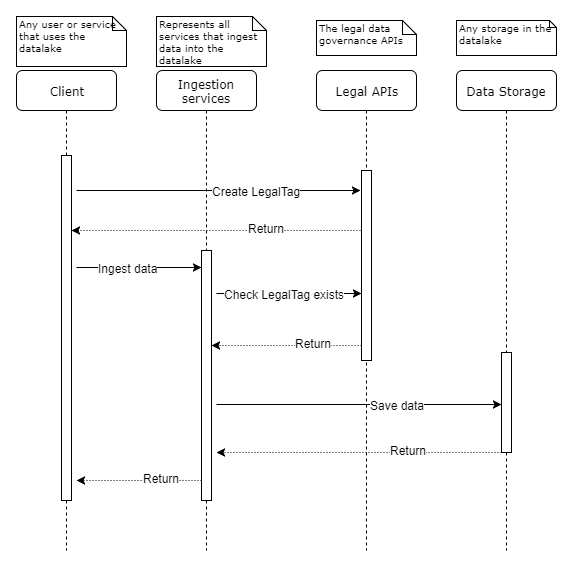
The above diagram shows the typical sequence of events of a data ingestion. The important points to keep in mind:
- It is the client's responsibility to create a LegalTag. LegalTag validation happens at this point.
- The Storage service validates the LegalTag for the data being ingested.
- Data ingestion can only occur after validating that a LegalTag exists. Never store data without a valid LegalTag in the Data Platform.
All data being ingested must have a LegalTag associated with it. You can create a LegalTag by using the POST LegalTag API:
POST /api/legal/v1/legaltags
Curl
curl --request POST \
  --url '/api/legal/v1/legaltags' \
  --header 'accept: application/json' \
  --header 'authorization: Bearer <JWT>' \
  --header 'content-type: application/json' \
  --header 'data-partition-id: opendes' \
  --data '{
        "name": "opendes-demo-legaltag",
        "description": "A legaltag used for demonstration purposes.",
        "properties": {
            "countryOfOrigin":["US"],
            "contractId":"No Contract Related",
            "expirationDate":"2099-01-01",
            "dataType":"Public Domain Data",
            "originator":"OSDU",
            "securityClassification":"Public",
            "exportClassification":"EAR99",
            "personalData":"No Personal Data"
        }
}'
LegalTag names should be clear and descriptive of the properties they represents such that it should be easy to discover and to associate to the correct data with it. Also, the description field is a free form optional field that allows you to add context to the LegalTag, making easier to understand and retrieve over time.
When creating LegalTags, the name is automatically prefixed with the data-partition-name that is assigned to the partition. So in the example above, if the given data-partition-name is mypartition, then the actual name of the LegalTag would be mypartition-demo-legaltag.
Valid values: The legalTag name must be between 3 and 100 characters. Only alphanumeric characters and hyphens are allowed
To help with LegalTag creation, use the Get LegalTag Properties API to obtain the allowed properties and values before creating a legal tag.
The following code segment details of the properties and values that you can supply when creating a LegalTag. The allowed properties values can be data partition specific. Valid values associated with the property are shown. All values are mandatory unless otherwise stated.
To get the data partition's specific allowed properties and values, use the LegalTag Properties API:
GET /api/legal/v1/legaltags:properties
Example 200 Response
    {
    	"countriesOfOrigin": {
    		"TT": "Trinidad and Tobago",
    		"TW": "Taiwan, Province of China",
    		"LR": "Liberia",
    		"DK": "Denmark",
    		"LT": "Lithuania",
    		"PY": "Paraguay",
    		"US": "United States",
    		...
    		...
    	},
    	"otherRelevantDataCountries": {
    		"PT": "Portugal",
    		"PW": "Palau",
    		"PY": "Paraguay",
    		"QA": "Qatar",
    		"AD": "Andorra",
    		"AE": "United Arab Emirates",
            ...
            ...
    	},
    	"securityClassifications": ["Private", "Public", "Confidential"],
    	"exportClassificationControlNumbers": ["No License Required", "Not - Technical Data", "EAR99", "0A998"],
    	"personalDataTypes": ["Personally Identifiable", "No Personal Data"]
    }
Curl
curl --request GET \
  --url '/api/legal/v1/legaltags:properties' \
  --header 'accept: application/json' \
  --header 'authorization: Bearer <JWT>' \
  --header 'content-type: application/json' \
--header 'data-partition-id: opendes' \Valid values: An array of ISO Alpha-2 country code. This is normally one value but can be more. This is required.
Notes: This is the country from where the data originally came, NOT from where the data was sent. The list of allowed countries for a specific data partition is returned from the GET /api/legal/v1/legaltags:properties API. To request ingestion of data originated from a country not listed, please follow the Compliance request process If ingesting Third Party Data, you can ingest data from any country that is not embargoed, if you have a valid contract associated with it that allows for this. This property is case sensitive.
To request ingestion of data that originated from a country that is not currently allowed in a data partition, please contact SLB IP Counsel. Please provide information such as:
- Use case for this request
- Billing account, contract, and data partition ID information
- Specify whether the partition is a client or SLB data partition
- Type of data you want to ingest
- Origin of data (country of origin)
- Company/Party involved
- Contract - expiration of contract
Upon the approval of the IP counsel, we will configure the data partition to allow the requested country as the Country of Origin, and then enable creation of the legal tag with the requested country. After the consent has been given, please contact the Managed Planning Data Foundation's Product Analyst to fulfill the request.
Valid values: This should be the Contract ID associated with the data, 'Unknown', or 'No Contract Related'.
The contract ID must be between 3 and 40 characters and only include alphanumeric values and hyphens.
Notes: This is always required for any data type. This property is case sensitive.
Valid values: Any date in the future in the format yyyy-MM-dd (such as 2099-12-25) or empty.
If the provided contract ID is "Unknown" or "No Contract Related", then the expiration date can be empty. However, if the date is provided, then it will be honored in validating the legal tag and the associated data, even when no contract is provided. When the legal tag expires, the associated data is soft-deleted from the Data Platform.
Notes: This sets the inclusive date when the LegalTag expires and when the data it relates to is no longer usable in the Data Platform. This is usually taken from the physical contract's expiration date, such as when you supply a contract ID. This is not a mandatory field, but is required for certain types of data, such as third-party data. If the field is not set, it is autopopulated with the value 9999-12-31. This property is case sensitive.
Valid values: The name of the client, supplier, or SLB.
Notes: This is always required. This property is case sensitive.
| dataType | Data residency restriction |
|---|---|
| "Public Domain Data" | "public data, no contract required" |
| "Second Party Data" | "client's data, contract is required" |
| "First Party Data" | "partition owner's data, no contract required" |
| "Third Party Data" | "contract required" |
| "Transferred Data" | "EHC, Index data; no contract required" |
Notes: To list the allowed data types for your data partition, use the LegalTag properties. 'Third Party Data' is allowed ONLY with a contract ID and expiration date set. This property is NOT case sensitive.
Valid values: 'Public', 'Private', 'Confidential'
Notes: We currently do not allow 'Secret' data to be stored in the Data Platform. This property is NOT case sensitive.
Valid values: '0A998'(0 as Zero), 'EAR99', 'Not - Technical Data', 'No License Required'
Notes: We only allow data with the ECCN classification 'EAR99' and '0A998'(0 as Zero). This property is NOT case sensitive.
Valid values: 'Personally Identifiable', 'No Personal Data'
Notes: We do not allow data that is 'Sensitive Personal Information', so this type of data should not be ingested. This property is NOT case sensitive.
This relates to creating records that are NOT derivatives. See the derivative section below for details about record creation for derivative data.
After you create a LegalTag, you can assign it to as many records as you like. However, it is the data manager's responsibility to assign accurate LegalTags to data.
When creating a record, you must assign the following for legal compliance:
- The LegalTag name associated with the record
- The Alpha-2 country code of the original caller where the data is being ingested from
The following is a full example of the payload needed when creating a record. The legal section shows what is required.
Details
    [{
            "acl": {
                    "owners": [
                         "data.default.owners@{datapartition}.{domain}.com"
                    ],
                    "viewers": [
                        "data.default.viewers@{datapartition}.{domain}.com"
                    ]
            },
            "data": {
                    "count": 123456789
            },
            "id": "opendes:id:123456789",
            "kind": "opendes:welldb:wellbore:1.0.0",
            "legal" :{
                    "legaltags": [
                            "opendes-demo-legaltag"
                    ],
                    "otherRelevantDataCountries": ["US"] //the physical location of the person ingesting the data
            }
}]- legaltags - This section represents the names of the LegalTags associated with the record. This must be supplied when the record represents raw or source data, meaning not derivative data.
- otherRelevantDataCountries - This is the Alpha-2 country codes for the country the data was ingested from and the country where the data is located in the Data Platform. The otherRelevantDataCountries property is not part of the LegalTag. It is part of the legal property of the record. The location of the data center where the record is stored is automatically added to the otherRelevantDataCountries list when the record is created. This location depends on the environment/region that the partition locates.
You can get the list of all valid LegalTags using the GET LegalTags API. You can use this to help assign only valid LegalTags to data when ingesting.
GET /api/legal/v1/legaltags?valid=true
Example 200 response
    {
      "legalTags": [
        {
          "name": "osdu-ehc-public",
          "description": "",
          "properties": {
            "countryOfOrigin": [
              "US"
            ],
            "contractId": "A1234",
            "expirationDate": "2099-01-25",
            "originator": "OSDU",
            "dataType": "Transferred Data",
            "securityClassification": "Public",
            "personalData": "No Personal Data",
            "exportClassification": "EAR99"
          }
        },
        {
          "name": "osdu-welldb-public",
          "description": "",
          "properties": {
            "countryOfOrigin": [
              "US"
            ],
            "contractId": "AB123",
            "expirationDate": "2099-12-25",
            "originator": "OSDU",
            "dataType": "Second Party Data",
            "securityClassification": "Public",
            "personalData": "No Personal Data",
            "exportClassification": "EAR99"
          }
        },
        ...
        ...
        ...
    }
Curl
curl --request GET \
  --url '/api/legal/v1/legaltags?valid=true' \
  --header 'accept: application/json' \
  --header 'authorization: Bearer <JWT>' \
  --header 'content-type: application/json' \
  --header 'data-partition-id: opendes' \
For details about how to create a record, refer to the [Storage service tutorial](0(Subsurface---Core-Services_Core-Services_Storage-Service).
Often when ingesting data into the Data Platform, it is the raw data itself. In these scenarios, you associate a single LegalTag with this data.
However, when the data to ingest come from multiple sources, it is known as derivative data. For instance, if you take multiple records from the Data Platform and create a new record based on all of the records, it then contains derivative data. This also occurs if you run an algorithm over your seismic data and create an attribute associated with the data you want to ingest.
At this point, you have derivative data, data derived from data. In these scenarios, you need to assign LegalTags to this new data which is the union of the LegalTags associated with all of the source data from which it was created.
For example, Data A is associated with LegalTag 1, and Data B is associated with LegalTag 2. If I create Data C from Data A and Data B, then Data C will inherit LegalTag 1 from Data A and LegalTag 2 from Data B.
If one or more parent legal tags expire, then the derived/child record will be invalidated and will be soft-deleted from the Data Platorm. For more information about Legal Tag validation, see the Compliance documentation.
When creating records that represent derivative data, you must assign the following items:
- The record ID and version of all the records that are the direct parents of the new derivative. This is added to the ancestry section.
- The Alpha-2 country code of where the derivative was created.
Below is an example of the minimum number of fields required to ingest a derivative record.
Details
        [{
                "acl": {
                        "owners": [
                            "data.default.owners@{datapartition}.{domain}.com"
                        ],
                        "viewers": [
                            "data.default.viewers@{datapartition}.{domain}.com"
                        ]
                },
                "data": {
                        "count": 123456789
                },
                "id": "opendes:id:123456789",
                "kind": "opendes:welldb:wellbore:1.0.0",
                "legal" :{
                        "otherRelevantDataCountries": ["US"] //the physical location of where the derivative was created
                },
                "ancestry" :{
                       "parents": ["opendes:id:1:version", "opendes:id:2:version"] //the record ids and versions of the Records this derivative was created from
                }
        }]
Note: Ancestry is a root property. There is only 1 version of the metadata or root property for a record. Therefore, changes to ancestry will be applied to all versions of the record.
As shown below the parent records are provided as well as the otherRelevantDataCountries (ORDC) of where the derivative was created. The Storage service takes responsibility for populating the full LegalTag and ORDC values based on the parents.
Therefore, the child record looks something like the following upon creation:
Sample derived record
        {
          "records": [
           {
                "acl": {
                        "owners": [
                            "data.default.owners@{datapartition}.{domain}.com"
                        ],
                        "viewers": [
                            "data.default.viewers@{datapartition}.{domain}.com"
                        ]
                },
                "data": {
                        "count": 123456789
                },
                "id": "opendes:id:123456789",
                "kind": "opendes:welldb:wellbore:1.0.0",
                "legal": {
                    "legaltags": [Parenttag1, Parenttag2],
                    "otherRelevantDataCountries": ["Parent1ORDC","Parent2ORDC","US"]
                },
                "ancestry" :{
                       "parents": ["opendes:id:1:version", "opendes:id:2:version"] //the record ids and versions of the Records this derivative was created from
                }
           }],
          "notFound": [],
          "conversionStatuses": []
}The Storage service validates whether a record is legally compliant during ingestion and consumption. Therefore, you can delegate the effort to the Storage service because the request fails if the record is not compliant.
However, there may be times you want to validate LegalTags directly.
You can validate a LegalTag by using the LegalTag validate API and supplying the names of the LegalTags that you wish to validate. For example:
POST /api/legal/v1/legaltags:validate
Curl
curl --request POST \
  --url '/api/legal/v1/legaltags:validate' \
  --header 'accept: application/json' \
  --header 'authorization: Bearer <JWT>' \
  --header 'content-type: application/json' \
  --header 'data-partition-id: opendes' \
  --data '{
        "names": ["opendes-demo-legaltag"]
}'
If the LegalTag is valid, the response then looks similar to this:
Details
    {
        "invalidLegalTags": []
    }
If the LegalTag is invalid, the response then looks similar to this:
Details
    {
        "invalidLegalTags": [
            {"name":"opendes-demo-legaltag", "reason": "Contract expired"}
        ]
    }
So if you just want to check that the given LegalTags are currently valid, check to see if the returned 'invalidLegalTags' collection is empty.
The Ingestion service forwards the request to the LegalTag API using the same SAuth token that made the ingestion request. This checks both that a LegalTag exists and that the data has appropriate access to it.
A LegalTag can become invalid if a contract expiration date passes. This makes both the LegalTag invalid and makes all data associated with that LegalTag invalid including derivatives.
In these situations you can update the LegalTags to make them valid again and therefore make the associated data accessible. Currently we only allow the update of the description, contract ID, and expiration date properties.
PUT /api/legal/v1/legaltags
Curl
curl --request PUT \
  --url '/api/legal/v1/legaltags' \
  --header 'accept: application/json' \
  --header 'authorization: Bearer <JWT>' \
  --header 'content-type: application/json' \
  --header 'data-partition-id: opendes' \
  --data '{
        "name": "opendes-demo-legaltag",
        "contractId": "AE12345"
        "expirationDate": "2099-12-21"
    }
}'
*Note: There is a difference between "querying for a valid or invalid LegalTag (List Legal Tag API)" and "checking to see if the legalTag is valid (Validate Legal Tag API)". The "List Legal Tag" API will check whether the tag is valid right now, and the "Validate Legal Tag" API will check whether the tag would be valid after the next, once-a-day, update process. Therefore, updating the LegalTag Expiration Date will not make the record appear as valid in the Valid Tag list until its status has been updated. The update process validates the LegalTags and then updates the status of the LegalTag from Invalid to Valid or vice versa. This update process runs only once in a day.
There is not a public API available to delete a legal tag, since the result could be drastic when it triggers a deletion of many associated records. Instead, a work-around is to set an expiration date for a legal tag. When the legal tag expires, the associated data is soft-deleted from the Data Platform.
As previously stated, the Records in the Storage service largely governs data compliance. This means that if you use the Storage or Search core services, then compliance on consumption is handled on your behalf i.e. these services will not return Records that are no longer legally compliant.
However, if you are not using Search or Storage service e.g. if you have your own operational data store, then you will need to check the LegalTags associated with your data are still valid before allowing consumption .
This means you need to make a subscription to every data partition project you wish to receive the notifications on.
Info "Async Process"
When new data partitions are added into the Data Ecosystem, it may take up to 24 hours for the topic to become available to subscribe to.
After subscribing to the topic via the cloud messaging service, you will receive notifications daily. These notifications will list all LegalTags that have changed, and whether the LegalTag has become compliant or non-compliant.
Details
    {
        "statusChangedTags": [ {
                "changedTagName": "legaltag-name1",
                "changedTagStatus": "compliant"
            },
            {
                "changedTagName": "legaltag-name2",
                "changedTagStatus": "incompliant"
            } ]
    }
The above shows an example message sent to subscribers. It shows you receive an array of items. Each item has the LegalTag name that has changed and whether it has changed to be compliant or incompliant.
If it has become incompliant, associated data will be soft deleted in storage and deleted from search/indexer. If you have your own operational data store, you must make sure associated data is no longer allowed to be consumed.
If it is marked compliant, data that was not allowed for consumption can now be consumed through your services.
For deployment available public /info endpoint, which provides build and git related information.
{
    "groupId": "org.opengroup.osdu",
    "artifactId": "storage-gcp",
    "version": "0.10.0-SNAPSHOT",
    "buildTime": "2021-07-09T14:29:51.584Z",
    "branch": "feature/GONRG-2681_Build_info",
    "commitId": "7777",
    "commitMessage": "Added copyright to version info properties file",
    "connectedOuterServices": [
      {
        "name": "elasticSearch",
        "version":"..."
      },
      {
        "name": "postgresSql",
        "version":"..."
      },
      {
        "name": "redis",
        "version":"..."
      }
    ]
}
This endpoint takes information from files, generated by spring-boot-maven-plugin, git-commit-id-plugin plugins. Need to specify paths for generated files to matching properties:
version.info.buildPropertiesPathversion.info.gitPropertiesPath