- Overview
- Status Data Model
- How to publish status and dataset details events
- Sample of status and dataset details message contracts
- Supported Stages and Statuses
- Restricting Field Size
Global Status monitoring is a mechanism that tracks the status of data journey/dataflows on the data platform. This mechanism helps to track the status of files, data, and records ingested through the File Service, Storage API, and specific DOMS until it is consumed by dependent services.
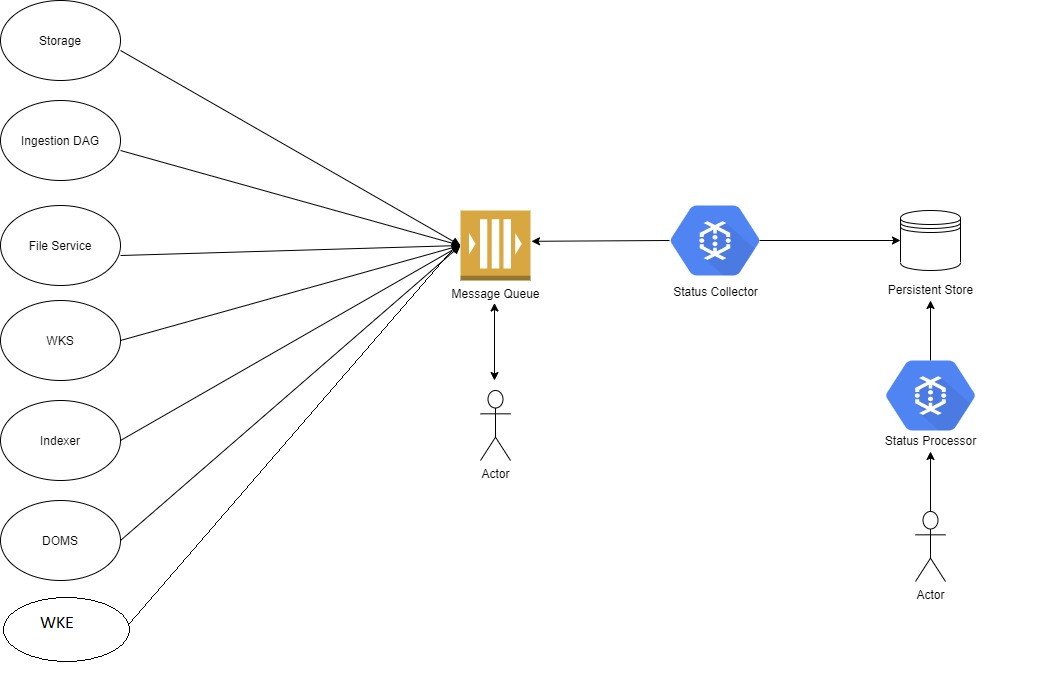
Every stage publishes status events to the message queue. Some stages, like WKS_SYNC, INGESTOR_SYNC, STORAGE_SYNC. etc., publish two statuses per record. The first status is for “In Progress” messages, and the second status is for a “SUCCESS” or “FAILED” message. From there on, the Status Collector picks up all status events and normalizes them to store in persistent storage for future reference. Then the Status Processor provides an API to query and check the status of past datasets.
The core services of Global Status Monitoring are the Status Collector and Status Processor.
Status Processor Service provides APIs that allow users to monitor the status of files, data, and records ingested through the File Service, Storage API, and specific DOMS until it is consumed by dependent services. The status indicates whether the dataflow has finished or not and if it is Successful or Failed.
For more detailed information, follow Status Processor tutorial
The Status Publisher Service provide APIs for publishing dataSet details and status messages to statuschangedtopic.
For more detailed information, follow Status Publisher tutorial
Data Model properties help users search for status with multiple or specific properties. Every request is tracked through a specific dataSetId or its associated correlationId. correlationId is a unique id that tracks the status of a request at various stages of the Data Platform.
The Status Data Model has multiple tables for tracking the stages of dataflow.
- DataSet Details - Dataset pertains to any data, such as file, collection of files, etc.
- Status - Holds the status of a dataflow.
There are two ways to publish status and dataset details in a message queue.
To publish status and dataset details directly to a message queue for a JAVA application, follow the steps below:
- Add the
os core commonlibrary as a dependency - There are models, classes, and interfaces defined in thecore common libfrom Azure.
Ensure that you select the correct version of the library which includes theStatusDetailsandDatasetDetailsclasses, 0.13.0 or higher.- Models -
StatusDetailsandDatasetDetails- Use these two models to publish status and dataset details. - Utility -
AttributesBuilder- Creates an attributes map which is a required method ofIEventPublisherto publish status or dataset details.
The attributes map consists of theslb partition idandcorrelation id. - Publisher Interface -
IEventPublisher- This is the interface that the cloud provider must implement to produce status and dataset details.
It contains a method which accepts the Message array and Attributes map. Message is an interface that is implemented by both Status and Dataset Details.
- Models -
  <dependency>
    <groupId>org.opengroup.osdu</groupId>
    <artifactId>os-core-common</artifactId>
    <version>0.13.0</version>
</dependency>- Add
core-lib-azurelibrary as dependency - provides a publisher facade to publish messages to the ServiceBus, version 0.13.0 or higher.
  <dependency>
    <groupId>org.opengroup.osdu</groupId>
    <artifactId>core-lib-azure</artifactId>
    <version>0.13.0</version>
</dependency>- Publisher to identify all scenarios to publish Status/Dataset Details - You should determine all possible scenarios in which either Status or Dataset Details need to be published.
A service can publish multiple sets of both Status and Dataset Details. - Cloud Implementation to publish Status/Dataset Details
- Provide an implementation of the
IEventPublisherinterface from theos core commonlibrary. Thepublishmethod ofIEventPublishermust be implemented to publish an event instatuschangedtopicthat accepts:- Array of type Message:
Messageis an interface implemented by bothStatusDetailsandDatasetDetailsclasses. TheMessagearray can be either Status or Dataset Details. For an example , refer to sectionSample of status and dataset details message - Map of key-value pair attributes: Key and value are of type string. Examples: "correlation-id": "1235345" and "slb-partition-id": "user defined value".
- Array of type Message:
- Provide an implementation of the
- Create
PublisherInfoto provide needed information for publishing:- batch - An array of messages, such as Status or DataSet Details.
- serviceBusTopicName - The name of the ServiceBus topic that is
statuschangedtopic.
- Call method
publishMessagefromMessagePublisherclass that accepts:- DpsHeaders - Must contain "correlation-id" and "slb-partition-id".
- PublisherInfo - The ServiceBus topic name and data to publish.
- Enable ServiceBus publishing by providing the following configuration -
azure.serviceBus.enabled = true
  public class StatusEventPublisher implements IEventPublisher {

  private final MessagePublisher messagePublisher;
  private final ServiceBusConfig serviceBusConfig;
  private final DpsHeaders dpsHeaders;
  private final JaxRsDpsLog log;

  @Override
  public void publish(Message[] messages, Map<String, String> attributesMap) throws CoreException {
      PublisherInfo publisherInfo = PublisherInfo.builder()
              .batch(messages)
              .serviceBusTopicName(serviceBusConfig.getServiceBusTopic())
              .build();
      messagePublisher.publishMessage(dpsHeaders, publisherInfo);
      log.info("Status event generated successfully");
} public class StatusPublisher {
private static final String FAILED_TO_PUBLISH_STATUS = "Failed to publish status ";
private static final String PUBLISH_STATUS_STARTED = "Publish Status started";
private final IEventPublisher statusEventPublisher;
private final AttributesBuilder attributesBuilder;
private final JaxRsDpsLog log;
private void publish(List<StatusDetails> statusDetailsList) {
try {
log.info(PUBLISH_STATUS_STARTED);
Map<String, String> attributesMap = attributesBuilder.createAttributesMap();
statusEventPublisher.publish(statusDetailsList.toArray(new StatusDetails[0]), attributesMap);
} catch (CoreException e) {
log.warning(FAILED_TO_PUBLISH_STATUS + e.getMessage());
throw new ApplicationException(FAILED_TO_PUBLISH_STATUS, e);
}
}
}Note: We have an Azure implementation of Global Status Monitoring. Services that are not part of the OSDU AKS cluster have to use /status and /datasetDetails endpoints of the Status Processor service. The Status Processor service publishs status and dataset details in statuschangedtopic.
There are two endpoints to publish status messages in the queue. These messages can be used by applications outside the OSDU cluster if they want to use GSM to track the status.
- Publish Status - POST /status endpoint
- Publish Dataset Details - POST /dataset-details endpoint
Follow Status Publisher tutorial for more information related to publish endpoints.
There are two kinds of status messages, DataSet Details and Status, but they are published into the same Azure ServiceBus statuschangedtopic.
- DataSet Details
{
  "message":{
    "data":[
      {
        "kind": "datasetDetails",
        "properties": {
          "correlationId": "1cc462e9-9a39-48b9-84c3-9d53b18b8089",
          "datasetId": "opendes:dataset--File.Generic:332b55d5-0cf2-4474-a3e5-d3cff0c5746a",
          "datasetVersionId": "opendes:dataset--File.Generic:332b55d5-0cf2-4474-a3e5-d3cff0c5746a:23423432",
          "datasetType": "FILE",
          "recordCount": 1,
          "timestamp": 1625221800
        }
      }
    ],
    "account-id":"opendes",
    "slb-partition-id":"opendes",
    "correlation-id":"3f41d31b-862f-40ce-9749-ee26a3f714f2"
  }
}- Status
{
  "message":{
    "data":[
      {
        "kind": "status",
        "properties": {
          "correlationId": "1cc462e9-9a39-48b9-84c3-9d53b18b8089",
          "recordId": "opendes:wellbore:osdudemo-ATVMxMDEzTVMxMDQ",
          "recordIdVersion": "opendes:wellbore:osdudemo-ATVMxMDEzTVMxMDQ:23423432",
          "stage": "STORAGE_SYNC",
          "status": "FAILED",
          "message": "acl is not valid",
          "errorCode": 400,
          "userEmail": "test@email.com",
          "timestamp": 1625221800
        }
      }
    ],
    "account-id":"opendes",
    "slb-partition-id":"opendes",
    "correlation-id":"3f41d31b-862f-40ce-9749-ee26a3f714f2"
  }
}The stage shows the current activity of the record. For example if the record is in WKS transformation, this will be at the WKS_SYNC stage.
| Stage | Service | Usage |
|---|---|---|
| DATASET_SYNC | File Service, Dataset | Emits all status events related to File Metadata Record creation. |
| INGESTOR | All Ingestors for e.g., CSV, LAS/DLIS/Document, CI-doc. This status is a DAG level status | Ingestors publish events under this stage when they receive calls from the Workflow Service and when they are finished with all the steps of the DAG. |
| The INGESTOR SUBMITTED status is emitted by the Workflow Service and the INGESTOR IN_PROGRESS and COMPLETE or FAILED statuess are emitted by the Specific Ingestor. | ||
| Here the SUCCESS status means that all of the steps of the DAG were invoked and completed. It does not mean that raw records were successfully created in the data platform. | ||
| INGESTOR_SYNC | All Ingestors for e.g., CSV, LAS/DLIS/Document, CI-doc. This status is a record level status | Ingestors publish status events under this stage about the records that will be stored after parsing the file. This status is different from the one above because the INGESTOR stage is a DAG level status, but INGESTOR_SYNC is record level status. If there are 10 records in the CSV to ingest, then the CSV is supposed to generate 10 status messages. |
| WKS_SYNC | All those services that create WKS source records in the Data Platform, for e.g.: | Services that are involved in standardizing the records publish status under this stage. |
| * WKS Transformation Service | The WKS service generates WKS records for the raw records ingested by CSV ingestion, so the WKS service publishes status events for each record it transforms. | |
| * Document Enrichment Service | Document Ingestion records are standardized within the Document Enrichment Service, so that the service publishes status for each document record. | |
| * Wellbore DDMS | LAS/DLIS Ingestors directly create WKS records by hitting the Wellbore DDMS, and in this case, the Wellbore DDMS publishes status events for each record it creates. | |
| DATA_MASTER_SYNC | WKE Service | The WKE Creation Service publishes status events under this stage for its progress about WKE record creation. |
| STORAGE_SYNC | Storage Service | The Storage service publishes status events under this stage for every record it processes. |
| ES_SYNC | Indexer Service | The indexer publishes status events under this stage for each record, whether it is indexed or not. |
| QUALITY_CHECK | DQM | Services involved with the checking and correcting the quality of the data. |
| RELATIONSHIP_SYNC | Relationship & Lineage Service | Services that maintain the relationship between various records of the data platform in the graph DB. |
| SF_SYNC | Spotfire | Services that are responsible for indexing records in Spotfire. |
| IMAGE_GENERATION | Image Generator Service | The Document Insight Image Generator Service Publishes IN_PROGRESS/SUCCESS/FAILED status events under this stage for each page. |
| PAGE_CLASSIFICATION | Page Classification Service | The Document Insight Page Classification Service Publishes SUCCESS/FAILED status event under this stage for each page when the page-classification is successful or fails. |
| PAGE_TEXT_GENERATION | Image OCR Service | The Document Insight Image OCR Service Publishes SUCCESS/FAILED status event under this stage for each page when the image-ocr is successful or fails. |
| DOCUMENT_INSIGHTS_GENERATION | Insight Generator Service | The Document Insight Insight Generator Service Publishes SUCCESS/FAILED status event under this stage for the particular document when insight generation is successful or fails. |
The status of the record shows if it was processed as Successful or Failed.
| Status |
|---|
| SUBMITTED |
| SUCCESS |
| FAILED |
| IN_PROGRESS |
| SKIPPED |
| PARTIAL_SUCCESS |
- Status Fields Max Allowed Size
| Field Name | Size | Description |
|---|---|---|
| message | 1000 chars | The Status Message that contains information useful for the user, such as the reason for failure, reason for success, etc. The maximum value length of message is 1000 chars. When the length is exceeded, the message is trimmed to the 1000th chararcter and stored. |